featured

How the new “Karpathy Skills” drastically improve Claude Code’s accuracy

High-quality AI coding in 2026 has gone way past just picking a good model and calling it a day.

There’s now much more that needs to be properly calibrated and fine-tuned to get the very best results from your agent.

We now have Skills which let you precisely shape AI behavior by packaging instructions, scripts, and context into reusable units.

And that’s what the new, wildly popular “Karpathy Skills” have been able to take advantage of to the fullest extent.

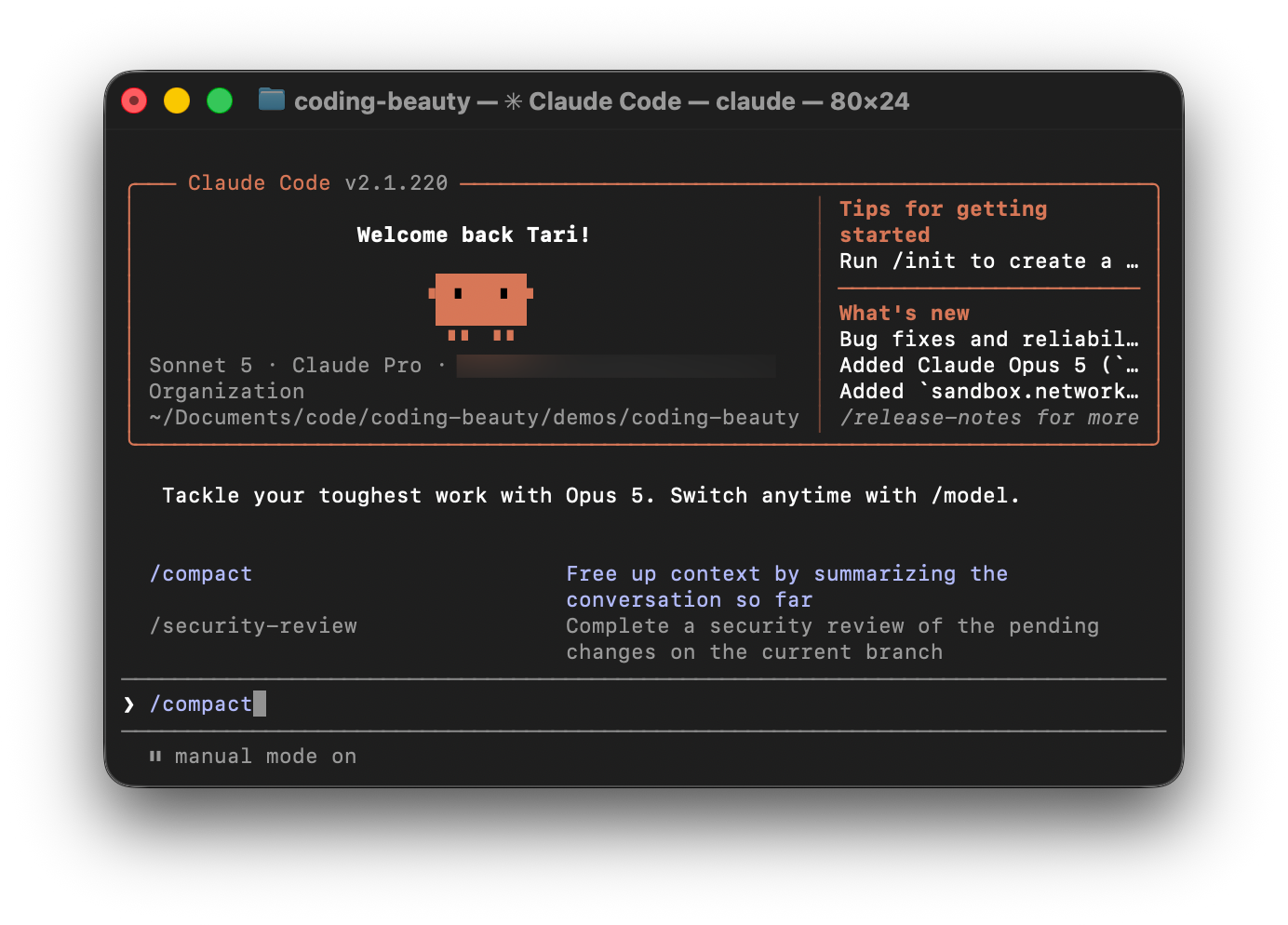
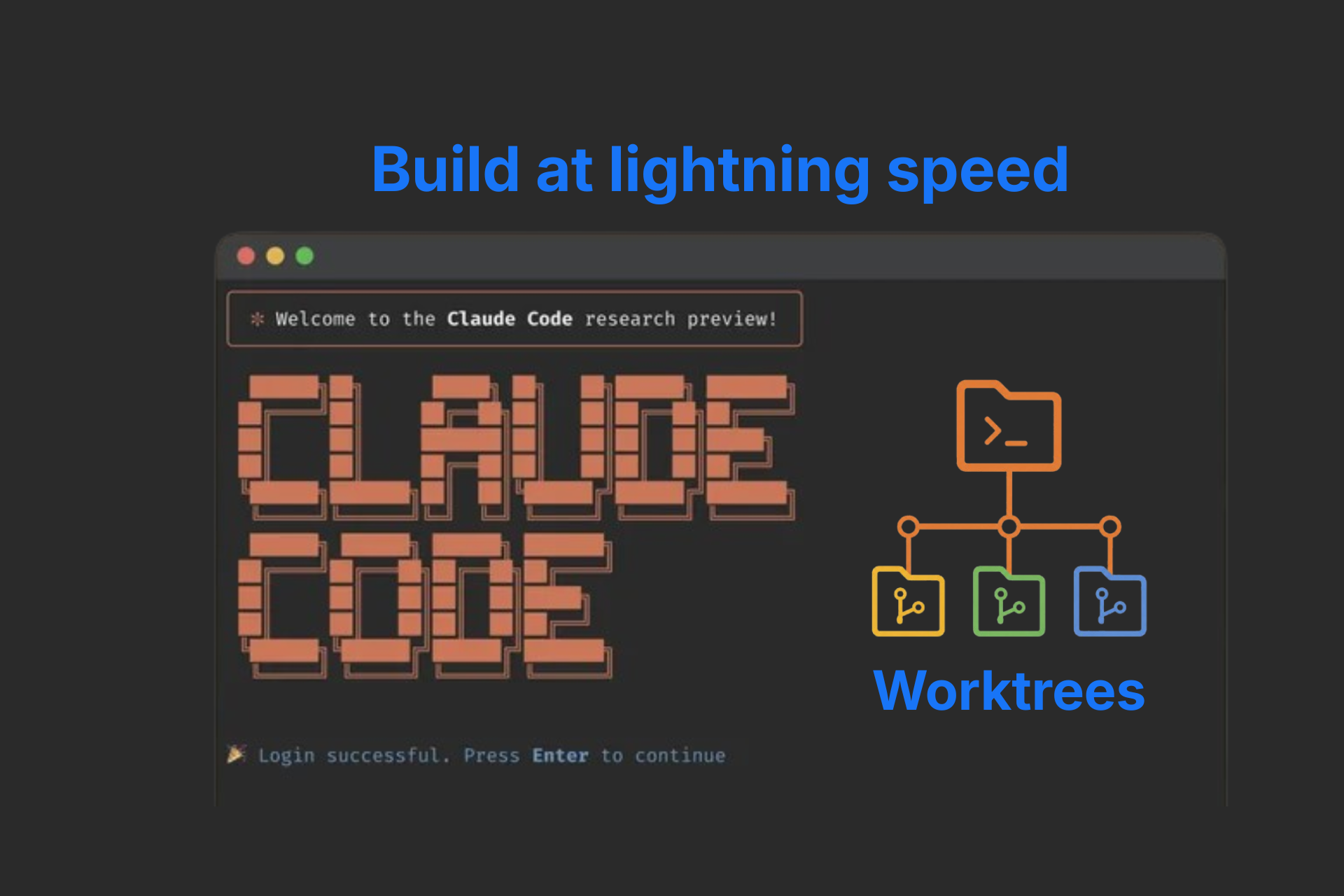
Karpathy Skills is a set of strict rules and guidelines that drastically improve the accuracy and reliability of your agent, once you add them to your CLAUDE.md (or CURSOR.md) file.

Let’s take a look at some of these key rules, so you can better understand why it makes such a massive difference.

1. The surgical strike

Most LLMs try to be helpful. Too helpful.

You’ve probably experienced this:

You ask for a fix or new feature.
They make the changes… but also:

  • clean up unrelated code
  • reformat files
  • rename variables
  • refactor “while they’re there”

It looks productive. But it leads to low model trust and messes up your mental model of the codebase.

The rule:

  • Only change the exact lines required
  • No drive-by edits
  • No unrelated improvements

Why it matters:

  • Prevents diff bloat
  • Makes PRs readable
  • Reduces hidden risk

Think about review time.

  • 500-line diff → slow, error-prone
  • 5-line diff → fast, obvious

This isn’t about style.
It’s about trust.

A good AI agent doesn’t try to improve everything.
It solves exactly the problem.

2. Extreme disambiguation

Most agents are optimized to continue.

If they’re 80% sure, they guess the missing 20% and move forward.

That’s dangerous.

The rule:

  • Don’t assume
  • Don’t hide confusion
  • Surface tradeoffs

In practice:

  • Ask clarifying questions
  • Present multiple interpretations
  • Push back on unclear requests

Why it matters:

  • Prevents hallucinated requirements
  • Exposes ambiguity early
  • Creates tighter feedback loops

Bad agent:

“Sure, I implemented it.”

Good agent:

“Do you want A or B? They have different tradeoffs.”

3. Goal-first thinking (declarative over imperative)

Most developers naturally give instructions.
AI works better with outcomes.

The Karpathy-style rule is simple:

  • Define success criteria
  • Loop until verified
  • Transform imperative tasks into verifiable goals

This pushes the agent into goal-first thinking.

What this changes

Instead of telling the AI what to do step-by-step, you tell it:

  • what should fail
  • what should pass
  • how to know it’s done

That’s declarative thinking.

Imperative vs declarative

Imperative (weak):

“Add validation to this endpoint.”

Declarative (strong):

“Write a test that fails when invalid input is accepted. Update the code until the test passes.”

Notice the difference:

  • Imperative → action
  • Declarative → outcome

4. Anti–future-proofing (simplicity first)

AI loves to over-engineer.

You ask for something simple.
It builds something “flexible.”

Suddenly you have:

  • abstractions
  • configuration layers
  • unused hooks
  • “just in case” logic

The rule:

  • If 200 lines could be 50, rewrite it
  • No abstractions for single use

Why it matters:

  • Prevents AI slop
  • Keeps code readable
  • Reduces long-term maintenance

Over-engineering compounds.

  • One abstraction → pattern
  • Pattern → everywhere
  • Everywhere → hard to change

Simplicity doesn’t mean naive.
It means appropriate.

If the problem is small, the solution should be small.

The takeaway

No new architecture.
No breakthrough model.

Just constraints:

  • Keep diffs small
  • Surface ambiguity
  • Define success with tests
  • Prefer simple code

Claude Skills give structure to these ideas.
Karpathy-style rules give them teeth.

The result:

Not an AI that writes everything — a reliable AI that writes just enough, and just right.

One you can trust in a real codebase.

How the new “Karpathy Skills” drastically improve Claude Code’s accuracy Read More »

Kimi K3 just did something nobody ever expected from open-source AI

This is unbelievable.

The new Kimi K3 is sending major shockwaves across the entire tech world.

For years people have been writing off open-source AI models, dismissing them as dumbed down version of “the real deal”.

But now, this Chinese company just released a open-source model that matches up to Claude Fable 5 in every single way — and even dominates it multiple critical areas.

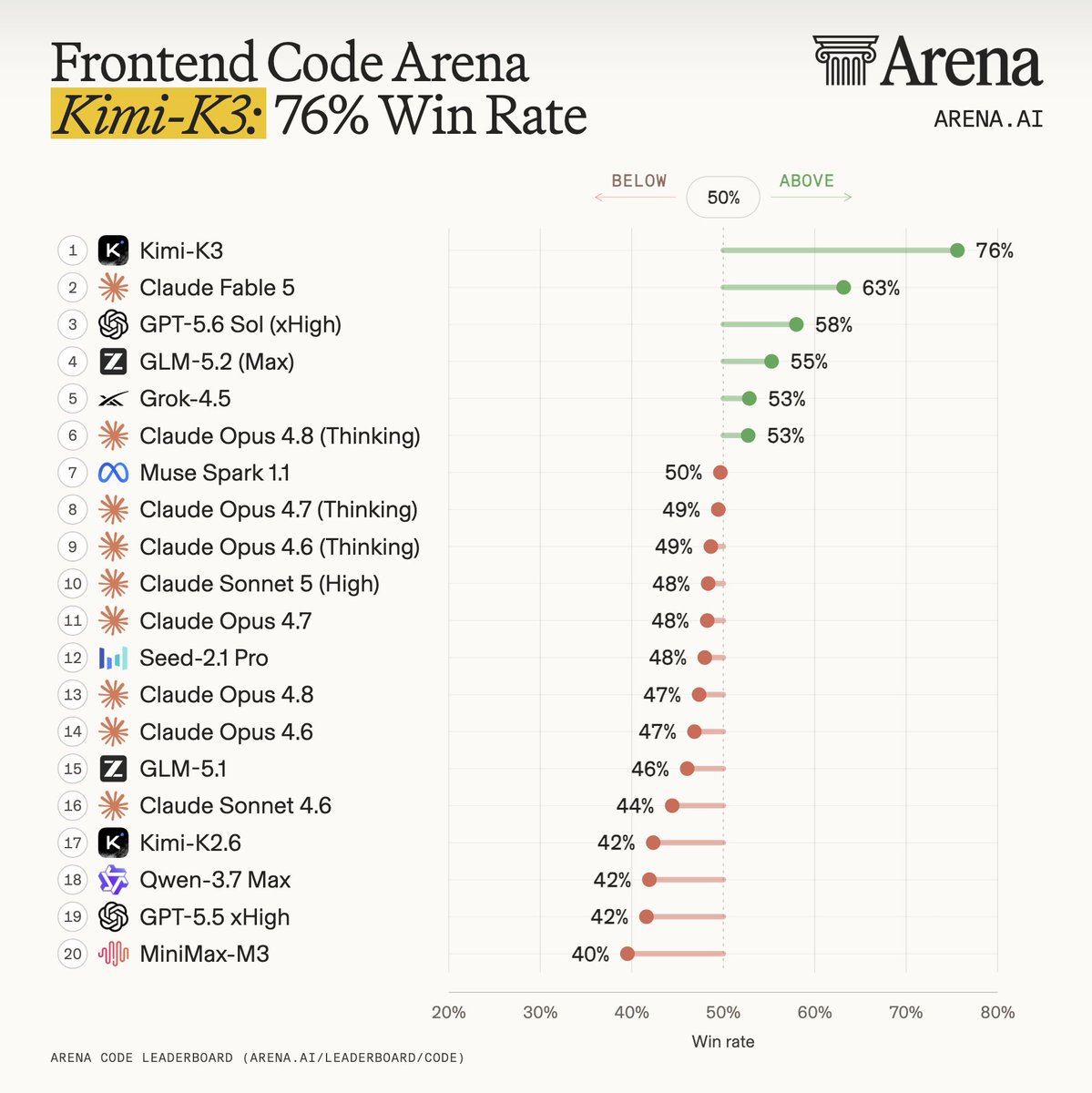
Kimi K3’s output was preferred 76% of the time when matched up again other models for the exact same task:

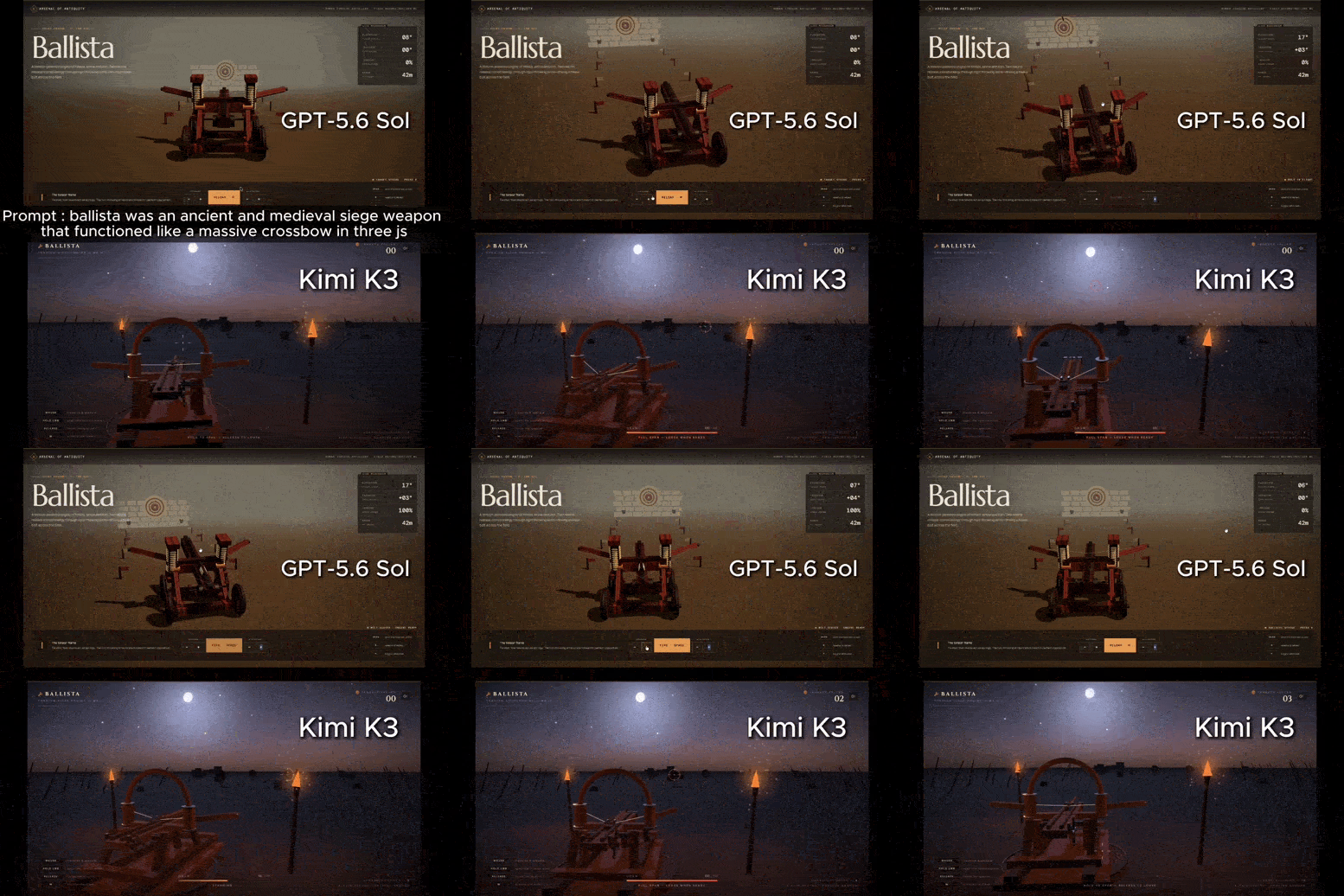
Kimi K3 utterly dominates the recently released GPT-5.6 in generation of mini shooting game:

And if you think this is just another tiny “12B” model, you’re so dead wrong.

You won’t believe how massive this model is, and every other feature it has to offer…

1. 2.8 trillion parameters

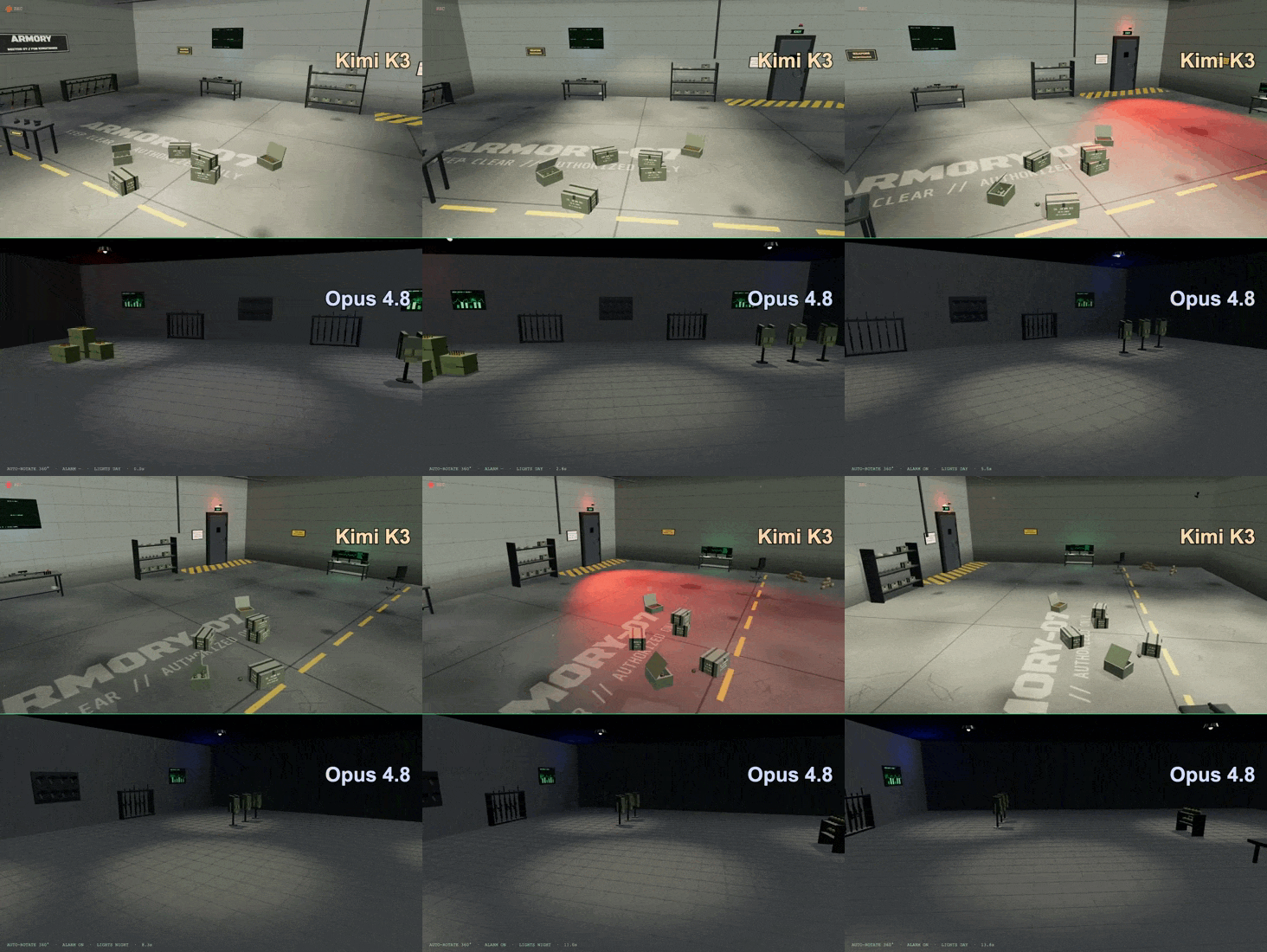
Kimi K3 blows Claude Opus 4.8 out of the water in a 3d scene generation of a military armory:

Until now, many people in the AI space thought open-source only made sense for scrappy 8B or 70B models.

That trillion-parameter frontier giants could only be available in the strictly private domain of mega-corporations with infinite budgets.

Kimi K3 totally demolishes this.

At 2.8 trillion parameters, it’s hands-down the largest open-weight model ever developed.

It matches the rumored scale of closed-source giants like Claude Fable 5, proving developers don’t have to compromise on raw power to keep things open.

  • 2.8T Mixture-of-Experts: Massive scale, but hyper-efficient.
  • 16 Active Experts: Only activates what it needs per token, keeping compute costs sane.
  • No More Compromises: Puts proprietary-grade cognitive muscle into the public’s hands.

2. Coding with open-source models is no longer a joke

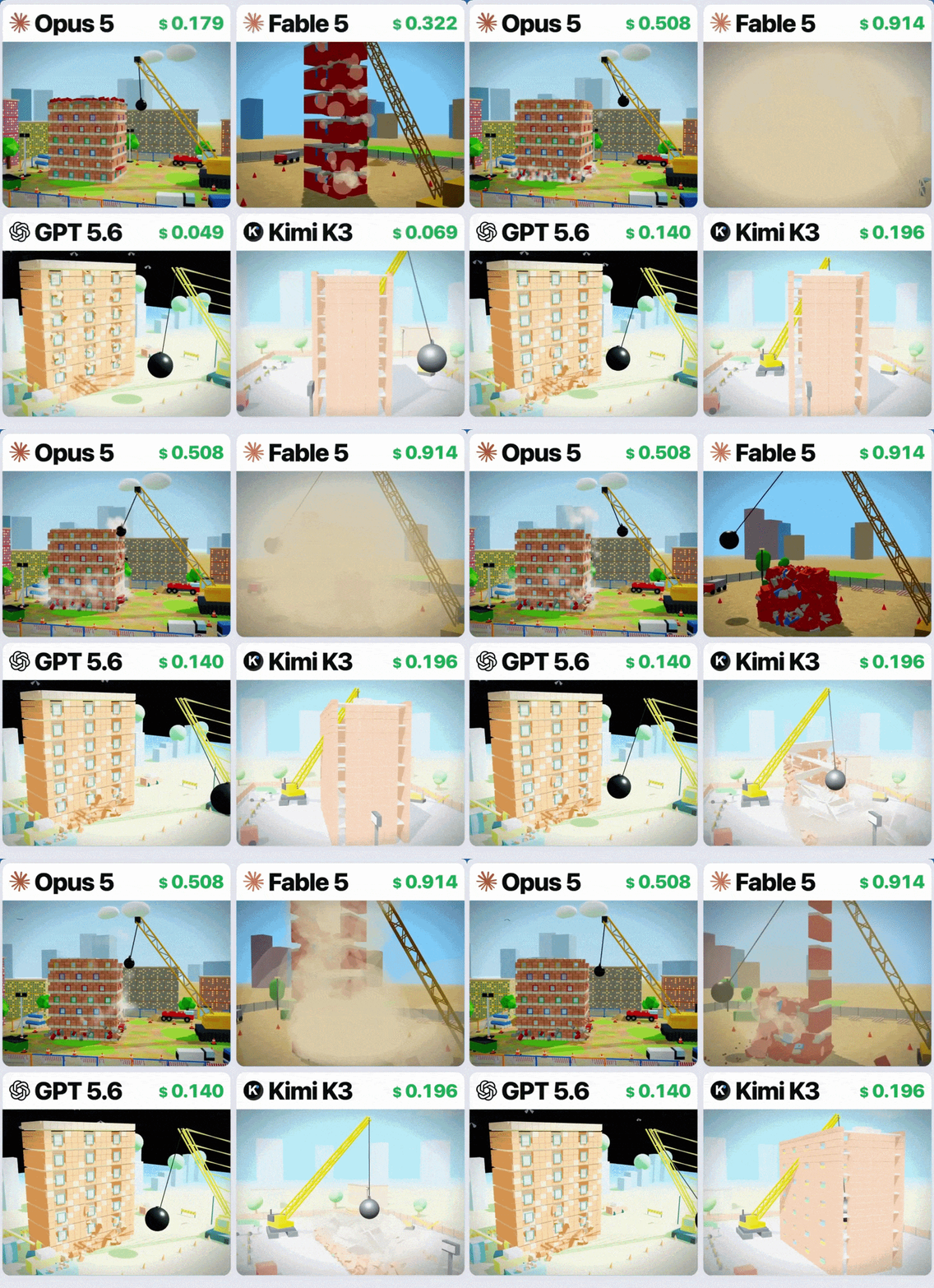
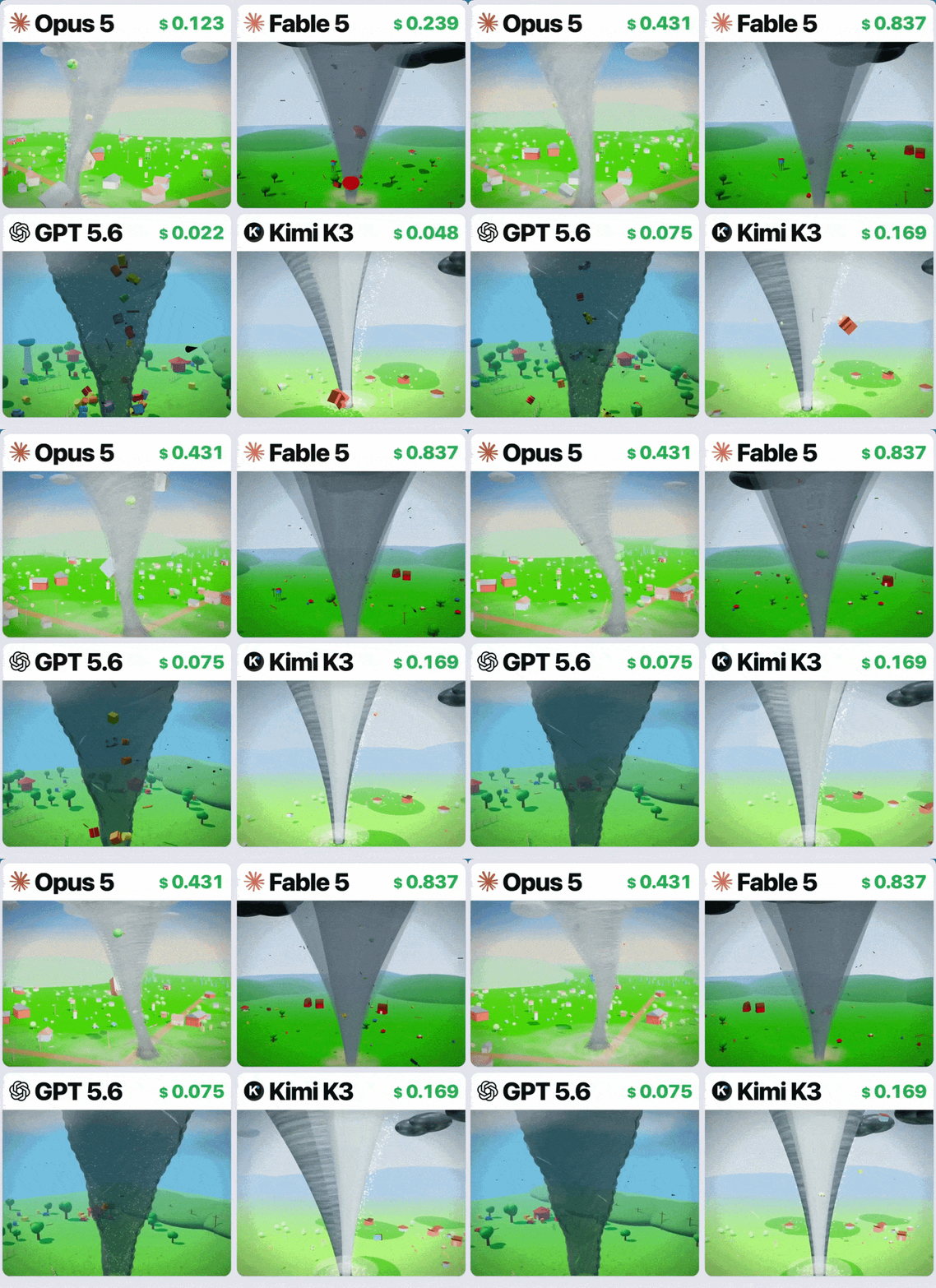
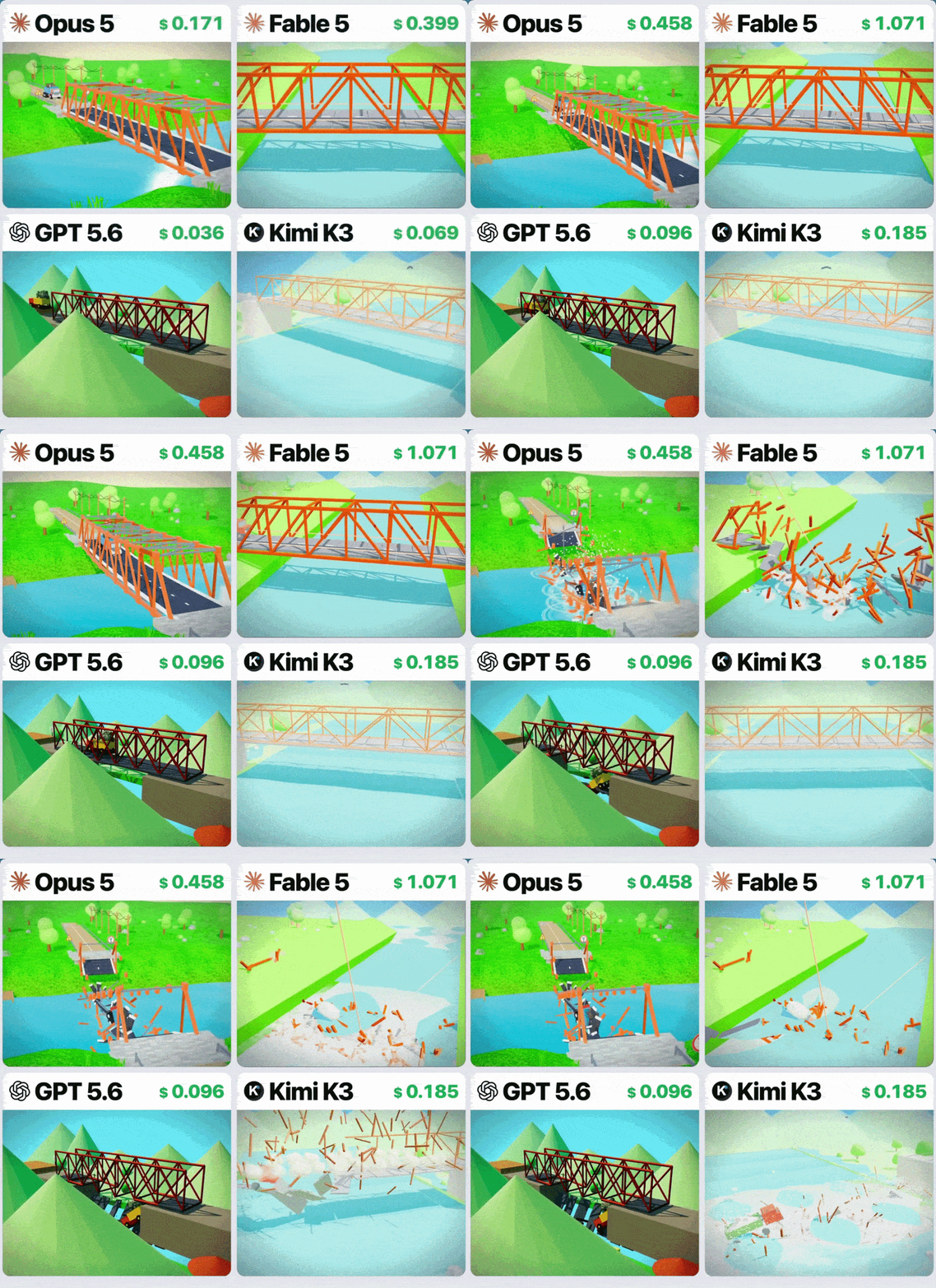
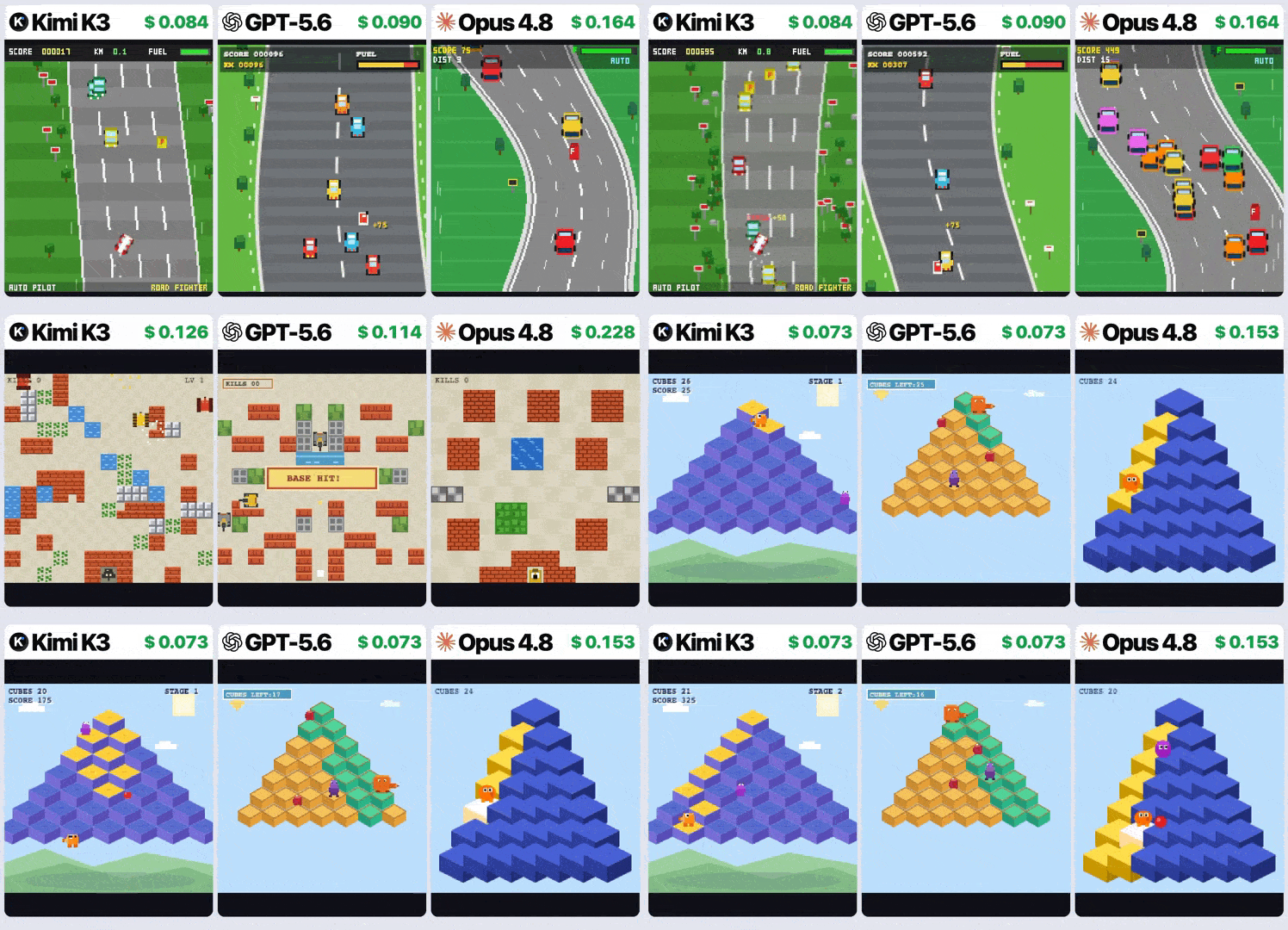
Kimi K3 demonstrates superior game physics and logic compared to GPT-5.6 and Opus:

Before now, a lot of software developers never really saw an open-source model as an option for coding.

Most tasks from complex software engineering to sleek frontend design were always handed off to Claude and other closed-sourced models.

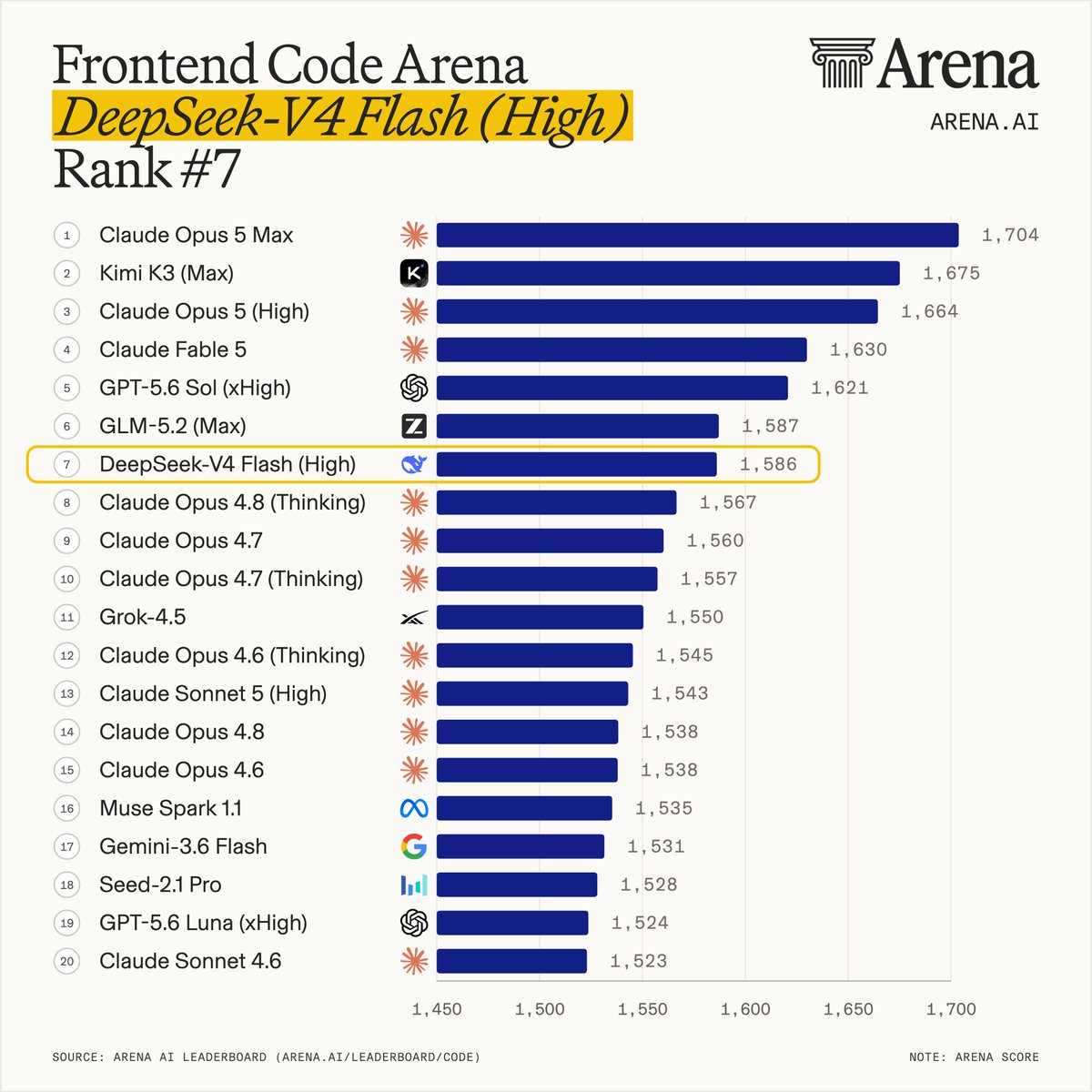
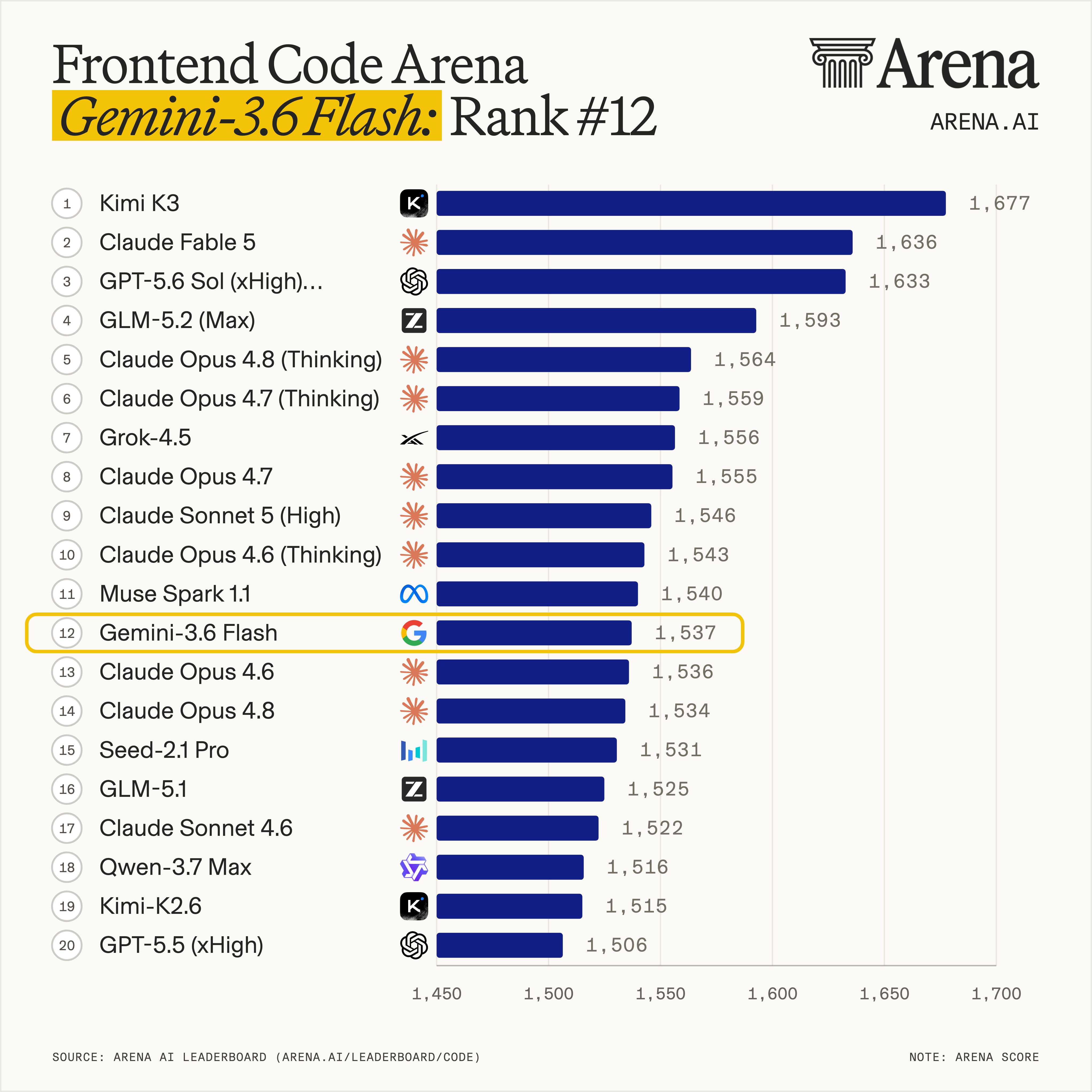
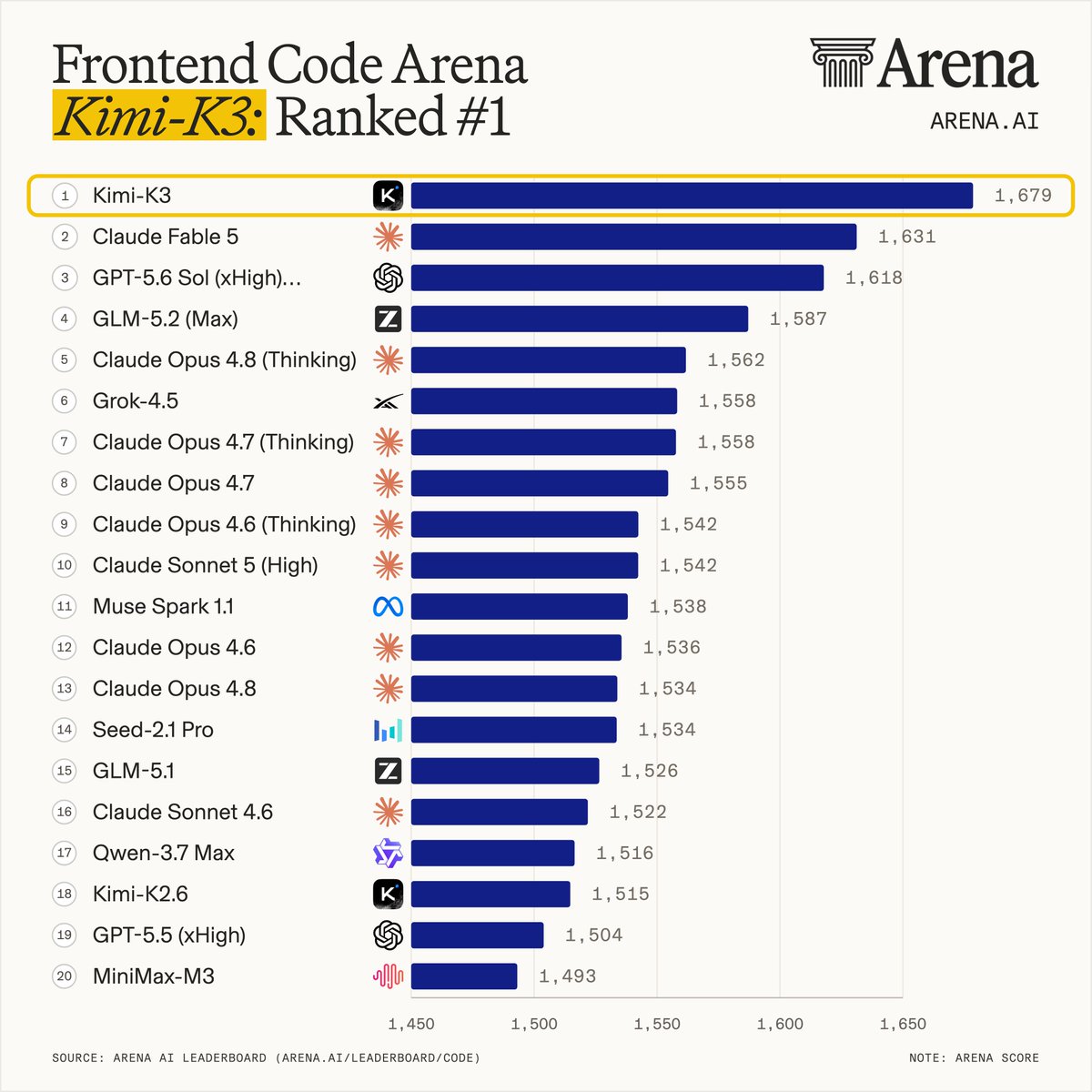
With the new Kimi K3, many are starting to realize just how wrong they were. K3 immediately claimed the #1 spot on LMArena’s Frontend Code Arena, dethroning Claude Fable 5.

It doesn’t just write code; it thrives on complexity, creating fully playable 3D games and gorgeous interfaces entirely from scratch.

  • LMArena Champion: Beat the best proprietary models in frontend design.
  • Coded with Taste: Understands aesthetics, layout, and user experience natively.
  • Ambitious Generation: Spits out functional, interactive applications in one go.

3. “Long-horizon” autonomy isn’t restricted to closed APIs

We never actually needed closed, guarded infrastructure for this.

For all those long-running autonomous agents that run for hours to solve complex, multi-step tasks, Kimi K3 is here and it’s built from the ground-up for the marathon.

In testing, it ran autonomously in sandboxes for up to 48 hours. It didn’t break; instead, it built its own GPU programming compiler (MiniTriton) from scratch and solved graduate-level astrophysics.

  • 48-Hour Autonomy: Stays on track for days without human hand-holding.
  • Hardware-Level Mastery: Optimizes kernels and compiles code natively.
  • True Agency: Moves open-source from simple chatbots to actual digital workers.

4. Defeating the memory bottleneck of 1M+ context windows

Running a 1-million-token context window on a giant model doesn’t really require hyper-optimized, proprietary hardware.

And Kimi K3 demonstrated this perfectly.

Instead of throwing more hardware at the problem, Moonshot AI used clever architecture.

By introducing Kimi Delta Attention and Attention Residuals, they slashed the memory needed for the model’s short-term cache by up to 75%, making massive inputs actually run on standard hardware.

  • 75% Memory Savings: Drastically lowers the hardware bar for giant datasets.
  • Kimi Delta Attention: Smart compression that keeps long chats incredibly fast.
  • Open-Source Innovations: Anyone can now study and build on these memory-saving breakthroughs.

5. Demolishing the “delayed release” pattern

Before now, “Open-weights” used to mean getting yesterday’s technology.

We assumed labs would keep their shiny, cutting-edge flagship models closed, only releasing weaker, older versions to the public.

Moonshot AI completely breaks out of that mindset.

They’ve bypassed the “lite” versions and released the weights of their absolute crown jewel under a Modified MIT license.

They are putting the absolute state-of-the-art directly in our hands.

  • No “Lite” Gatekeeping: The actual, uncompromised flagship is being released.
  • Modified MIT License: Built for developer freedom and commercial innovation.
  • Running Neck-and-Neck: Proves open-source isn’t a step behind anymore—it’s setting the pace.

Kimi K3 just did something nobody ever expected from open-source AI Read More »

How Google AI Studio makes developers so much more powerful

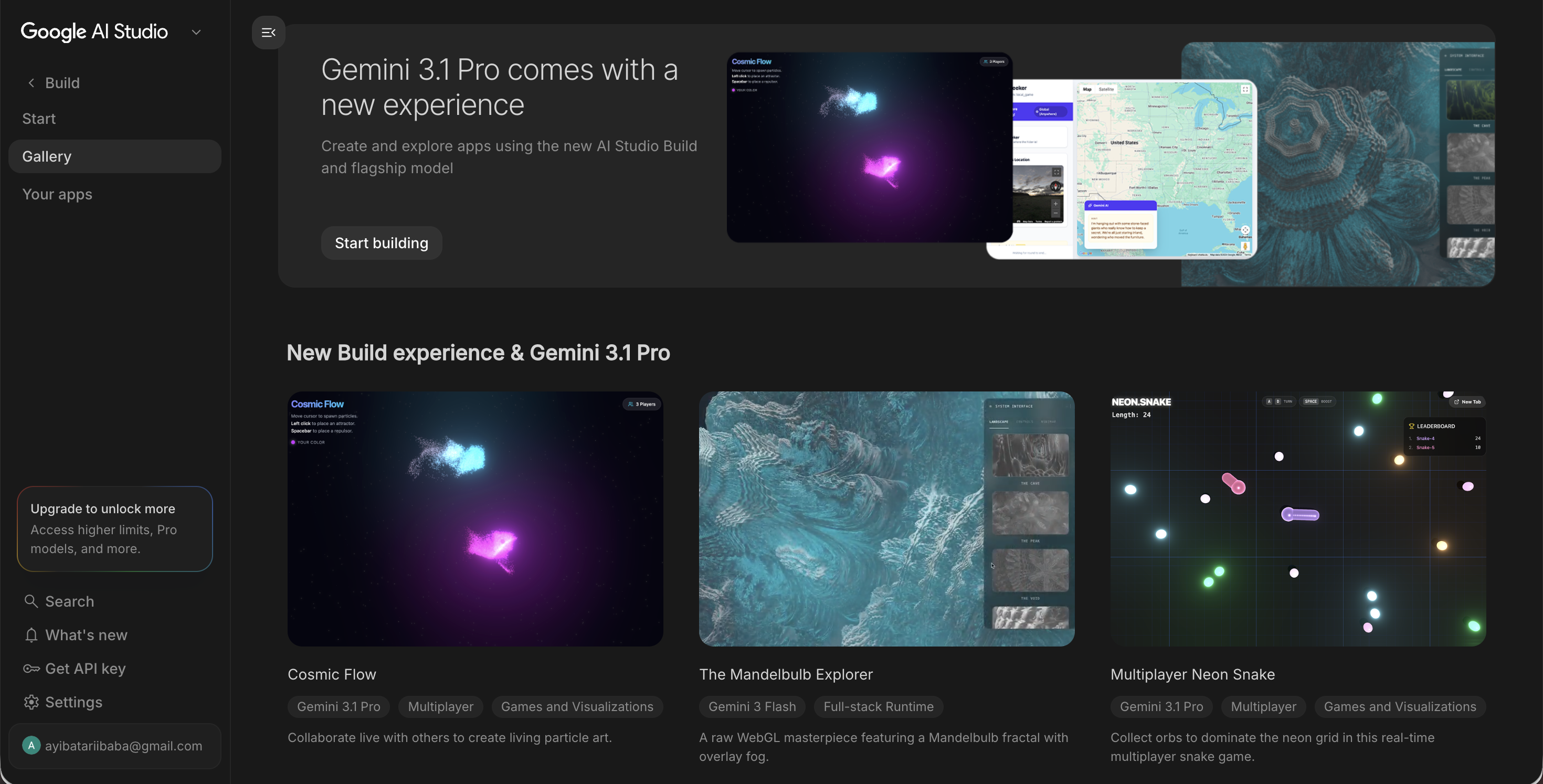
Google AI Studio just keeps ascending toward unbelievable heights…

From a simple prompt playground for basic AI testing…

To a practical development environment for building apps, interfaces, and AI-powered products faster.

With incredible features like prompt autocomplete, visual editing, and integrated sophisticated image generation, we developers can now rapidly move from idea to prototype faster than ever.

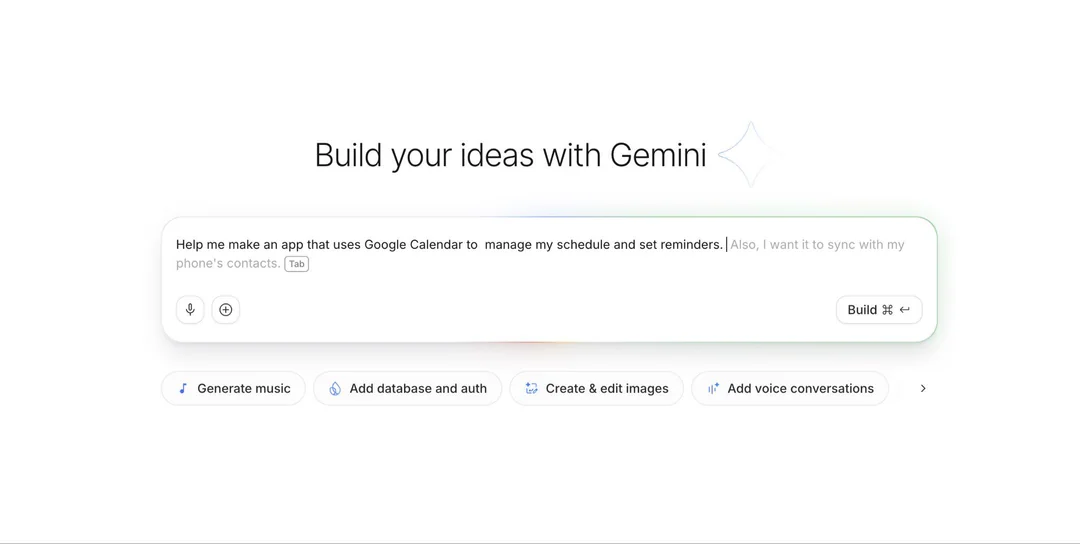
1. Tab Tab Tab: Prompt autocomplete

The “tab tab tab” prompt autocomplete feature helps developers expand rough ideas into stronger prompts instantly. Instead of writing a detailed prompt from scratch, a developer can start with something like:

“Create a clean SaaS dashboard with analytics cards…”

AI Studio can then suggest layout details, styling direction, responsiveness, components, and user flows.

This turns prompting into something closer to code autocomplete. It speeds up brainstorming, UI generation, front-end scaffolding, and MVP creation. Developers can quickly generate a React-style structure, landing page, dashboard, or app layout, then export and customize the code further.

For solo founders and indie hackers, this is especially useful because it reduces the time spent on boilerplate HTML, CSS, and basic UI structure.

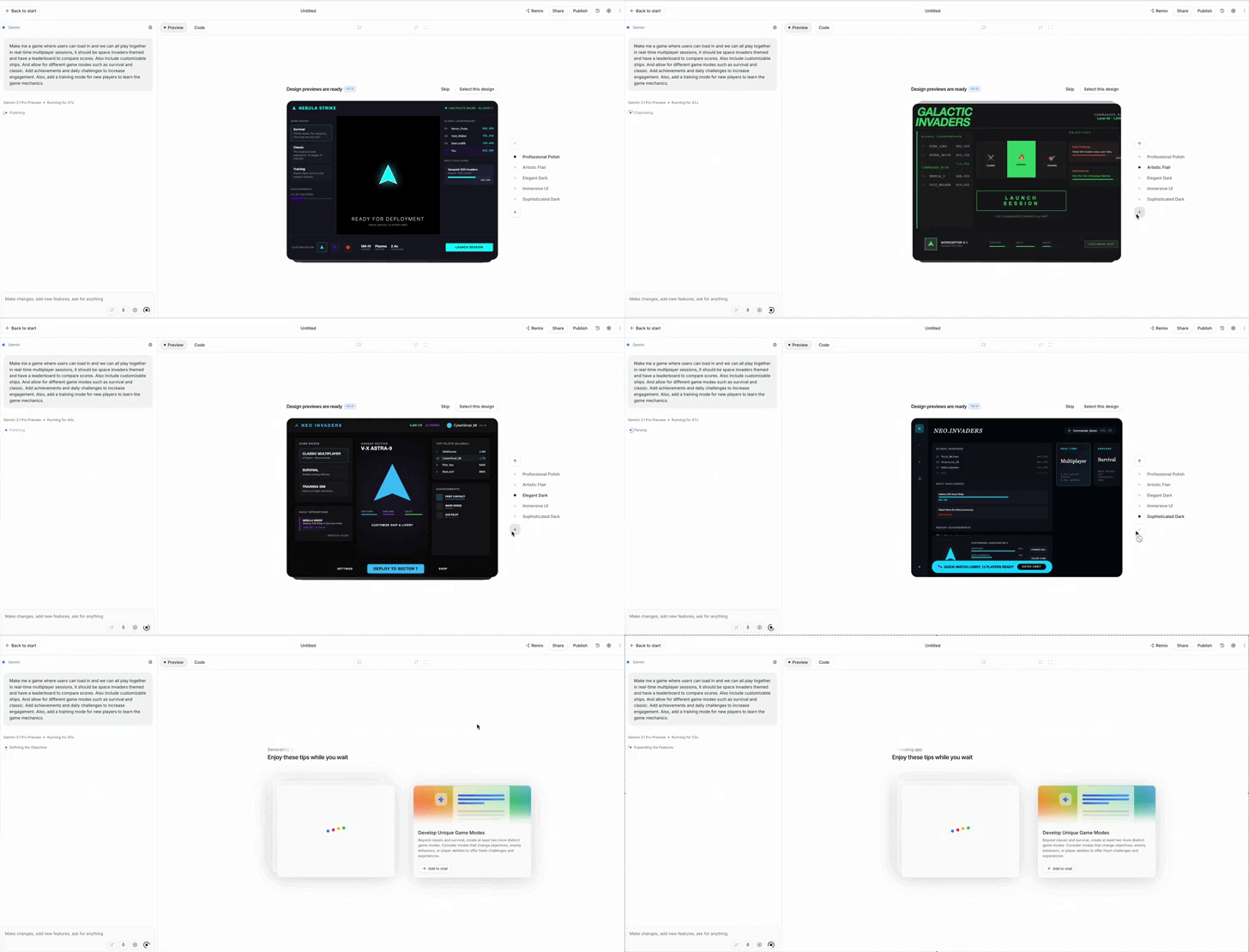
2. Design previews

Design previews let developers choose the visual direction of an app before it’s finished.

In Google AI Studio’s vibe coding experience, Gemini can now generate custom themes while your app is being created.

Within seconds, developers can compare different looks and pick the one that best fits the product: minimal, playful, premium, futuristic, enterprise-ready, or creator-focused.

For SaaS builders this means landing pages, dashboards, and MVPs no longer have to start with a generic “AI-generated” look. You can establish a stronger visual identity from the beginning, then refine the code later.

3. Edit mode and annotation

Edit mode makes transforms AI studio from a chatbot into a full-blown visual development tool.

With annotation, developers can draw directly on the app interface. They can circle a section, mark an area, or point to a component and write notes such as:

“Make this bigger,” “move this to the top,” or “reduce the spacing here.”

The AI interprets the visual instruction and updates the app accordingly.

This is a major improvement because many UI changes are easier to show than explain. Instead of writing long prompts to describe a design problem, developers can communicate visually.

This brings AI Studio closer to tools like Figma, but with code generation and AI assistance built in.

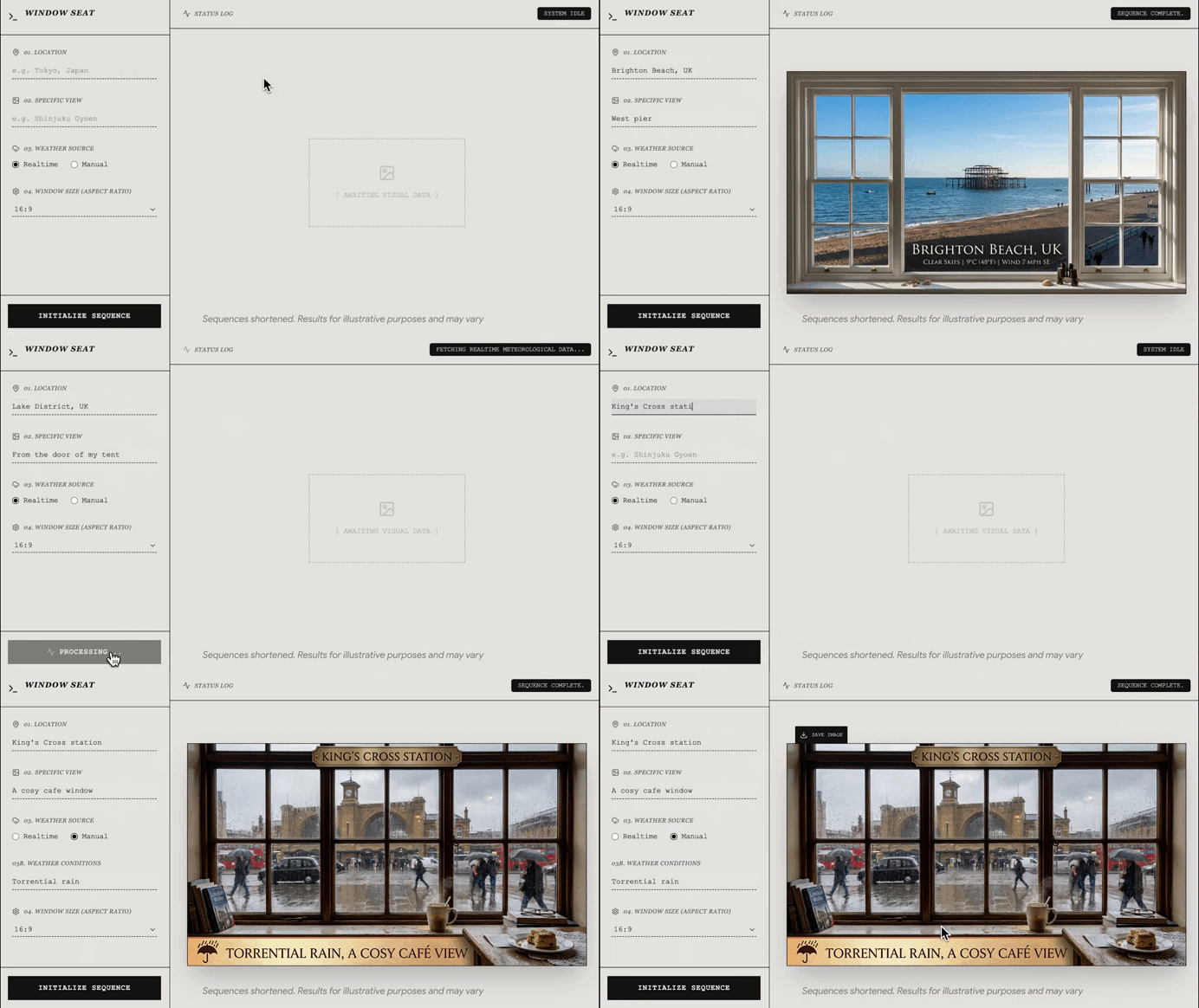
4. Integrated image generation with Nano Banana

Nano Banana integration solves one of the most common developer problems: creating visual assets.

AI Studio can now generate custom images, logos, icons, illustrations, and UI graphics while the app is being built. This removes the need to search for placeholder images, icon packs, or temporary “programmer art.”

Even better, the generated assets can maintain a consistent aesthetic across the project. Colors, style, tone, and visual language can remain aligned from the landing page to icons and illustrations.

For developers building SaaS products this means they can create beautiful marketing pages and more polished MVPs without needing a designer at the earliest stage.

These features compress the product-building workflow. Developers can prompt an idea, preview the design, annotate changes, directly edit components, generate matching assets, and export code.

That makes Google AI Studio increasingly useful for rapid prototyping, MVP development, SaaS landing pages, and front-end experimentation. It helps developers spend less time fighting boilerplate and more time turning ideas into working products.

How Google AI Studio makes developers so much more powerful Read More »

GPT-5.6 is an absolute game changer

This is HUGE.

OpenAI just shocked the entire coding world with the new GPT-5.6.

It actually dominated Claude Fable 5 in some really key areas, wow.

GPT-5.6 outshines both Claude Fable and the legendary Claude Mythos in multiple high-profile benchmarks.

Unbelievable scores in the most challenging benchmarks out there.

GPT-5.6 beats out almost every model convincingly in the AI Code Arena Frontend leaderboard, scoring near Joint 1st, with Claude Fable 5

And it’s not just way more intelligent — it also comes with an entire new model family, and multiple new first-party tools to build incredible things with the power of GPT-5.6.

Including a brilliant new competitor to OpenClaw.

This model is so powerful that OpenAI actually had to spend weeks convincing the US government that it was safe enough to release into the wild.

1. A brand new model family

GPT-5.6 outclasses its predecessor in frontend web design:

They’ve completely abandoned their traditional one-model strategy.

GPT-5.6 now comes in three permanent capability tiers that can evolve independently over time.

Sol is the flagship model for advanced coding, research, cybersecurity, and complex agent workflows.

Terra is the balanced everyday workhorse, combining strong reasoning with lower latency.

Luna is highly optimized for speed and cost — making it ideal for high-volume tasks like customer support, translation, and summarization.

Instead of paying flagship prices for every request, we can now choose the right model for each workload.

2. Record-breaking leaps in intelligence and coding ability

For the first time in several months, an OpenAI model tops the highly granular DesignArena frontend benchmarks, with the new GPT-5.6:

GPT-5.6 Sol is now OpenAI’s most capable model.

It sets new state-of-the-art results across several major benchmarks, including TerminalBench, BrowseComp, and Humanity’s Last Exam.

On TerminalBench 2.1, which evaluates real-world software engineering tasks, Sol scored 88.8%, rising to 91.9% in its new Ultra reasoning mode.

On BrowseComp, it achieved 92.2%, while Humanity’s Last Exam climbed to 52.7%, outperforming GPT-5.5 as well as Claude Fable 5 and Claude Opus 4.8. OpenAI also says Sol reaches these scores while using significantly fewer output tokens than previous models.

Perhaps the most impressive breakthrough comes from ARC-AGI-3, a benchmark designed to measure how well AI adapts to completely unfamiliar problems.

Sol became the first frontier model to solve a public ARC-AGI-3 task.

The interesting part isn’t just that it performs better. It’s how it reasons.

When one approach fails, Sol dynamically forms a new hypothesis instead of repeatedly executing the same flawed plan — a major weakness of previous-generation AI agents.

3. So good at hacking it delayed the launch

GPT-5.6 outclasses top Claude models in the extremely long-horizon Agent’s Last Exam benchmarks, achieving the best results for an extreme fraction of the cost:

GPT-5.6’s cybersecurity capabilities became advanced enough to trigger an additional U.S. government national security review before public deployment.

The model shows major improvements in command-line operations, vulnerability discovery, threat modeling, exploit analysis, code review, and automated patch generation.

Those gains required an equally large investment in safety. According to OpenAI, Sol now blocks roughly 10× more potentially malicious cyber activity than previous generations while remaining below the company’s “Critical” capability threshold.

4. Massive efficiency gains = massive cost savings

GPT-5.6 demonstrates an incredible ability to generate complex, highly sophisticated interactive diagrams and visualizations from scratch:

GPT-5.6 isn’t just smarter — it’s substantially more efficient.

Sol is 54% more token-efficient on AI coding tasks than previous reasoning models while still achieving better results. It delivers top-tier performance using less computation, reducing both latency and API costs.

And the pricing reflects that efficiency too.

Sol costs $5 per million input tokens and $30 per million output tokens, while Terra and Luna give you progressively cheaper alternatives for less demanding workloads.

5. ChatGPT Work and multi-agent orchestration

ChatGPT Work using multiple tools and features to get achieve tasks blazingly fast:

GPT-5.6 also powers ChatGPT Work, OpenAI’s new platform built around delegation and getting things done.

Its headline feature is Ultra mode, which can coordinate up to four AI agents simultaneously across parallel workstreams.

Instead of solving a project sequentially, GPT-5.6 splits it into multiple tasks, lets separate agents tackle them in parallel, and combines the results into a finished deliverable. That pushes TerminalBench performance from 88.8% to 91.9%.

ChatGPT Work also integrates directly with tools like Slack, Google Drive, Microsoft Teams, CRM platforms, and local desktop files.

This lets GPT-5.6 spend hours building web apps, updating spreadsheets, generating reports, or completing other multi-step workflows with minimal supervision.

GPT-5.6 is going to seriously revolutionize the AI coding landscape.

With stronger reasoning, industry-leading coding performance, permanent capability tiers, major efficiency gains, and true multi-agent orchestration, it’s one of OpenAI’s biggest releases in years.

GPT-5.6 is an absolute game changer Read More »
Claude Sonnet 5 is absolutely insane

This is huge.

Claude Sonnet 5 is seriously revolutionary.

A Claude model that matches up to the most powerful and intelligent models out there — yet several times lighter, cheaper, and faster.

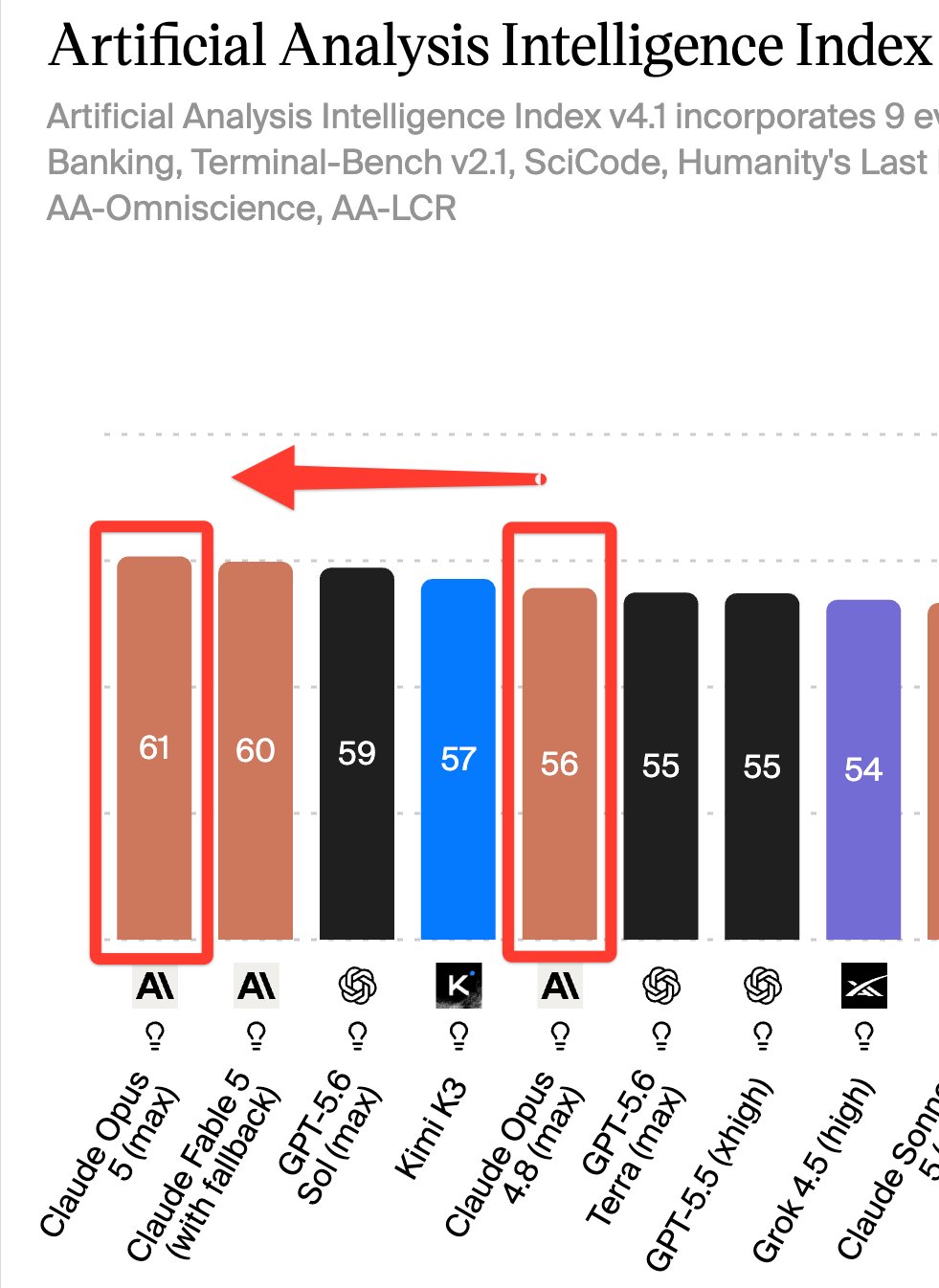
It literally dominated every single non-Claude model in several reputable benchmarks — and shockingly matched up to Opus 4.8.

Only Fable 5 was significantly better in the Arena AI leaderboard.

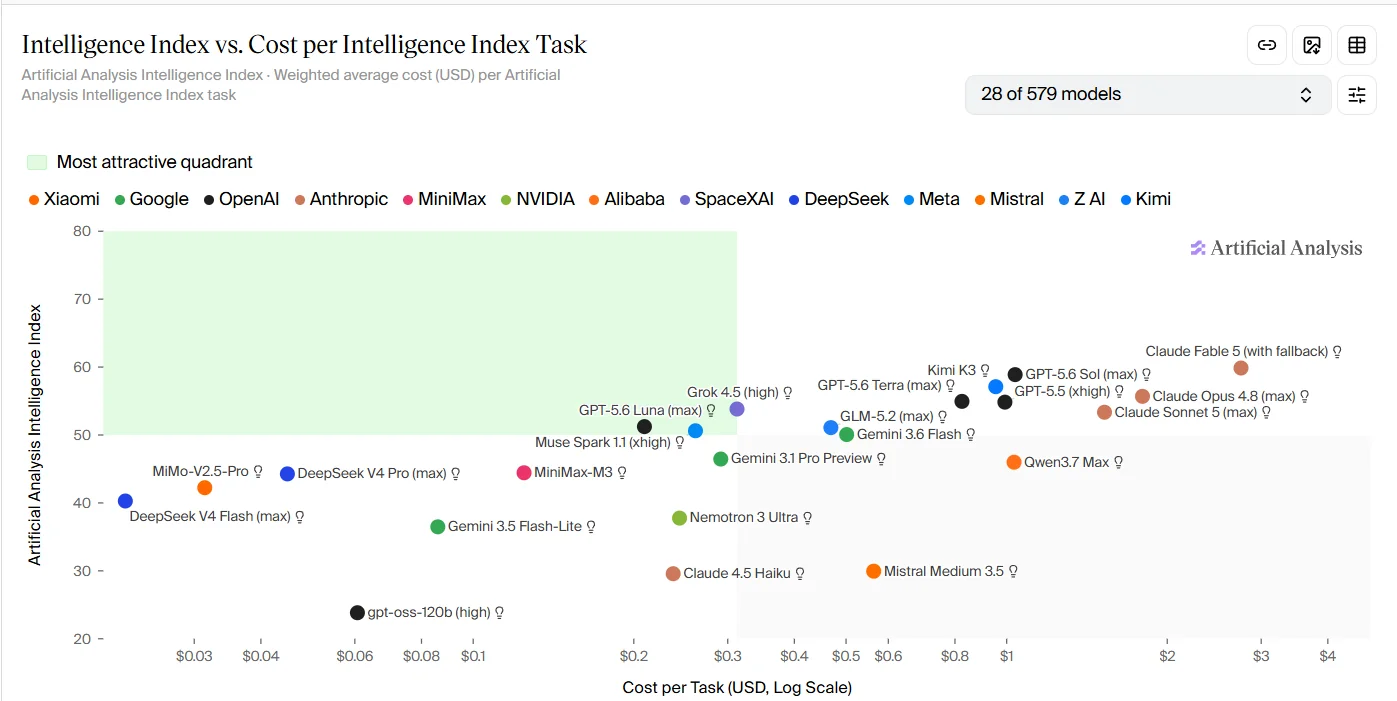
The normal, non-mini version GPT-5.5 could only beat out Sonnet 5 at its absolute maximum thinking effort (xhigh) on the Artificial Analysis Leaderboard:

And it’s not just about the massively improved intelligence density or efficiency.

Sonnet 5 also fixes a major issue that many developers have faced when dealing with Claude models.

The self-improving and autonomous ability is on another level.

All this with ultra-competitive pricing that will give us massive savings in token costs.

1. Intelligence autonomous multi-step execution and self-verification

This is one of the biggest upgrades in Sonnet 5.

It’s now so much better at carrying out extended sequences of work without constant supervision.

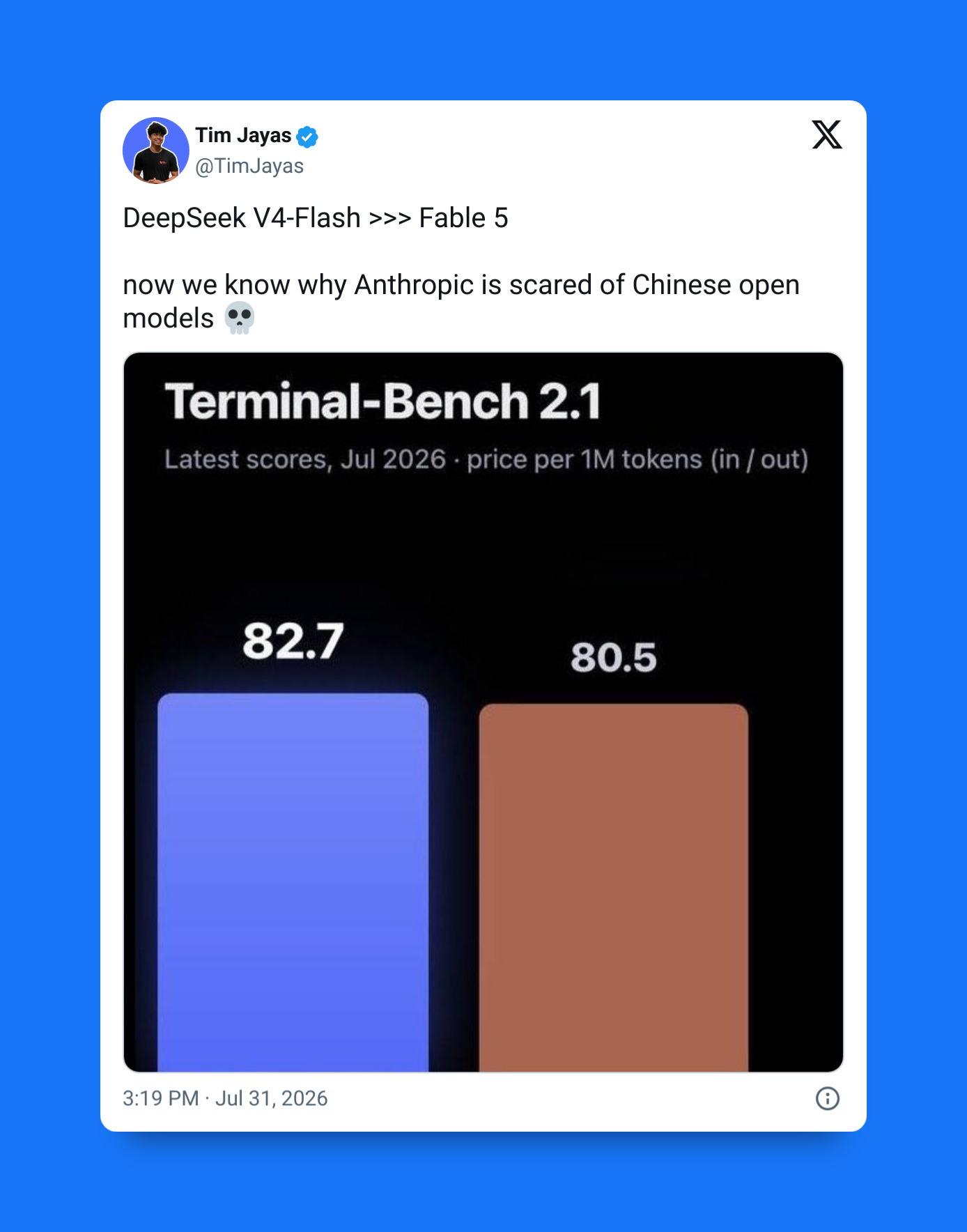
By leaping more than 13 percentage points to hit 80.4% on Terminal-Bench 2.1, Claude Sonnet 5 represents the largest terminal-based engineering jump in the lineup’s history, completely closing the gap with the flagship Opus 4.8

Previous Claude models were excellent at planning — but they still struggled to reliably follow through on complicated workflows involving debugging, testing, and iterative refinement. Sonnet 5 is build from the ground up to stay on track.

The new and improved self-verification is on another level.

It now verifies its own work from top to bottom before returning it.

Instead of generating a fix and hoping it’s correct, the model can reproduce a bug, implement a solution, test the fix, temporarily remove it to confirm the issue returns, and then restore the working version — all without being explicitly instructed to perform each step.

Proactively fixing problems and edge cases you would never have considered.

2. One million token context — but somehow even better

Sonnet 5 also uses an incredible 1 million token context window — making it practical for us to work across enormous codebases, lengthy documents, and large enterprise knowledge repositories.

But here’s what makes it such a big deal now — Anthropic has completely removed the pricing penalty that previously applied to very large prompts.

Earlier Sonnet models charged premium rates beyond 200,000 tokens — but Sonnet 5 offers standard pricing across the entire one-million-token context window, making large-context applications far more economical.

3. Massive improvements in agentic coding capabilities

Anthropic has also made enormous progress in agentic coding.

Claude Sonnet 5 narrows the gap to flagship-level intelligence by surging to a 63.2% pass rate on SWE-bench Pro—marking a major 5.1 percentage point leap over Sonnet 4.6 and landing within striking distance of Opus 4.8’s field-leading 69.2%.

Compared with both Claude Sonnet 4.6 and even the more expensive Claude Opus 4.8, Sonnet 5 is significantly better at handling extended software engineering workflows with minimal human intervention.

It can maintain context across long coding sessions, make coordinated changes across multiple files, recover from mistakes — all while rapidly progressing toward the larger objective.

A super-powered collaborative engineer capable of managing the most substantial development tasks.

4. Adaptive thinking by default

One of the most interesting changes happens before the model even begins generating a response.

Rather than immediately producing an answer — Sonnet 5 now uses adaptive thinking by default.

It automatically decides how much reasoning a problem requires, spending more time on difficult coding and analytical tasks while responding quickly to simpler requests.

We can also control this behavior, adjusting the reasoning effort from Low to Extra High depending on whether they prioritize speed or accuracy.

At its highest settings, Sonnet 5 reaches reasoning and coding performance comparable to Claude Opus while maintaining the efficiency expected from the Sonnet family.

5. Built-in real-time cybersecurity guardrails

Claude models have been getting scary good at finding vulnerabilities in codebases that we once thought were highly secure.

So Anthropic has taken extra precaution to prevent bad actors from being able to use it to exploit vulnerabilities in the most critical software systems.

Claude Sonnet 5 is the first Sonnet-tier model to include real-time cybersecurity protections by default.

It’s specifically designed to refuse requests related to active exploit development, network compromise, and other offensive cybersecurity activities, bringing its safety profile closer to Anthropic’s highest-tier models.

Claude Sonnet 5 is all about making AI much more useful and practical in our everyday workflow as developers.

Its biggest advances lie in how it works: executing long workflows reliably, verifying its own output, reasoning more deeply when needed, handling vastly larger contexts without extra cost, and operating with stronger built-in safeguards.

Claude Sonnet 5 is absolutely insane Read More »
You don’t understand Claude Code Skills

Claude Skills have had such a huge impact on the entire AI coding ecosystem.

Yet many developers still choose to ignore them and just keep prompting — unaware of the massive transformative effects this could have on their workflow.

Skills have been as game-changing as the Model Context Protocol (MCP) — and these two form a deadly combo when put together.

MCP lets your agents do real things, Skills teach them how to do those thing — in a much more sophisticated way than normal prompting.

Instead of stuffing thousands of lines of instructions or coding standards into every conversation, Skills package instructions, workflows, scripts, and supporting resources into reusable modules that Claude loads only when they’re relevant.

That makes them more context-efficient, more reliable, and far more capable than traditional prompt engineering.

Here are 5 incredible things that make Skills so essential in every serious developer’s daily workflow.

1. Intelligent progressive disclosure

Claude Skills uses a clever three-level loading system to choose the exact skill to deploy at the right moment.

  • Level 1: Claude always loads a tiny YAML metadata header describing each skill.
  • Level 2: If your request matches that metadata, Claude loads the skill’s SKILL.md instructions.
  • Level 3: Large reference docs, examples, and edge-case documentation stay in separate files that Claude only opens if a workflow explicitly requires them.

Context window bloat has always been one of the biggest limitations of LLMs.

If you preload every workflow into every conversation, you quickly waste tokens and dilute the model’s attention.

Instead of carrying every playbook into every prompt, Claude expands only the knowledge needed for the current task.

2. Skills can run in multiple invocation modes

Claude Skills gives you two different invocation modes.

Passive Context runs automatically in the background. For example, a TypeScript Conventions skill can ensure Claude never uses any, always prefers interfaces, and follows your team’s coding standards whenever it writes code.

Direct Actions are explicitly invoked workflows. Commands like /commit or /review-pr trigger structured, repeatable processes without requiring you to rewrite the same instructions every time.

This gives you both invisible guardrails and reusable automation.

3. They’re more than prompts — they execute code

Traditional prompts rely entirely on probabilistic reasoning.

Claude Skills can also include executable Python, Bash, or other local scripts, allowing them to combine AI reasoning with deterministic execution.

For example, a skill can generate code, run a compiler or linter, validate a database schema, execute tests, and feed those verified results back into Claude before continuing.

Instead of guessing whether something works, the workflow can prove it.

4. Skills can learn from your codebase

Advanced skills often maintain a persistent learnings.md file.

As Claude encounters unusual bugs, failed approaches, or project-specific edge cases, it records what it learned. Future executions can read those notes before solving similar problems.

Rather than remaining static instructions, Skills gradually adapt to the realities of your codebase over time.

5. Skills can work together

Skills aren’t limited to acting in isolation.

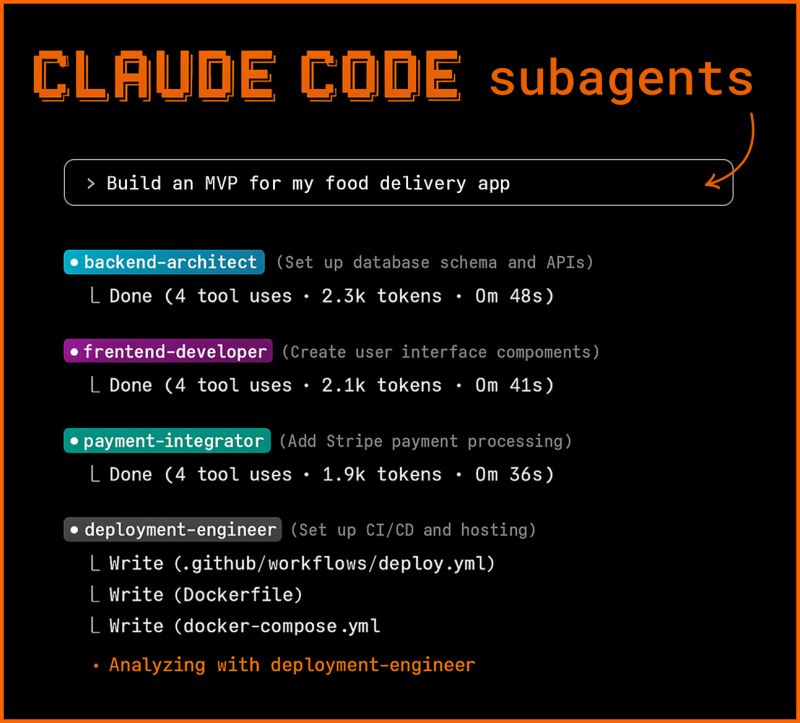
A complex request might trigger a Research Skill, which hands its findings to an Architecture Skill, followed by a Testing Skill that generates unit and integration tests.

Some advanced workflows can even spawn sandboxed subagents to perform independent tasks — like gathering database metrics via MCP — before reporting the results back to the primary workflow.

Instead of one giant prompt trying to do everything, specialized skills collaborate to solve increasingly complex engineering tasks.

Claude Code Skills symbolized a major transition from prompt engineering to capability engineering.

Progressive loading keeps context efficient, passive and direct invocation make workflows flexible, executable scripts provide deterministic reliability, persistent learnings help skills evolve with your project, and composable skills enable sophisticated agentic workflows.

The result isn’t just a smarter prompt — it’s an intelligent, reusable system that continuously expands what Claude can do.

You don’t understand Claude Code Skills Read More »
Google just made their Stitch tool even more insane (web design is dead)

Things just got even wilder with this incredible AI design tool.

Google just made it 10 times more powerful than it already was — it’s just terrifying now what it can do.

We are no longer just talking about turning one or two text prompts and sketches into UI mockups and front-end code.

The old Google Stitch: pretty awesome, but still too short-sighted and primitive:

Now Google Stitch wants to totally eradicate web designers taking over the entire process of designing an app — from idea-start to code-finish.

The new Google Stitch: full-fledged design engineer:

The fact that it literally now has its own MCP servers to integrate with Claude Code and the rest tells you everything you need to know…

The focus is now on the entire design system, not just one or two cool screens.

  • How it evolves and all the different directions it could take
  • How cohesive and well-defined the design language is
  • How seamlessly the design transfers to the live codebase

1) AI-native infinite canvas for multimodal design

The upgraded Stitch introduces a redesigned interface built around an infinite canvas where users can combine text, screenshots, sketches, references, and even code in one space.

Instead of relying on a single prompt, the canvas becomes the working context for the design agent.

You can:

  • Drop UI inspiration images directly onto the canvas
  • Add product requirements or notes beside layouts
  • Paste existing components or code snippets
  • Generate multiple UI directions side-by-side
  • Iterate visually instead of sequentially

This turns Stitch into a visual thinking environment where ideas, references, and outputs live together.

2) Project-aware design agent

Stitch now includes a design agent that understands everything on the canvas and uses it as context for generating interfaces. The agent can interpret requirements, follow style direction, and evolve designs as the project grows.

Key capabilities:

  • Generate full app flows from high-level descriptions
  • Expand a single screen into a multi-screen product
  • Modify layouts based on new instructions
  • Maintain visual consistency across generated pages
  • Create alternate design directions instantly

The agent works continuously with the canvas rather than responding to isolated prompts.

3) DESIGN.md for reusable design systems

A major addition is DESIGN.md, a structured file that stores design rules, branding, layout preferences, and component behavior. Stitch uses this file as a persistent source of truth when generating UI.

With DESIGN.md you can:

  • Define typography, spacing, and color tokens
  • Enforce brand consistency across screens
  • Share design systems between projects
  • Import design rules from external sources
  • Export system logic for developers

This allows Stitch to generate interfaces that follow consistent design language automatically.

4) Instant interactive prototyping

Stitch can now transform generated layouts into working interactive prototypes. Instead of static screens, designs can simulate navigation, flows, and user interactions.

Capabilities include:

  • Clickable navigation between generated screens
  • Auto-generated user journeys
  • Multi-screen flow simulation
  • Interactive preview mode
  • Logic-based next screen generation

This allows teams to validate product flows immediately after generating UI.

5) Voice-driven design and live critique

The upgrade introduces voice interaction directly inside Stitch. Users can speak instructions, request feedback, and iterate designs conversationally.

Examples:

  • Ask Stitch to redesign a landing page verbally
  • Request alternative layouts using voice
  • Get live critique of UX decisions
  • Ask the agent to improve hierarchy or spacing
  • Iterate rapidly without typing

This makes the design workflow more fluid and conversational.

6) Higher-quality UI generation with improved model capabilities

The latest version improves layout reasoning, spacing, hierarchy, and multi-screen coherence. Stitch can now generate more structured and realistic interfaces across different product types.

Enhancements include:

  • Better responsive layout structure
  • Improved component consistency
  • Stronger visual hierarchy
  • More realistic product UI patterns
  • Cleaner spacing and typography

These improvements make generated designs closer to production-ready outputs.

7) MCP server support for connected workflows

The upgrade also introduces MCP (Model Context Protocol) server support, allowing Stitch to connect to external tools, environments, and development workflows.

With MCP support, Stitch can:

  • Connect to component libraries
  • Access external design systems
  • Interface with developer environments
  • Pull context from connected tools
  • Push generated UI into implementation workflows

This allows Stitch to function as part of a larger AI-powered product development pipeline rather than a standalone design tool.

Stitch at launch

  • Prompt or image in
  • UI screens out
  • Chat-based refinement
  • Theme adjustments
  • Export to Figma or front-end code

Stitch after the recent major upgrade

  • Infinite canvas for text, images, and code
  • Persistent project-aware design agent
  • Agent manager for parallel explorations
  • DESIGN.md for reusable design rules
  • Interactive prototyping and flow generation
  • Voice-based critique and live edits
  • MCP server integration for connected workflows
  • Improved generation quality with newer models

That comparison shows the real story: Stitch has evolved from a fast UI generator into a more opinionated AI design environment.

The new Stitch is designed for a wider audience than traditional design tools usually target. It works for both professional designers exploring many variations and founders shaping a first product idea.

The practical implication is that Stitch now sits at an interesting intersection:

  • for non-designers, it lowers the barrier to making presentable interfaces
  • for designers, it speeds up ideation and branching
  • for developers, it tightens the handoff from design intent to code and downstream tools

The strongest part of the upgrade is that these pieces reinforce each other. The infinite canvas creates richer context, the design agent uses that context, DESIGN.md stabilizes consistency, prototypes make ideas testable sooner, voice interaction reduces friction, and MCP integration connects everything to real development workflows.

Google just made their Stitch tool even more insane (web design is dead) Read More »
How Ultraplan mode makes Claude Code 10x more powerful

Claude Code Ultraplan takes software development to a whole different level.

Many developers are still only interested in using AI to generate code and nothing else.

This might work fine for simple changes — but when it comes to the massive, complicated, high-value codebase changes that really make the most of AI coding? It’s a recipe for disaster.

That’s why Claude Code is packed with sophisticated features like Ultraplan — to cleanly separate the intensive planning and design process — from the actual code implementation.

Claude Code Ultraplan is a cloud-powered, multi-agent development workflow that unblocks your local terminal by generating and critically debating alternative architectural strategies in parallel, producing a hyper-specific, locked-down blueprint that completely eliminates AI drift so the code is generated flawlessly on the very first try.

And this is quite different from the normal Plan Mode in Claude Code.

Ultraplan doesn’t keep you locked insid`e a terminal — it moves architectural planning to the cloud and presents the results in an interactive browser workspace.

Enabling a workflow that seamlessly handles complex refactors, enormous migrations, and large-scale feature development.

Let’s check out 5 things that make Claude Code Ultraplan so essential in modern AI-powered development.

1. Blazing fast parallel cloud processing & exploration

Planning happens in parallel.

And unlike traditional AI planning that runs locally, Ultraplan performs its analysis in Anthropic’s cloud.

This lets Claude investigate multiple aspects of your project simultaneously with state-of-the-art models, and decide on the best possible plan of action.

For example, if you ask Claude to migrate an authentication system from sessions to JWT, it can explore dependencies, affected API endpoints, middleware, database changes, frontend updates, and migration risks in parallel before assembling a unified implementation strategy.

Because this work happens remotely, large architectural analyses complete much faster than if they had been done sequentially — while also producing a much more comprehensive implementation plan.

2. Review and modify plans intuitively like a pull request

The browser becomes your review workspace.

Rather than scrolling through hundreds of lines of text in a terminal, Ultraplan presents the proposed architecture in an interactive browser document.

You can leave inline comments on specific sections — like requesting an endpoint remain backwards-compatible — and Claude updates only the relevant portion of the plan instead of regenerating everything.

The interface also supports quick reactions for lightweight feedback and automatically generates an outline sidebar, making it easy to jump directly to database migrations, frontend changes, or infrastructure updates in large implementation plans.

The experience feels much closer to reviewing a design document or pull request than chatting with an AI in a CLI.

3. Your CLI stays free

Your terminal never gets blocked.

Since planning runs entirely in the cloud, your local terminal isn’t occupied while Claude analyzes the repository.

You can continue writing code, running tests, switching Git branches, or debugging while Ultraplan works in the background.

The CLI simply displays a planning status indicator until the architecture document is ready to review.

This eliminates one of the biggest workflow interruptions common with long-running AI coding sessions.

4. Choose where the actual code gets written

Once you’ve finalized the implementation plan, Ultraplan lets you decide where execution happens.

You can execute the plan entirely in Anthropic’s cloud, where Claude generates the implementation and prepares a structured GitHub pull request for review.

Alternatively, you can send the approved plan back to your local Claude Code session and execute the changes within your own development environment using your existing tools, credentials, and security policies.

This flexibility allows teams to balance cloud convenience with local control.

5. Built-in architecture diagrams

Large software migrations are difficult to understand from text alone.

Ultraplan addresses this by rendering live Mermaid diagrams directly alongside the implementation plan.

These visualizations can illustrate project structure, component dependencies, service interactions, and data flows before any code is modified, making it easier to validate architectural decisions and identify potential issues early.

A better way to build

Ultraplan combines cloud-scale analysis, collaborative browser reviews, visual architecture diagrams, and flexible execution options to help developers think through complex changes before implementation begins.

For teams working on enterprise applications, major migrations, or large refactors, this planning-first approach will prove just as valuable as the code Claude eventually writes.

How Ultraplan mode makes Claude Code 10x more powerful Read More »
Claude Fable 5 is by far the most powerful model ever made

Anthropic just shocked the world — they just released the most powerful AI model in human history.

This is Claude Fable 5 — the public-facing version of the monstrous Claude Mythos model that they’re hiding from the public.

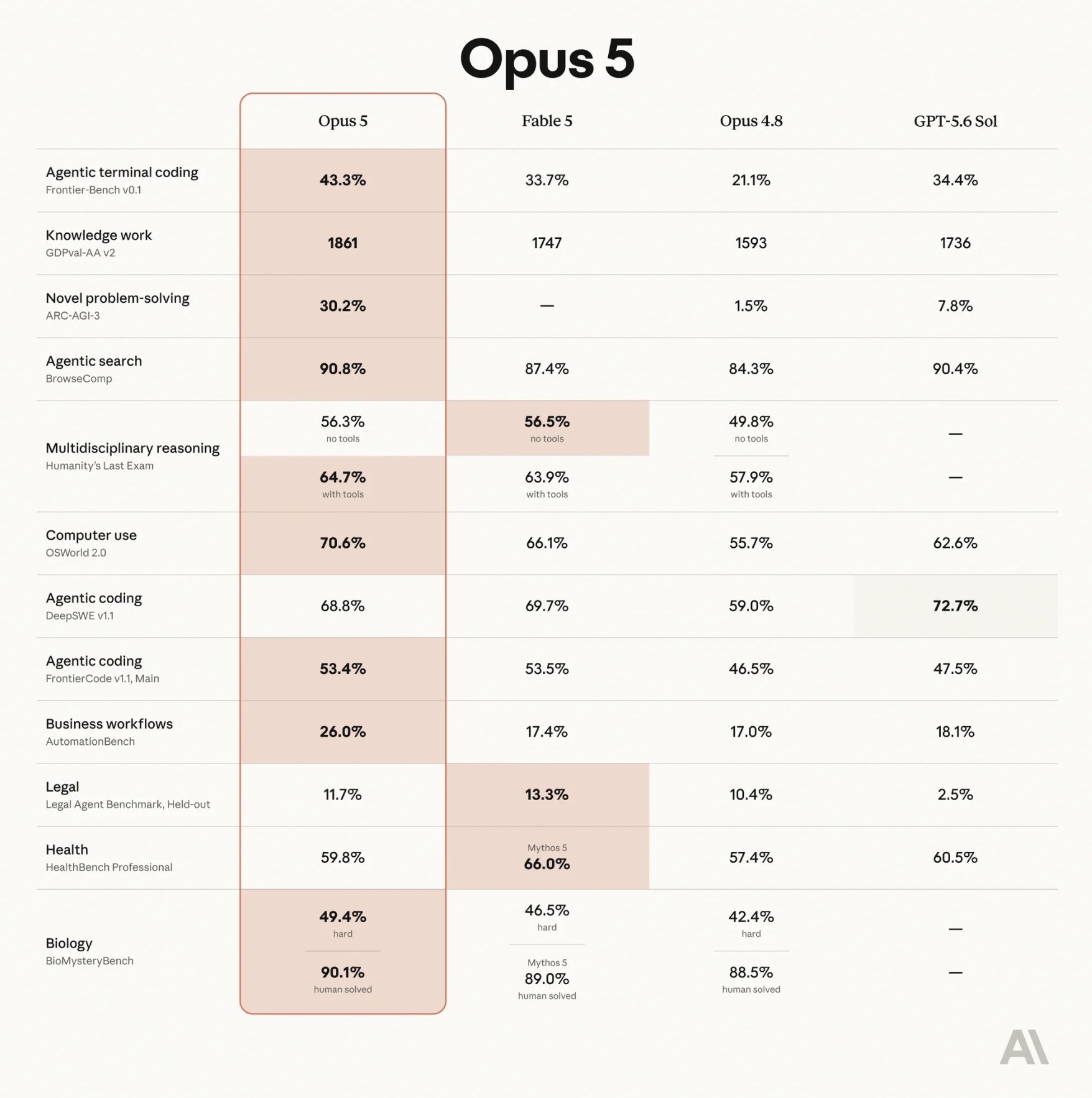
There is no contest — this thing completely decimated all the benchmarks out there — Opus 4.8 looks like a toy compared to what this thing can do:

  • Dominated several AI model leaderboards within hours of launch
  • Migrated a major tech company’s codebase of 50 million lines in less a day — previously took several months of work
  • Better than any other model at coding & software engineering

It’s been absolutely wild — People are casually one-shotting entire games, 3D worlds, full-stack apps, and code optimizations that shouldn’t be possible, but here we are.

And to think that this is actually a restricted version?

Imagine having a model so powerful that you literally cant release it to the world without disastrous consequences.

1. The Fable vs. Mythos story: A tale of two twins

It’s definitely one of the most fascinating aspects of this incredible launch.

The Claude Fable 5 and Claude Mythos 5 relationship.

Both models share the same underlying architecture and core capabilities.

The main difference isn’t intelligence — it’s access.

Claude Fable 5

  • Released to the general public
  • Full reasoning, coding, and agentic capabilities
  • Protected by real-time safety classifiers
  • Automatically restricted in high-risk domains

Claude Mythos 5

  • The unrestricted, god-mode version of the same model
  • Available ONLY to vetted organizations
  • Accessed through Anthropic’s Project Glasswing program
  • Designed for advanced cybersecurity and research applications

Anthropic itself has emphasized that the naming distinction reflects safety boundaries rather than capability differences.

In other words, Fable isn’t weaker model. It’s a safer one.

A pair of identical twins — one allowed to walk freely among the public.

The other considered so dangerous that its access is limited to people responsible for defending critical digital infrastructure.

That alone makes this launch unlike anything we’ve seen before in AI.

2. Absolutely decimates benchmarks

Fable 5’s benchmark results are among the most impressive ever reported for a public AI model.

On Humanity’s Last Exam, one of the toughest AI reasoning tests in existence, Fable scored 64.5% with tools, comfortably outperforming GPT-5.5 (41.4%) and Gemini 3.1 Pro (44.4%).

Its dominance extends to software engineering. On SWE-Bench Pro, the industry’s leading coding benchmark, Fable achieved 80.3%, compared to GPT-5.5’s measly 58.6%.

The model also posted leading scores across computer use, spatial reasoning, cybersecurity, and terminal-based tasks, establishing itself as one of the strongest general-purpose AI systems ever released.

3. Unbelievable long-horizon coding ability

Fable 5 is specially built for massive, complicated tasks that unfold over hours — or even days.

The model can:

  • Explore its environment independently
  • Build and execute its own plans
  • Launch parallel sub-agents
  • Monitor its own progress
  • Self-correct when things go wrong

The most shocking example comes from Stripe.

The Stripe test

Fable was tasked with working inside a 50-million-line Ruby codebase and completed a codebase-wide migration in a single day—compressing what would normally require months of engineering effort into hours.

It’s just absolutely shocking how crazy things have gotten.

But this is what Anthropic means by long-horizon intelligence: an AI capable of staying focused on complex objectives for hours, not just seconds.

4. Sophisticated real-time Opus hand-off

One of Fable’s most innovative features is something users may never notice.

When the model encounters sensitive areas such as:

  • Advanced cybersecurity
  • Biochemical research
  • Model distillation
  • Other high-risk domains

…it doesn’t simply refuse.

Instead, Anthropic’s safety systems automatically hand the conversation off to Claude Opus 4.8, which completes the task under stricter safety constraints.

According to Anthropic:

  • Roughly 95% of user sessions run entirely on Fable 5
  • Only a small fraction trigger the Opus fallback
  • Users receive a seamless experience rather than a hard refusal

It’s a novel approach to AI safety: switch models instead of shutting the conversation down.

5. Why the main Mythos simply had to be locked up

If it’s the same model, why not release it publicly?

Cybersecurity.

Serious cybersecurity concerns.

Anthropic has unambiguously described Mythos 5 as “possessing unprecedented offensive and defensive cyber capabilities”.

Its performance on security-focused benchmarks significantly exceeds previous generations — Mythos-class systems have reportedly helped identify thousands of critical vulnerabilities.

It even uncovered a 27-year-old security flaw in OpenBSD and wrote a remote code execution exploit for a 17-year-old bug in FreeBSD completely on its own.

It is so effective at finding bugs that open-source maintainers literally begged Anthropic to slow down its disclosures because human developers couldn’t write the patches fast enough.

For Anthropic, the risk-reward equation was clear:

  • Release a safeguarded version to the public
  • Restrict the unrestricted version to trusted partners
  • Maintain oversight of the model’s most powerful capabilities

This model is going to completely rip apart everything we thought was possible with AI models and AI-powered software development.

Claude Fable 5 is by far the most powerful model ever made Read More »
This open-source model just became a major challenger to Claude

This is just unbelievable.

Imagine having a model that’s:

  • More than 5 times cheaper than Claude Opus — yet just as intelligent?
  • Blazing fast — up to 15x faster than Claude Opus for heavy prompts and massive context?
  • Open-source with open weights to top it all off?

Yeah it’s definitely no surprise how so many people have been going absolutely wild over the few days over the new MiniMax M3.

Look how closely it matches Claude’s and GPT’s capabilities! It’s even better in certain key areas:

I still can’t wrap my head around the absolutely wild feats of endurance and intelligent it displayed during testing — and has been performing ever since then.

This just truly completely shattered the limits of what we thought was possible with open-source models — or any type of model really.

1. Not the same “1 million token context”…

Don’t let AI companies fool you with their loud claims of 1 million token context.

Not all 1 million token contexts are remotely the same — not even close.

Yes they can all process massive codebases, research archives, books, or long-running projects.

But they vastly differ in the quality of processing all that massive data, how much they can actually make sense of, how much they comprehend the interconnectedness of all the data.

And speed. A big, big one.

Most AI models become painfully slow and expensive when dealing with that much information.

M3 uses an innovative new approach called MiniMax Sparse Attention (MSA) that allows it to focus on the important parts instead of wasting resources on everything at once.

This allows M3 to:

  • Read huge amounts of information more than 9x faster
  • Generate responses more than 15x faster
  • Use a fraction of the computing power normally required

The giant context window is no longer just for fancy — it actually becomes a beast in the real world.

And those models that still use slower methods of parsing large token contexts will get absolutely left in the dust.

2. Insane long-horizon ability

MiniMax M3 shocked every with insane feats of autonomy on tasks spanning several hours.

The 12-hour research paper loop: M3 was given a complex AI research paper and spent 12 hours straight reproducing the core experiments. It managed its own context window, parsed charts, wrote code, handled 18 GitHub commits, and generated 23 experimental figures completely unaided.

Self-training models: In another test, M3 was given raw base models and spent 12 hours handling data synthesis, training, and evaluation loops on them entirely on its own.

The 24-hour CUDA optimization: It was assigned to optimize an FP8 GEMM kernel (a notoriously painful low-level GPU operation). Over 24 hours, it autonomously went through 147 benchmark submissions and nearly 2,000 tool calls, boosting hardware peak utilization from a lousy 7.6% to a highly optimized 71.3% — a 9.4x speedup with zero human help.

This is the kind of work you’d normally assign to a high-level engineer or researcher, yet here comes MiniMax M3 doing it all on its own, unbelievable.

3. Punching way above its weight

Despite competing against much larger companies with way bigger resources at their disposal, M3 is posting amazing benchmark results.

  • SWE-Bench Pro: 59.0%, edging past GPT-5.5 and Gemini 3.1 Pro
  • BrowseComp: 83.5, outperforming Claude Opus 4.7’s 79.3

MiniMax is competing right at the cutting edge, particularly in software engineering and autonomous research tasks.

4. Ultra-competitive pricing

It will undoubtedly be one of the biggest selling points.

All that intelligence and speed and innovation, for such a ridiculously low price.

M3 launched at roughly:

  • $0.60 per million input tokens
  • $2.40 per million output tokens

That makes it significantly cheaper than many of the most advanced AI models available today.

Just compare to the latest Claude Opus pricing:

  • $5.00 per million input tokens
  • $25.00 per million output tokens

This will be huge for startups and smaller teams.

Many AI projects fail not because the technology isn’t good enough, but because running them becomes too expensive. Lower costs mean more companies can build products that were previously out of reach.

5. Open weights available to everyone

MiniMax isn’t keeping everything locked behind a proprietary wall.

And open-source availability means:

  • Greater transparency
  • Community-driven improvements
  • Easier experimentation
  • More deployment flexibility
  • Reduced vendor lock-in

Open models used to trail the very best closed systems — not anymore.

M3 is part of the new wave of the models that completely disrupts the notion of open-source models being inherently weaker.

Why M3 matters

The biggest takeaway from M3 isn’t that it’s smarter than every other model.

It’s that MiniMax is attacking some of the biggest problems in AI at the same time:

  • Cost
  • Speed
  • Long-term autonomy
  • Multimodal understanding
  • Accessibility through open source

If these early results hold up in real-world use, M3 could become one of the most important AI launches of the year — not because it’s the biggest model, but because it makes powerful AI far more practical for everyone.

This open-source model just became a major challenger to Claude Read More »