It’s powerful AI from none other than Google DeepMind, the geniuses behind that god-level chess-playing program, AlphaZero.
They’ve conquered the mental realm of chess and Go (unfortunately), so now they’re trying to conquer the physical realm of sports.
(And by the way, they’ve been working on AlphaCode, to destroy all programming jobs — should we be worried?)
And they’re already well on their way: The robot destroyed every single player it faced, at the beginner level.
55% of every intermediate-level player it played against.
For a sport like tennis, not only does the AI need sophisticated algorithms for intelligent decision-making.
It also needs physical components for quick reactions and precise movements to adequately make those decisions in the real world.
So this is the biggest problem that makes it impossible for an expert system or classical algorithm to have any chance:
How can we track this tiny, rapidly moving ball, predict its trajectory, and respond quickly and accurately according to the rules of the game?
Well, like in every problem in Computer Science and programming, it all comes back to input, processing, output.
Inputs
We only need visual input here.
And of course, you know the standard way computers receive visual input.
So the robot has multiple high-speed cameras to constantly capture images at an impressive rate of 125 images per second.
All these images are rapidly fed into a neural network that tracks the ball’s position in real time.
With this position, it can calculate key variables like speed and trajectory.
Processing
For processing the robot has two levels of control.
First there are the low-level controllers, a bunch of specialized neural networks trained to execute specific table tennis skills: backhand drives, forehand topspin… basically anything you could normally do with the ball as a human.
Then we have the high-level controller for more abstract decision-making. It processes the inputs to decide which atomic skill to perform.
I think it’s just like how our brains have regions for higher-level processing like the prefrontal cortex, and then other regions like the motor cortex for lower-level for planning and executing motion.
Output
All that processing would be useless if it couldn’t do anything in the real world; It needs to move.
That’s why the robot has a powerful IRB 1100 robotic arm, allowing it to easily reach almost any part of the table to quickly strike the ball.
In a way you could say the low-level controllers are the output of the high-level one’s processing, but they also do their own processing.
It can be better
It beat all the beginners and much of the intermediates.
But how many advanced players did it beat?
Zero.
It was just too slow for those masters.
One reason for this is that it takes quite some time for the sensors to read input, and also for the actuators to carry out the output in the real world.
It also seems to have issues with balls that are too low/high, or have too much spin.
Early beginnings thought, and overall it’s a great system showing off serious progress being made in AI and robotics.
I was planning a powerful real-time app so Web Sockets was essential.
Unfortunately, all the Web Socket hosting options I found were too costly or complex to set up.
So, I hacked Firebase to get Web Sockets for free with an innovative trick from Redux.
Web sockets great cause unlike our classic HTTP request-response style, the web socket server can send several messages to multiple connected clients in real time without any need for a request.
Firebase Firestore is free and has this powerful real-time ability by default, but there was a major problem.
Firestore is data-centric and client-centric
But Web Sockets are action-centric and server-centric.
As a client in Web Sockets, you send event messages through channels and the server uses them to decide what to do with the data.
It has complete control, and there’s no room for malicious manipulation from any user.
JavaScriptCopied!
// channel to listen for events in server
channel.bind('sendChatMessage', () => {
// modify remote database
// client doesn't know what's happening
});
But in Firestore, you dump the data in the DB and you’re done. The client can store whatever they want. Anyone can access anything in your DB once they have the URL.
JavaScriptCopied!
// client can do anything
const handleSendChatMessage = ({ content, senderId }) => {
const messagesRef = collection(
`users/${userId}/messages`
);
addDoc(messagesRef, {
content: 'whatever I want',
senderId: 'whoever I want',
timestamp: new Date(),
});
};
Sure, you can add “security rules” to protect certain data paths:
But it’s woefully inadequate compared to the flexibility and remote control that real Web Socket servers like Pusher provide.
And yes there was Pusher, but it only allowed a measly amount of free concurrent connections, and in this app, all my users needed to be permanently connected to the server, including when they closed the app.
My delusions of grandeur told me I’d be paying quite a lot when thousands and millions of people start using the app.
But what if I could make Firebase Firestore act like a real server and have complete control of the data?
I’d enjoy the generous free limits and have 1 million concurrent connections.
What I did
I needed to transform Firestore from data-centric to action-centric.
But how exactly could I do this? How could I bring channels to Firestore and create some sort of “server” with full power to regulate the data?
The answer: Redux.
But how? How does Redux have anything to do with Firebase?
Well, it was Redux that helped transform vanilla React from data-centric:
So the data would live side-by-side with the action stream collection in the same Firestore DB:
No user will ever be able to access this data directly; Our security rules will only ever them to send messages through their subcollection in the channels collection.
Receiving real-time messages from the server
I create a special subcollection within every channel, exclusively for events from server to clients.
Here I relay the new message to other users in the chat after storing the data.
Every developer should fully understand how they work and be able to discern the subtle differences between them.
So you know, JS functions are first-class citizens.
Which means: they’re all just object values — all instances of the Function class, with methods and properties.
So bind(), apply(), and call() are 3 essential methods every JavaScript function has.
Were you with me in the painful early days of React; when we still did this? 👇
This was just one of the multiple applications of bind() — a seriously underrated JavaScript method.
JavaScriptCopied!
// damn class components are such a chore to write now
import React from 'react';
class MyComponent extends React.Component {
constructor(props) {
super(props);
}
greet() {
alert(`Hi, I'm ${this.props.name}!`);
}
// remember render()?
render() {
return (
<button onClick={this.greet.bind(this)}>Click me</button>
);
}
}
export default MyComponent;
sayName() would be a mess without bind() — the alert() would never work.
Because internally React is doing something fishy with this method that completely screws up what this means inside it.
Before sayName would have had absolutely no problems showing the alert — just like in this other class:
JavaScriptCopied!
class Person {
props = { name: 'Tari' };
greet() {
console.log(`Hi, I'm ${this.props.name}!`);
}
}
const person = new Person();
person.greet();
But guess what React does to the greet event handler method behind the scenes?
It reassigns it to another variable:
JavaScriptCopied!
class Person {
props = { name: 'Tari' };
greet() {
console.log(`Hi, I'm ${this.props.name}!`);
}
}
// reassign to another variable:
const greet = Person.prototype.greet;
// ❌ bad idea
greet();
So guess what happens to this — it’s nowhere to be found:
This is where bind comes to the rescue — it changes this to any instance object you choose:
So we’ve binded the function to the object — the bind target.
(I know it’s “bound” but let’s say binded just like how we say “indexes” for “index” instead of “indices”).
It’s immutable — it returns the binded function without changing anything about the original one.
And this lets us use it as many times as possible:
vs call()
There’s only a tiny difference between call and bind
bind creates the binded function for you to use as many times as you like.
But call? It creates a temporary binded function on the flyand calls it immediately:
JavaScriptCopied!
class Person {
constructor(props) {
this.props = props;
}
greet() {
console.log(`Hi, I'm ${this.props.name}`);
}
}
const person = new Person({ name: 'Tari' });
const greet = Person.prototype.greet;
greet.bind(person)();
greet.call(person);
So call() is basically bind() + a call.
But what about when the function has arguments? What do we do then?
No problem at all — just pass them as more arguments to call:
JavaScriptCopied!
class Person {
constructor(props) {
this.props = props;
}
greet(name, favColor) {
console.log(
`Hi ${name}, I'm ${this.props.name} and I love ${favColor}`
);
}
}
const person = new Person({ name: 'Tari' });
const greet = Person.prototype.greet;
// bind(): normal argument passing to binded function
greet.bind(person)('Mike', 'blue🔵');
// call(): pass as more arguments
greet.call(person, 'Mike', 'blue🔵');
And you can actually do the same with bind():
JavaScriptCopied!
// the same thing
greet.bind(person)('Mike', 'blue🔵');
greet.bind(person, 'Mike', 'blue🔵')();
vs apply()
At first you may think apply() does the exact same thing as call():
JavaScriptCopied!
class Person {
constructor(props) {
this.props = props;
}
greet() {
console.log(`Hi, I'm ${this.props.name}`);
}
}
const person = new Person({ name: 'Tari' });
const greet = Person.prototype.greet;
greet.call(person); // Hi, I'm Tari
greet.apply(person); // Hi, I'm Tari
But just like bind() vs call() there’s a subtle difference to be aware of:
Arguments passing:
JavaScriptCopied!
class Person {
constructor(props) {
this.props = props;
}
greet(name, favColor) {
console.log(
`Hi ${name}, I'm ${this.props.name} and I love ${favColor}`
);
}
}
const person = new Person({ name: 'Tari' });
const greet = Person.prototype.greet;
//💡call() -- pass arguments with comma separated
greet.call(person, 'Mike', 'blue🔵'); // Hi, I'm Tari
//💡apply() -- pass arguments with array
greet.apply(person, ['Mike', 'blue🔵']); // Hi, I'm Tari
One mnemonic trick I use to remember the difference:
call() is for commas
apply() is for arrays
Recap
bind() — bind to this and return a new function, reusable
call() — bind + call function, pass arguments with commas
apply() — bind + call function, pass arguments with array
Exciting news today as native TypeScript support finally comes to Node.js!
Yes you can now use types natively in Node.js.
So throw typescript and ts-node in the garbage.
❌Before now:
Node.js only ever cared for JavaScript files.
This would never have run:
Try it and you’d get this unpleasant error:
Our best bet was to install TypeScript and compile with tsc.
And millions of developers agreed it was a pretty good option:
But this was painful — having to install the same old package and type out the same command over and over again.
Extra compilation step to JS and having to deal with TypeScript configurations and stuff.
Pretty frustrating — especially when we’re just doing a bit of testing.
That was why ts-node arrived to try to save the day — but it still wasn’t enough.
We could now run the TypeScript files directly:
We could even start an interactive session on the fly like we’d do with the standalone node command:
And everyone loved it:
But it was still an extra dependency, and we still had to install typescript.
We still had more subtle intricacies to be aware of, like how to use ts-node for ES modules with the --esm flag:
✅Now:
All this changes now with all the brand-new upgrades now in Node:
Native built-in TypeScript support.
Zero dependencies
Zero intermediate files and module configurations
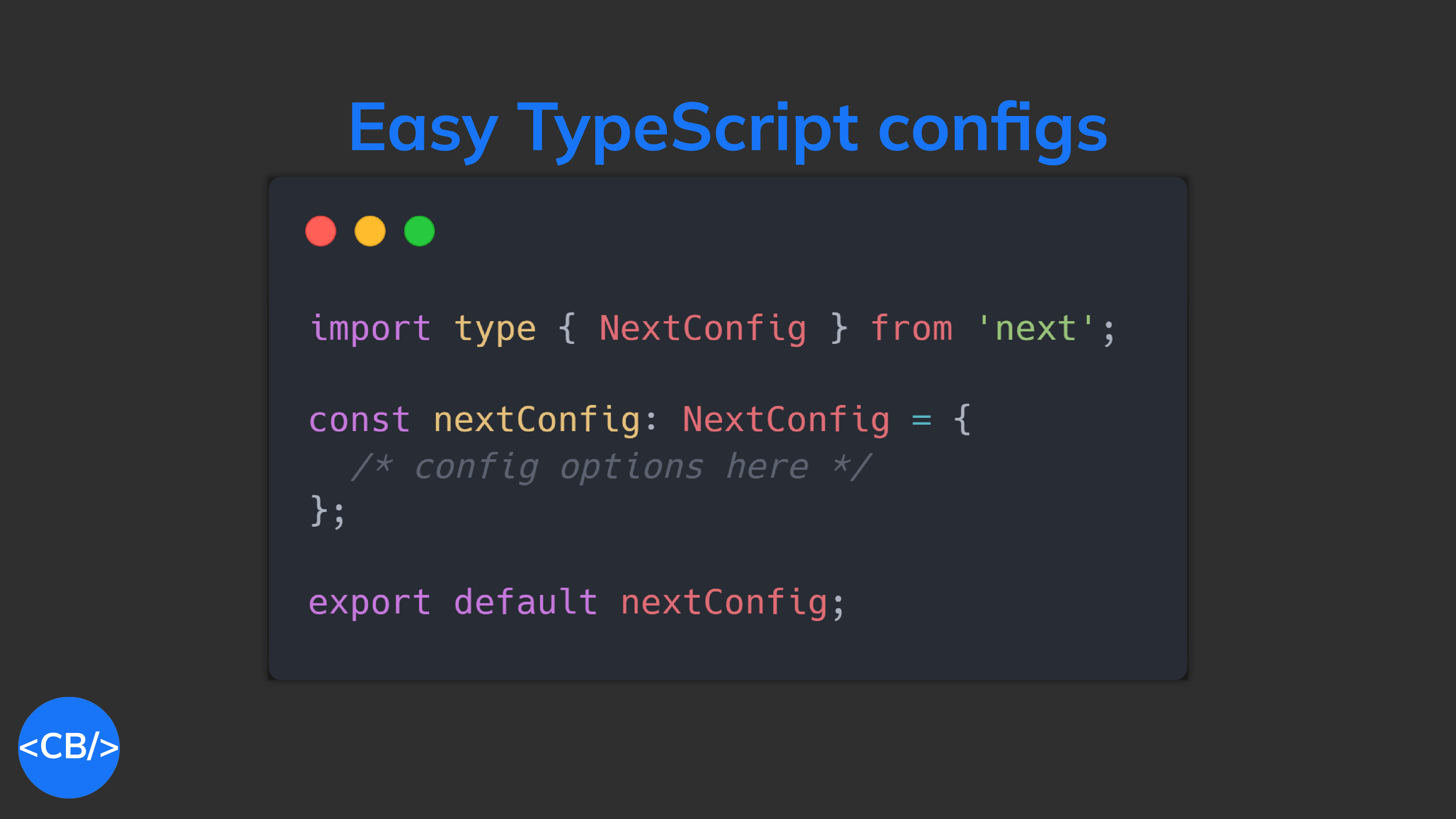
Now all our favorite JS tools like Prettier, Next.js, and Webpack can have safer and intellisense-friendly config files.
Okay almost no one has Webpack in their favorite tools list but still…
Look we already have pull requests like this to support prettier.config.ts in Prettier — and they’re going to be taking big steps forward thanks to this new development.
How does it work behind the scenes?
Support for TypeScript will be gradual, so right now it only supports types — you can’t use more TypeScript-y features like enums (although who uses enums these days).
It uses the @swc/wasm-typescript tool to internally strip the TypeScript file of all its types.
Early beginnings like I said, so it’s still experimental and for now you’ll need the --experimental-strip-types flag:
JavaScriptCopied!
node --experimental-strip-types my-file
This will be in an upcoming release.
Final thoughts
Built-in TypeScript is a serious power move to make Node.js a much more enjoyable platform for JS devs. I’ll definitely be using this.
Even though the support is not yet as seamless as in Bun or Deno, it makes a far-reaching impact on the entire JavaScript ecosystem as Node is still the most popular JS backend framework by light years.
Developers spend 75% of their time debugging and this is a major reason why.
Avoiding this mistake will massively cut down the bug occurrence rate in your code.
Never take new code for granted.
A simple but powerful principle with several implications.
Never assume your code works just because it looks alright
Always test your code in the real world.
And not just your machine.
You cannot trust your mind on this — That’s why bugs exist in the first place.
Bugs are always something you never expect.
It’s a big reason why debugging takes much time, especially for complex algorithms.
Your mental model of the code’s logic is hopelessly divorced from reality.
It’s often only when you carefully step through the code line-by-line & var-by-var before you finally realize the disconnect.
It’s the same reason why it can be so hard to proofread your own writing.
Your brain already knows what you meant to write. It has already created a mental model of the meaning you’re trying to convey that’s different from what’s actually there.
So what happens when you try re-reading your work for errors?
You’re far more focused on the overall intended meaning than the low-level grammatical and spelling errors.
That’s why code reviews are important — get your work scrutinized by multiple eyes that are new to the code.
That’s why testing regularly is important.
Test regularly and incrementally and you’ll catch bugs much faster and quicker.
As soon as you make a meaningful change, test it.
And this is where techniques of automated testing and continuous integration shine.
With manual testing you’ll be far more likely to procrastinate on testing until you’ve made huge changes — that are probably overflowing with bugs.
With continuous integration there’s no room for procrastination whatsoever.
As long as you commit regularly, you’ll drastically cut down on the bug turnaround time and the chances of something going horribly, mind-bogglingly wrong.
VS Code’s multi-cursor editing feature makes this even more powerful — with Ctrl + Alt + Down I easily select all the new elements to add text to all of them at the same time:
10. Lorem Ipsum
Lorem Ipsum is the standard placeholder text for designing UIs, and Emmet makes it effortless to add it for visual testing.
Just type lorem in VS Code and you’ll instantly a full paragraph of the stuff:
Type lorem again to expand the text — it intelligently continues from where it stopped:
Final thoughts
Use these 10 powerful Emmet syntax tips to write HTML and JSX faster than ever.
Prettier is a pretty😏 useful tool that automatically formats your code using opinionated and customizable rules.
It ensures that all your code has a consistent format and can help enforce a specific styling convention in a collaborative project involving multiple developers.
The Prettier extension for Visual Studio Code brings about a seamless integration between the code editor and Prettier, allowing you to easily format code using a keyboard shortcut, or immediately after saving the file.
Watch Prettier in action:
Pretter instantly formats the code after the file is saved.
ESLint is a tool that finds and fixes problems in your JavaScript code.
It deals with both code quality and coding style issues, helping to identify programming patterns that are likely to produce tricky bugs.
The ESLint extension for Visual Studio Code enables integration between ESLint and the code editor. This integration allows ESLint to notify you of problems right in the editor.
For instance, it can use a red wavy line to notify of errors:
We can view details on the error by hovering over the red line:
We can also use the Problems tab to view all errors in every file in the current VS Code workspace.
The Live Server extension for VS Code starts a local server that serves pages using the contents of files in the workspace. The server will automatically reload when an associated file is changed.
In the demo below, a new server is launched quickly to display the contents of the index.html file. Modifying index.html and saving the file reloads the server instantly. This saves you from having to manually reload the page in the browser every time you make a change.
As you saw in the demo, you can easily launch a new server using the Open with Live Server item in the right-click context menu for a file in the VS Code Explorer.
IntelliCode is another powerful AI tool that produces smart code completion recommendations that make sense in the current code context.
It does this using an AI model that has been trained on thousands of popular open-source projects on GitHub.
When you type the . character to access an object method or fields, IntelliCode will suggest a list of members that are likely to be used in the present scenario. The items in the list are denoted using a star symbol, as shown in the following demo.
IntelliCode is available for JavaScript, TypeScript, Python, and several other languages.
Icon packs are available to customize the look of files of different types in Visual Studio Code. They enhance the look of the application and make it easier to identify and distinguish files of various sorts.
VSCode Icons is one the most popular icon pack extensions, boasting a highly comprehensive set of icons and over 11 million downloads.
It goes beyond file extension differentiation, to provide distinct icons for files and folders with specific names, including package.json, node_modules and .prettierrc.
Final thoughts
These are 10 essential extensions that aid web development in Visual Studio Code. Install them now to boost your developer productivity and raise your quality of life as a web developer.