
Anthropic just released another amazing Claude Code feature.
The new Code Mode feature upgrades the token efficiency of your connected tools and makes Claude Code work much faster on any task involving tools or MCP servers or external files.
Before now when Claude calls a tool it would wait for the tool to give a response before deciding what to do with the data.
And this ended up wasting so much time — especially when a lot of tools were involved. Waiting for Tool A, then thinking, then waiting for Tool B, then thinking…
But now with Code Mode Claude can call every single one of those tools immediately using JavaScript code — it no longer needs to wait for any one of them to complete.
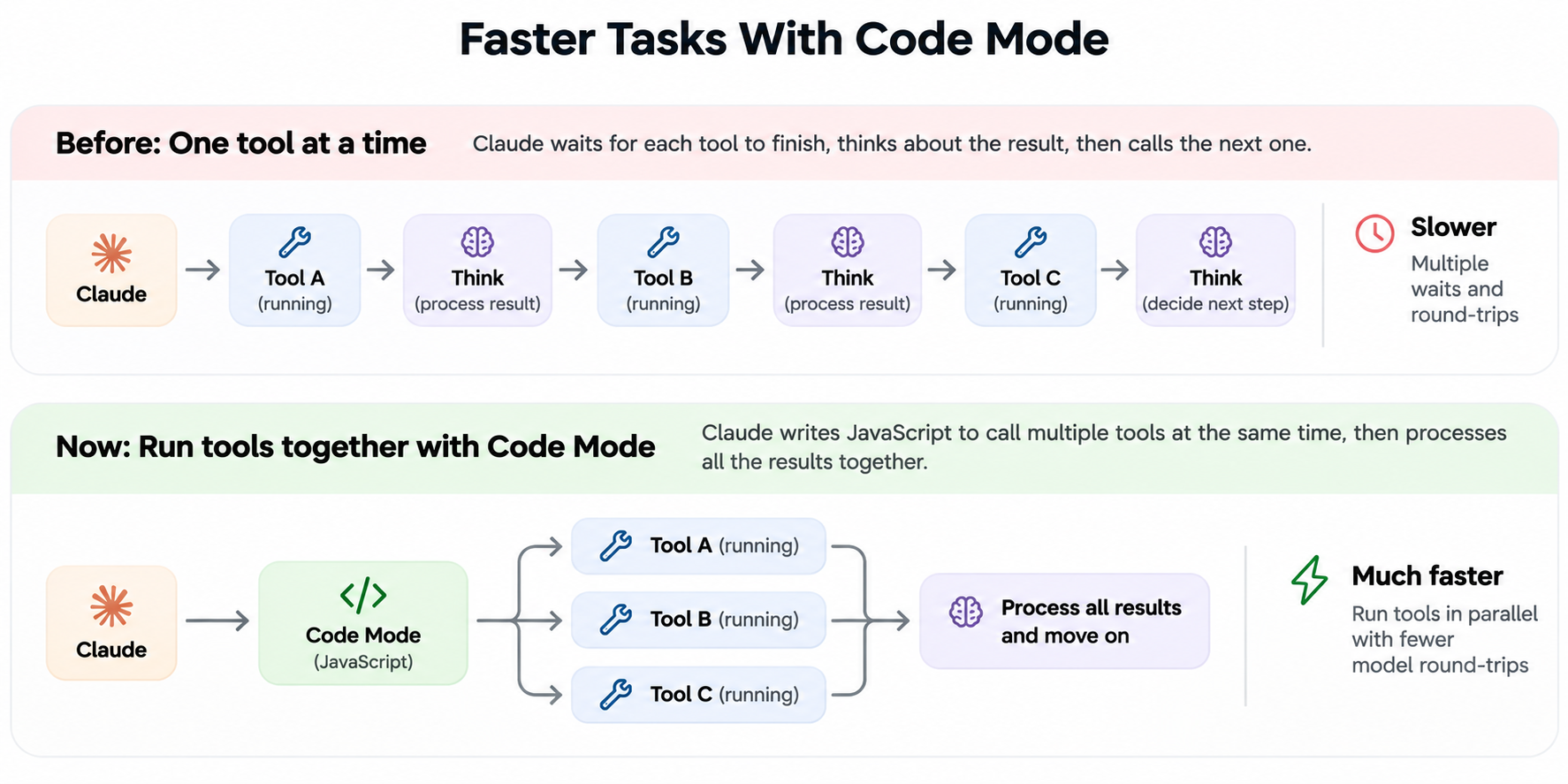
All your tasks complete so much faster no matter how many tools are involved.
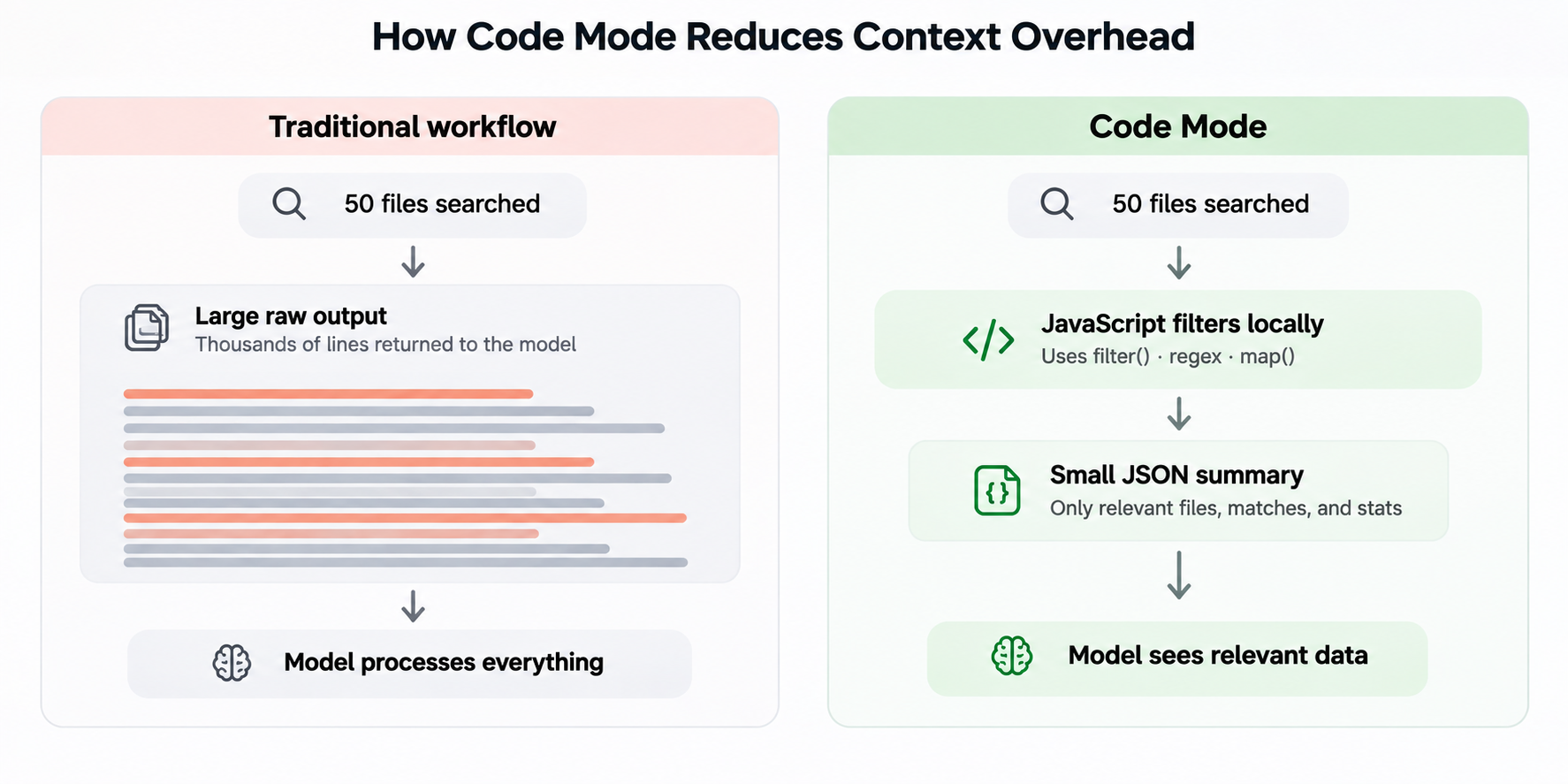
And now with Code Mode, Claude can write powerful, reusable scripts on the fly to locally process the output of those tools to extract only the relevant information that the agent really needs.
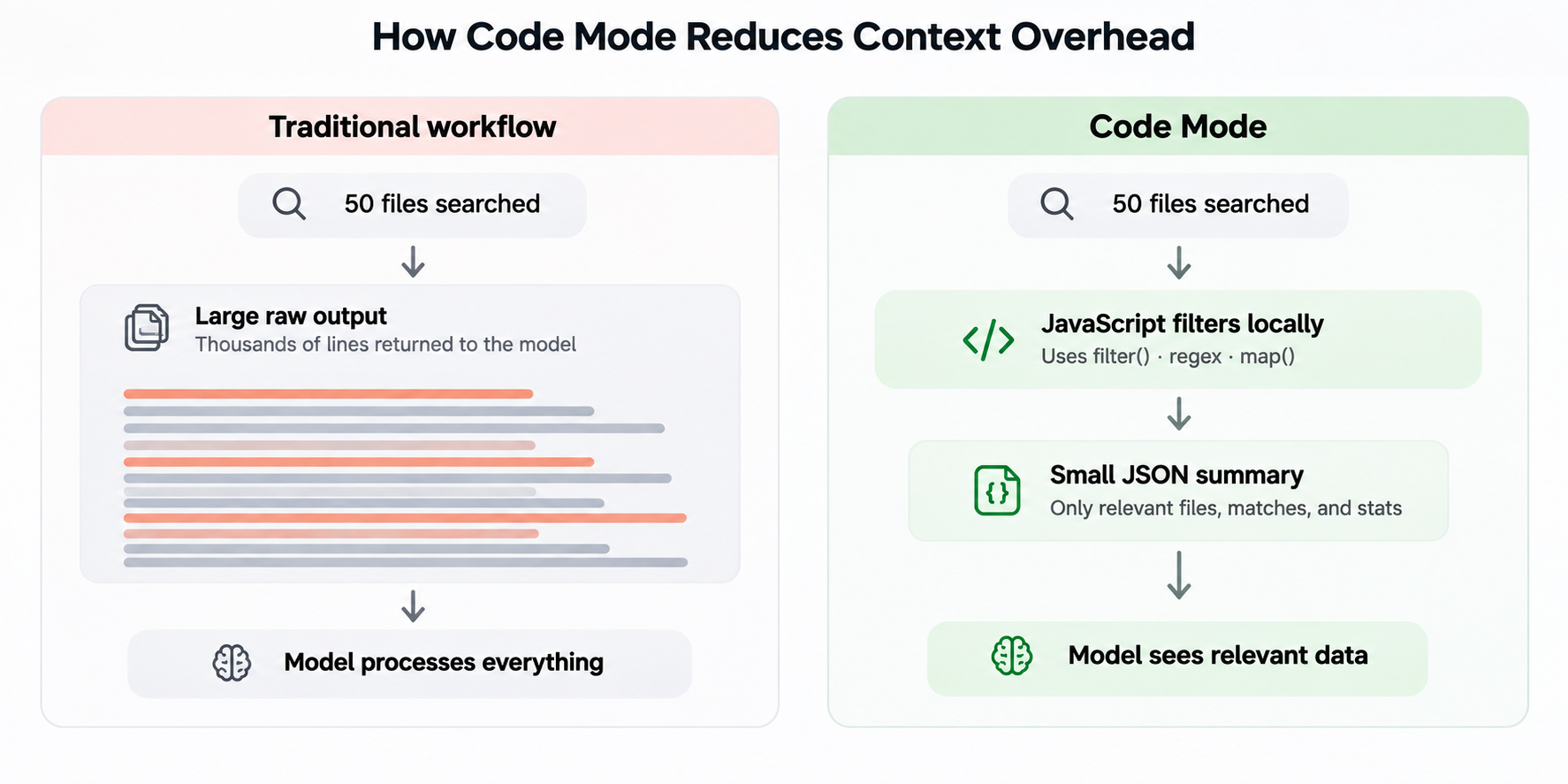
You cut down massively on token costs, eliminate all the delays and make much faster progress on your development goals.
Huge token savings from context & noise reduction
One big problem with AI coding agents is how much unnecessary information they send to the model.
Say you ask Claude to run your project’s test suite and find out why some tests are failing.
Normally, the test runner tool might produce thousands of lines of logs and stack traces even though you only need to know which tests failed and why.
With Code Mode, Claude can use JavaScript loops, regex, and methods like Array.filter() to process those results locally.
It can extract the failed test names, error messages, and relevant stack traces before sending a small JSON summary back to the model.
So instead of filling your context window with raw search results, Claude only sees what matters. This ends up saving tokens and reducing costs.
Code Mode also cuts down on back-and-forth tool calls. It can chain dependent operations in one script and run independent tasks at the same time using Promise.all().
This means we can get through large code searches and multi-step tasks with less waiting.
Native harness and MCP access: Keep MCP servers & tools as cost-efficient as possible
Its JavaScript runtime runs inside Claude Code’s harness. This lets Claude call built-in tools like Read, Edit, and Bash as well as tools from connected Model Context Protocol (MCP) servers.
Say you have one MCP server for meeting notes and another for creating project tickets.
Claude can write JavaScript that pulls the meeting notes, extracts action items, and sends them straight to the ticketing tool.
It doesn’t need to pass the full transcript through the model’s context window.
This saves tokens and reduces the risk of mistakes that can happen when an LLM keeps copying or summarizing data.
For us, this makes it easier to automate workflows across different tools without manually moving information between them.
Background jobs: Keep working while Claude runs, builds, and tests
Some coding tasks take a long time. Think about running large test suites or building an app across dozens of configurations.
Code Mode lets Claude run JavaScript jobs in the background while you keep chatting with it.
In supported auto or bypass-permissions modes, these jobs can run for roughly two hours.
Say you need to run 100 builds and collect all the failures. Claude can handle the batch in the background while you ask questions or work on something else.
You no longer have to sit around waiting for every long-running task to finish before continuing your conversation.
Cleaner UI and full script inspection: Less clutter without losing control
Code Mode can generate long JavaScript scripts to manage multiple tools. Showing all that code in your terminal would make conversations hard to follow.
So Claude Code hides the generated JavaScript in the main chat view.
You still see what Claude is doing without scrolling through hundreds of lines of orchestration code.
But you can inspect the scripts whenever you want.
Just press Ctrl+O to open the transcript viewer. From there, you can expand each collapsed Code entry and see the exact JavaScript Claude wrote and ran.
This gives us a cleaner terminal while making it easy to debug problems and check what the agent actually executed.
Security controls: More control over what Claude can run
Code Mode also changes how Claude Code checks tool execution for safety.
In auto mode, the safety classifier checks the entire JavaScript block once before running it instead of separately classifying every tool call inside the script.
Existing permissions and hooks still matter. But if your pre-tool-use hooks only check raw Bash commands, they may miss commands that Claude runs through JavaScript.
You may need to update your hooks to match the Code Mode REPL tool and inspect tool_input.code.
Anthropic also added protection against repositories turning on Code Mode without your knowledge.
A project’s local .claude/settings.json cannot enable it. You must turn it on yourself through an environment variable:
CLAUDE_CODE_EXPERIMENTAL_CODE_MODE=1 claudeYou can also enable it in your personal user settings.
This means cloning someone else’s repository won’t silently turn on Code Mode.
Code Mode shows us that making AI coding agents better isn’t just about giving them bigger context windows — it’s also about helping them get more work done without filling those windows with unnecessary information.