
Tari Ibaba

Tari Ibaba is a software developer with years of experience building websites and apps. He has written extensively on a wide range of programming topics and has created dozens of apps and open-source libraries.

GLM-5.3 is a huge huge sign of things to come

GLM-5.3 is a very unconventional upgrade — no one should ignore this and what it means.

Z.ai (the makers) refused to follow the same old formula of training a bigger model and spending more and more on compute.

Like as far as weights and parameters go, this is the exact same model as GLM-5.2 (and still open-source btw).

But somehow it’s just better in every single way — with an unbelievable 50% performance leap and scary coding and hacking ability that now surpasses even Claude Mythos 5.

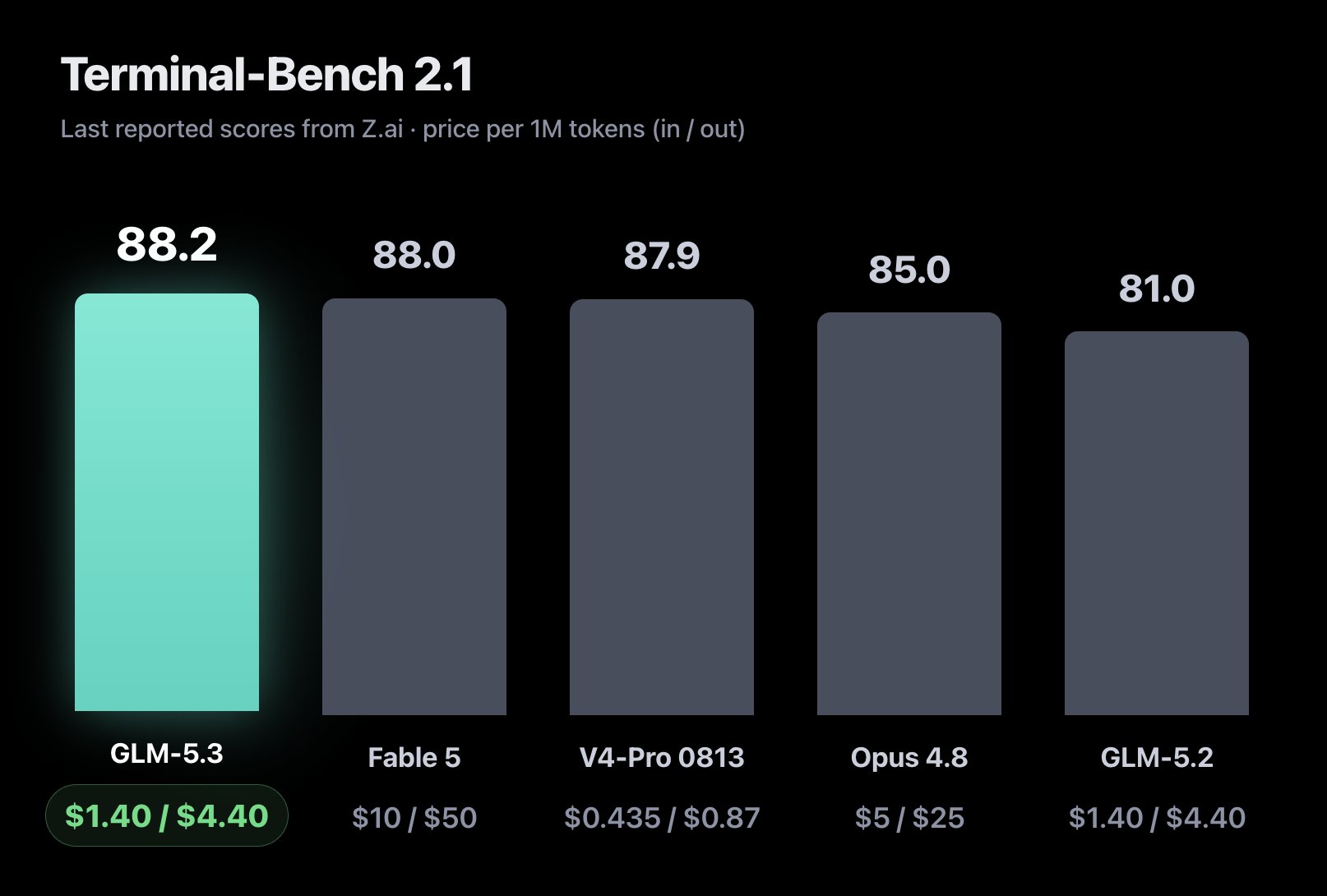
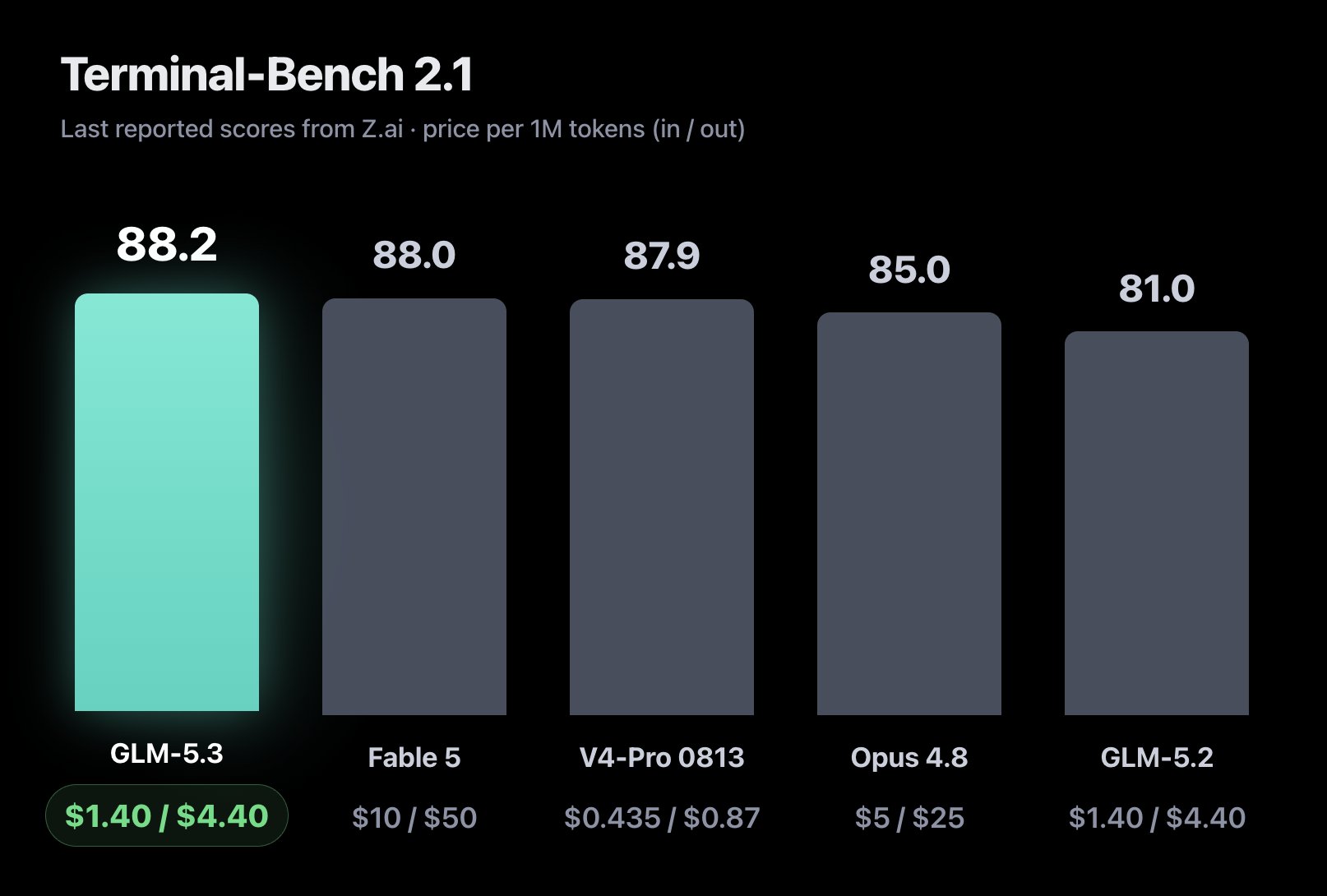
GLM-5.3 beats every single model in the official Terminal-Bench 2.1 benchmark — include Fable 5 — despite being several times cheaper:
On DeepSWE, GLM-5.3 scored 66.9, nearly matching Kimi K3 (67.5) and outperforming GLM-5.2 (46.2), while remaining competitive with Fable 5 (69.7) and GPT-5.6 Sol (72.7).

They didn’t build a new model from scratch — they focused entirely on how to make the model learn better from existing data — using sophisticated techniques like reinforcement learning and environment scaling.

A novel approach that has now paid off massively.

Open-source GLM-5.3 goes toe-to-toe with Fable 5 in coding and every other area — despite being several times cheaper:
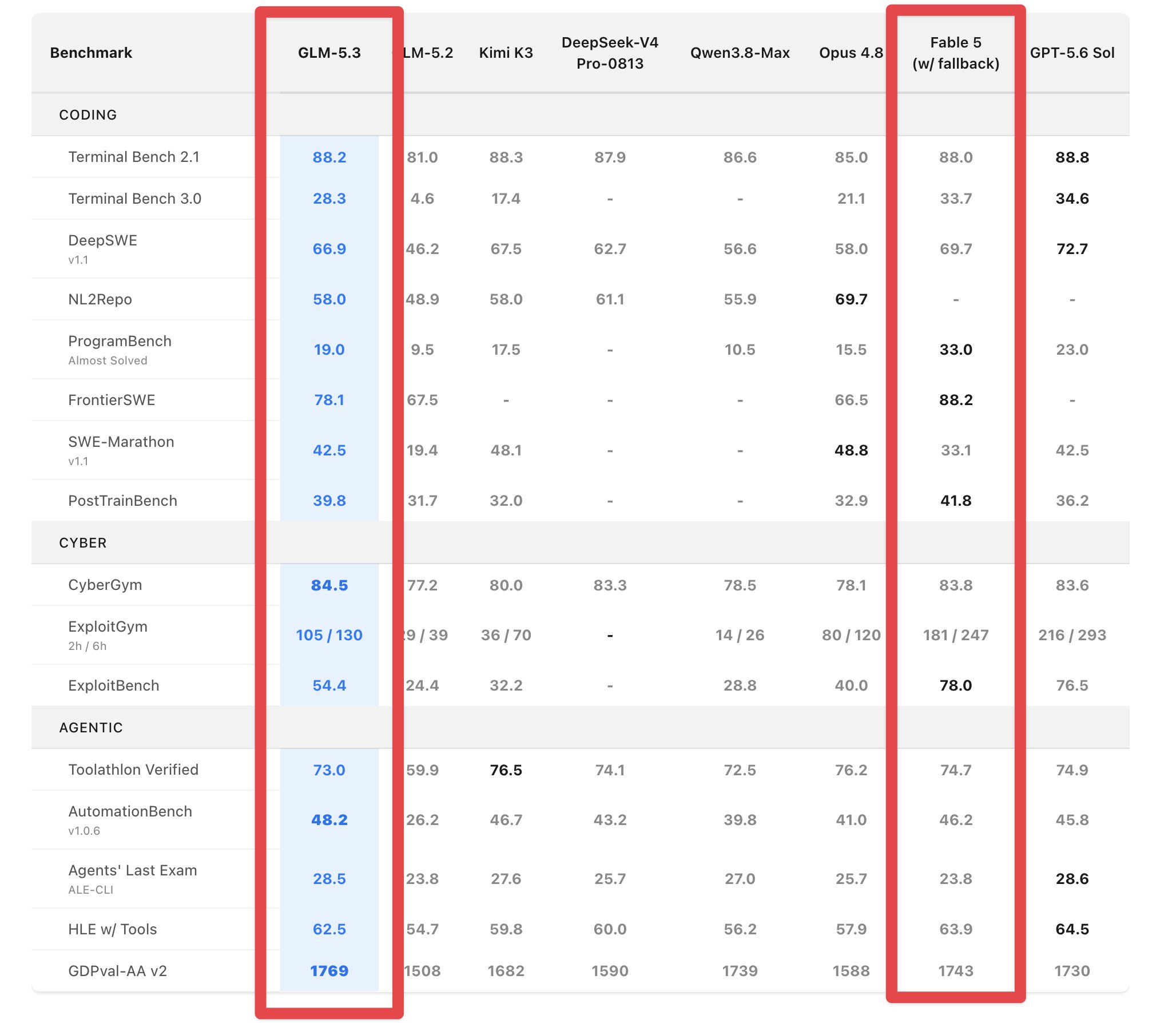
On Agents’ Last Exam (CLI), GLM-5.3 posted the highest score at 28.5, narrowly surpassing GPT-5.6 Sol (28.6) and Kimi K3 (27.6) to lead the benchmark.

It’s challenging the long-standing believe that better AI performance needs larger base models.

From GLM-5.3 we are seeing that we can get serious results from simply coming with new ways to improve how models learn after pre-training.

We could see major gains across board as more and more AI companies consider this different approach.

The cybersecurity performance is incredible.

GLM-5.3 achieved 84.5% on the CyberGym benchmark, a test designed to evaluate vulnerability discovery, software security analysis, and exploit-chain reasoning, surpassing both Claude Mythos 5 and GPT-5.6 Sol on the benchmark.

It’s very strong at:

  • Vulnerability discovery
  • Security auditing
  • Root-cause analysis
  • Multi-step software reasoning

GLM-powered systems identified thousands of real-world software vulnerabilities during internal testing, including critical security flaws in widely used developer tools.

They also designed GLM-5.3 with autonomous agents in mind.

The model supports:

  • 1 million token context
  • 128,000 token output length

This allows it to work across large codebases, lengthy technical documents, and multi-stage workflows without losing context.

Just as important, it also completes tasks using much fewer output tokens than GLM-5.2 while achieving higher accuracy.

That combination means:

  • Lower inference costs
  • Faster execution
  • Better agent efficiency
  • Improved performance on long-running tasks

And as we find ourselves using AI more and more for software engineering, efficiency is becoming just as important as raw intelligence.

GLM-5.3 also changes how reasoning works.

You can turn off reasoning anymore like in some other models — you can only choose between Low, High, and Max.

This reflects a growing industry trend where reasoning is treated as a core capability rather than an optional feature.

The question is no longer whether the model should think, but how much compute should be allocated to solving a problem.

Z.ai also remains committed to releasing model weights publicly.

But because of GLM-5.3’s strong cybersecurity abilities, they’ve had to introduce a new Open Source Shield Initiative — which is meant to:

  • Keep defensive security research open
  • Support code auditing and vulnerability detection
  • Restrict access to high-risk offensive exploitation capabilities

This helps to balance openness with responsible deployment.

GLM-5.3 may ultimately be remembered less for its benchmark scores and more for what it represents.

It shows us that massive gains are still possible without training a new base model.

It sets a new bar for AI-driven cybersecurity research. And it is optimized for the future of long-horizon autonomous agents.

If earlier AI progress was defined by scaling pretraining, GLM-5.3 is showing us that next era could be all about scaling post-training instead.

GLM-5.3 is a huge huge sign of things to come Read More »
This new Google model beats both Claude & GPT-5.6

This is HUGE.

Google’s new Gemini 3.7 Flash is absolutely insane.

It even dominated Claude Sonnet 5 and GPT-5.6 Terra — it’s the best & fastest mid-tier coding model in the world right now.

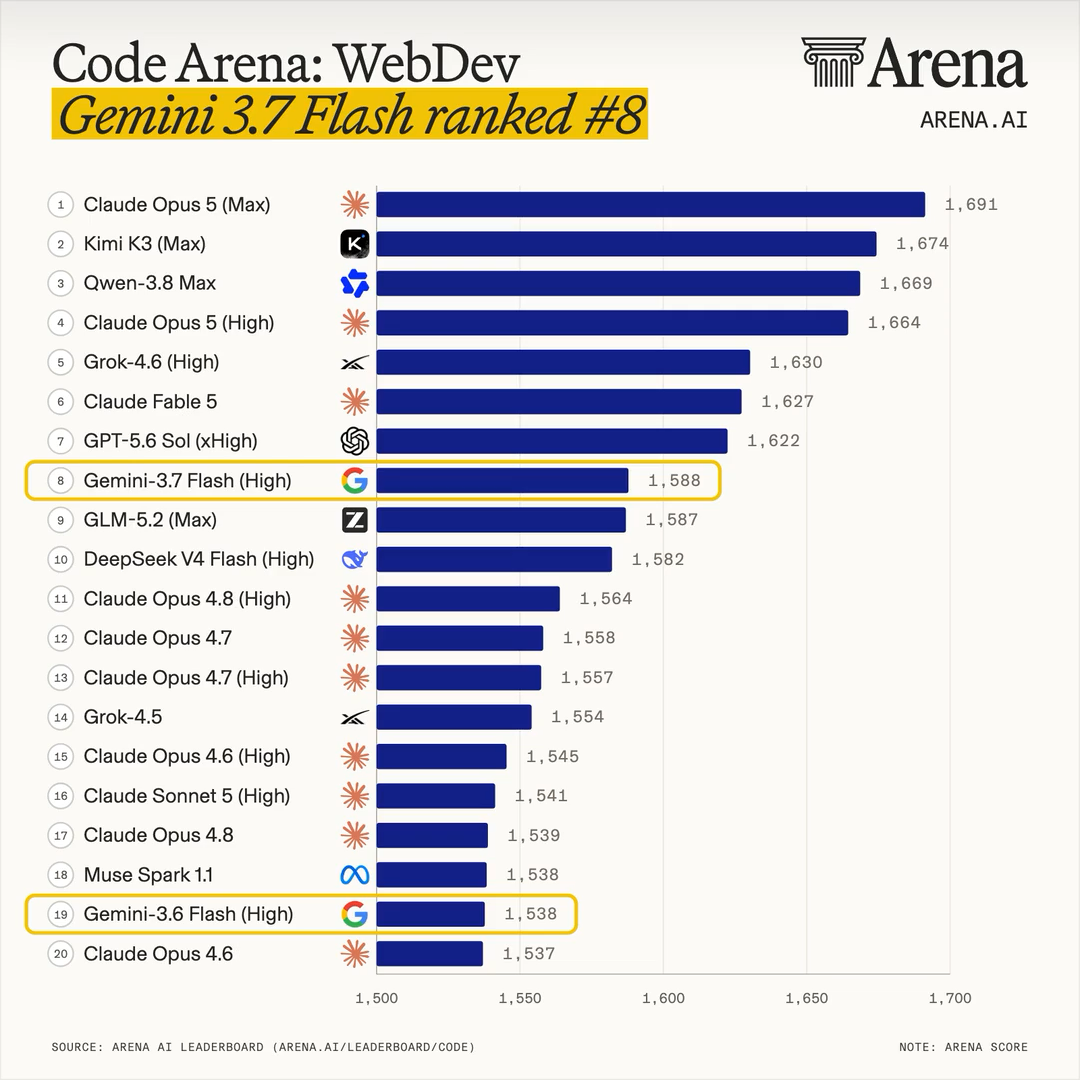
It literally jumped 11 good places in the AI Arena Leaderboard — now even beating models like Opus 4.8 and Grok 4.5 — despite being several times cheaper and faster.

It’s so amazing at software engineering, web design, and UI generation.

Gemini 3.7 Flash achieved 65.3% on DeepSWE v1.1—up dramatically from Gemini 3.6 Flash’s 48.6% and ahead of Claude Sonnet 5’s 49.7% and GPT-5.6 Terra’s roughly 52–54% results on the same benchmark, establishing a new high-water mark for autonomous software engineering.

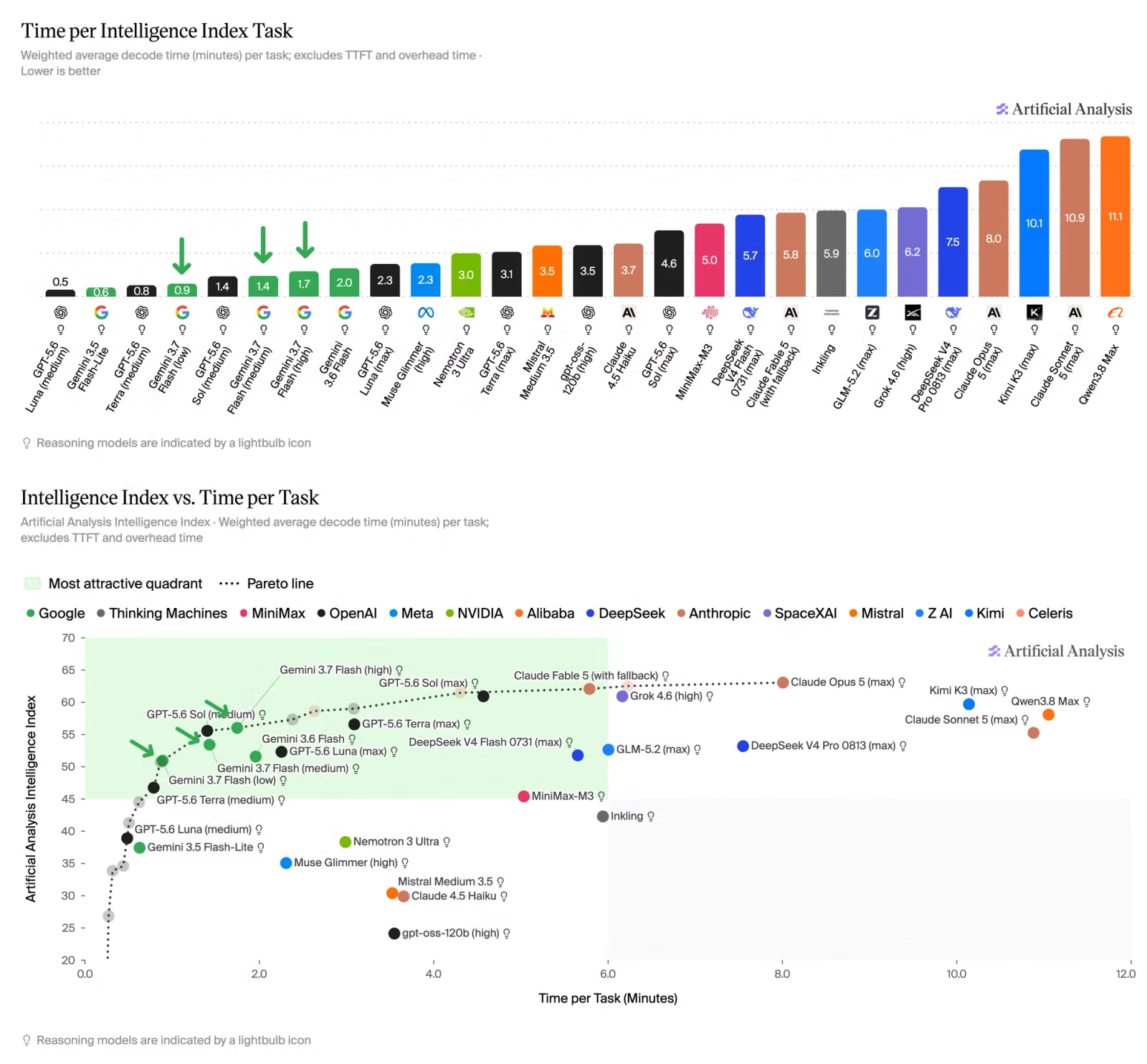
Gemini 3.7 Flash has by far the best Time per Intelligence of any model of this intelligence level:

Google’s Gemini 3.7 Flash delivers a breakthrough intelligence-to-speed ratio, hitting a peak output speed of roughly 340 tokens per second while scoring 56 on the Artificial Analysis Intelligence Index—outperforming several pricier flagship peers while finishing multi-step workflows up to 40% faster

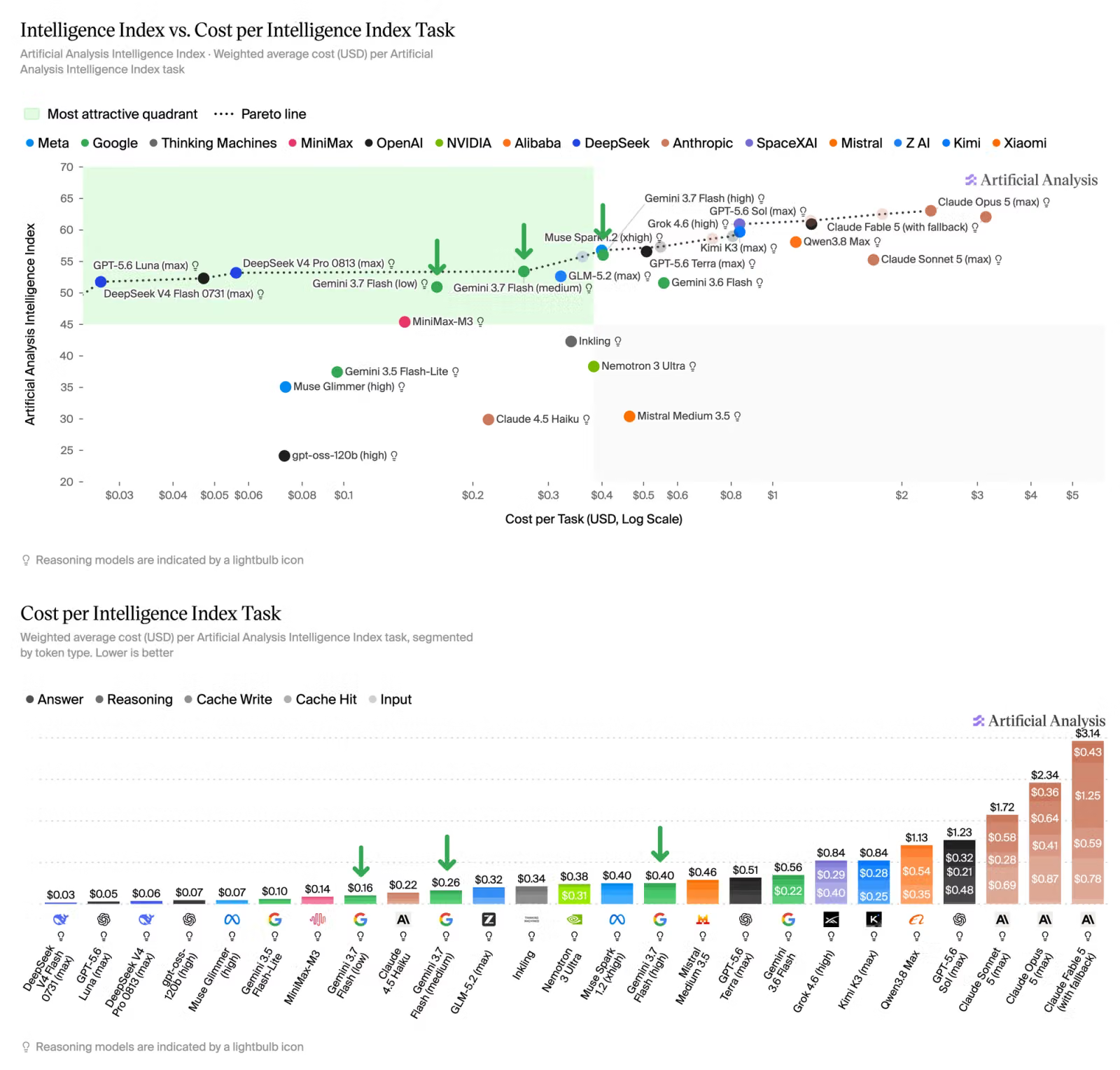
It costs so much less than all these other models on the same level of intelligence — you won’t believe how cheap it is right now.

Gemini 3.7 Flash has by far the best Cost per Intelligence of any model of this intelligence level:

Smarter agentic planning — “diligent” thinking

The reasoning and planning have gotten so much more sophisticated.

Instead of immediately generating a response, the model spends more time planning, reasoning, and coordinating tools before taking action.

It thinks more diligently, putting in more effort into multi-step planning and tool calls. A more disciplined execution means less manual oversight and fewer retries across engineering workflows.
— Google

This gives you:

  • Better upfront planning for complex tasks
  • Self-correction when code or tool calls fail
  • Recovery from dead ends without getting stuck in retry loops
  • Stronger tool orchestration across multi-step workflows
  • Intent clarification when instructions are ambiguous

It doesn’t make risky assumptions of things it’s not sure about — it pauses and ask the right question before continuing.

Which makes a much more reliable coding partner.

Massive software engineering gains

Nobody can look down on Gemini when it comes to coding anymore.

Gemini 3.7 Flash achieved 65.3% on DeepSWE v1.1—up dramatically from Gemini 3.6 Flash’s 48.6% and ahead of Claude Sonnet 5’s 49.7% and GPT-5.6 Terra’s roughly 52–54% results on the same benchmark, establishing a new high-water mark for autonomous software engineering.

3.7 Flash outperforms other frontier models like Sonnet 5 and GPT-5.6 Terra is key software engineering abilities — despite being multiple times cheaper.

It’s been such a massive upgrade:

Benchmark Performance:

65.3% on DeepSWE v1.1

  • Up from 48.6% in Gemini 3.6 Flash
  • Measures complex, long-horizon software engineering tasks

43.6% on FrontierCode 1.1

  • Evaluates first-pass coding accuracy
  • Tests real-world engineering capabilities

These gains translate into real meaningful improvements for you as a developer:

  • Better understanding of large codebases
  • Stronger debugging abilities
  • More accurate feature implementation
  • Improved multi-file reasoning
  • Higher-quality code on the first attempt

Exceptional web dev & frontend design ability

Frontend generation is becoming one of the most competitive areas in AI — and Gemini 3.7 Flash is now among the strongest performers.

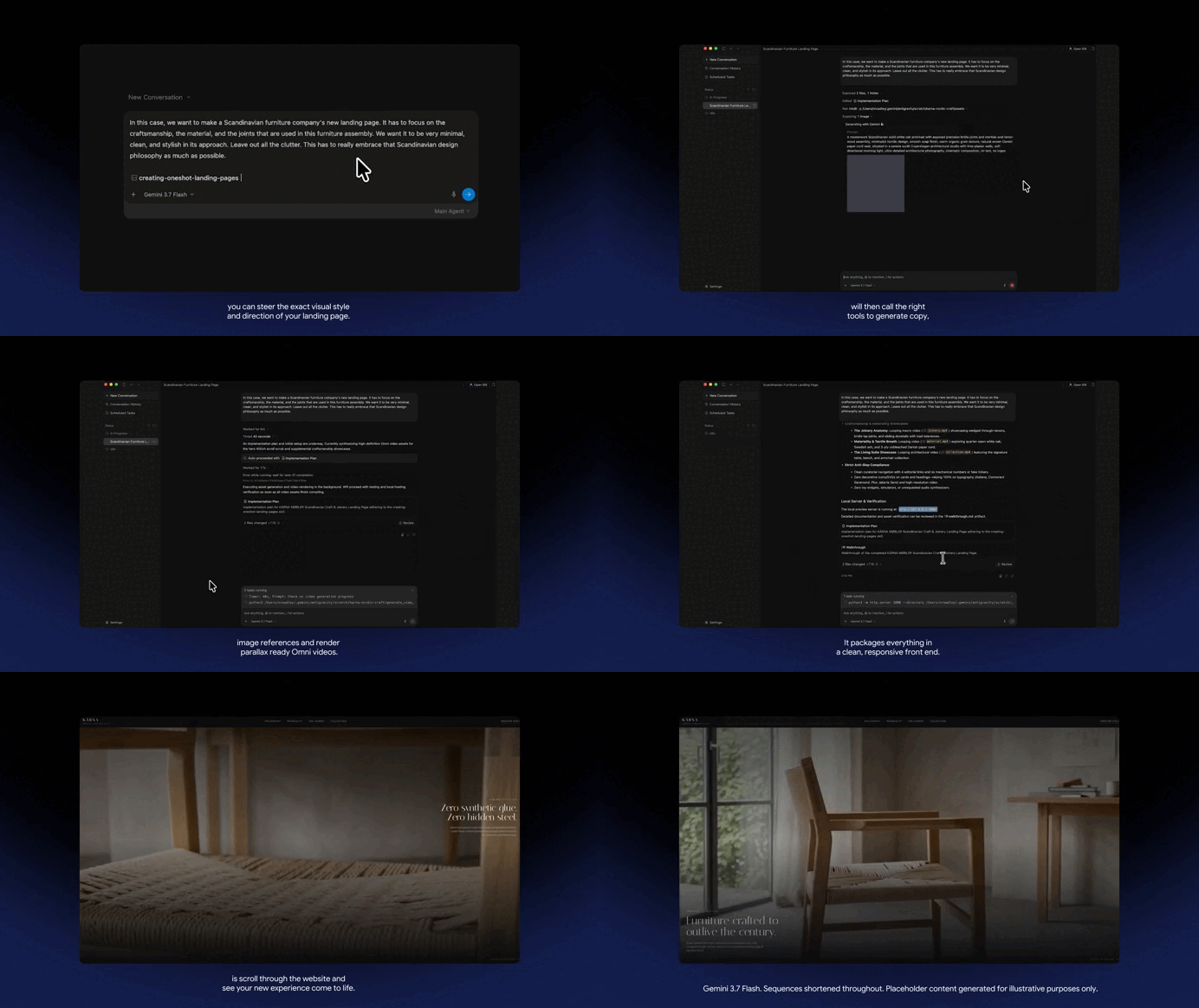
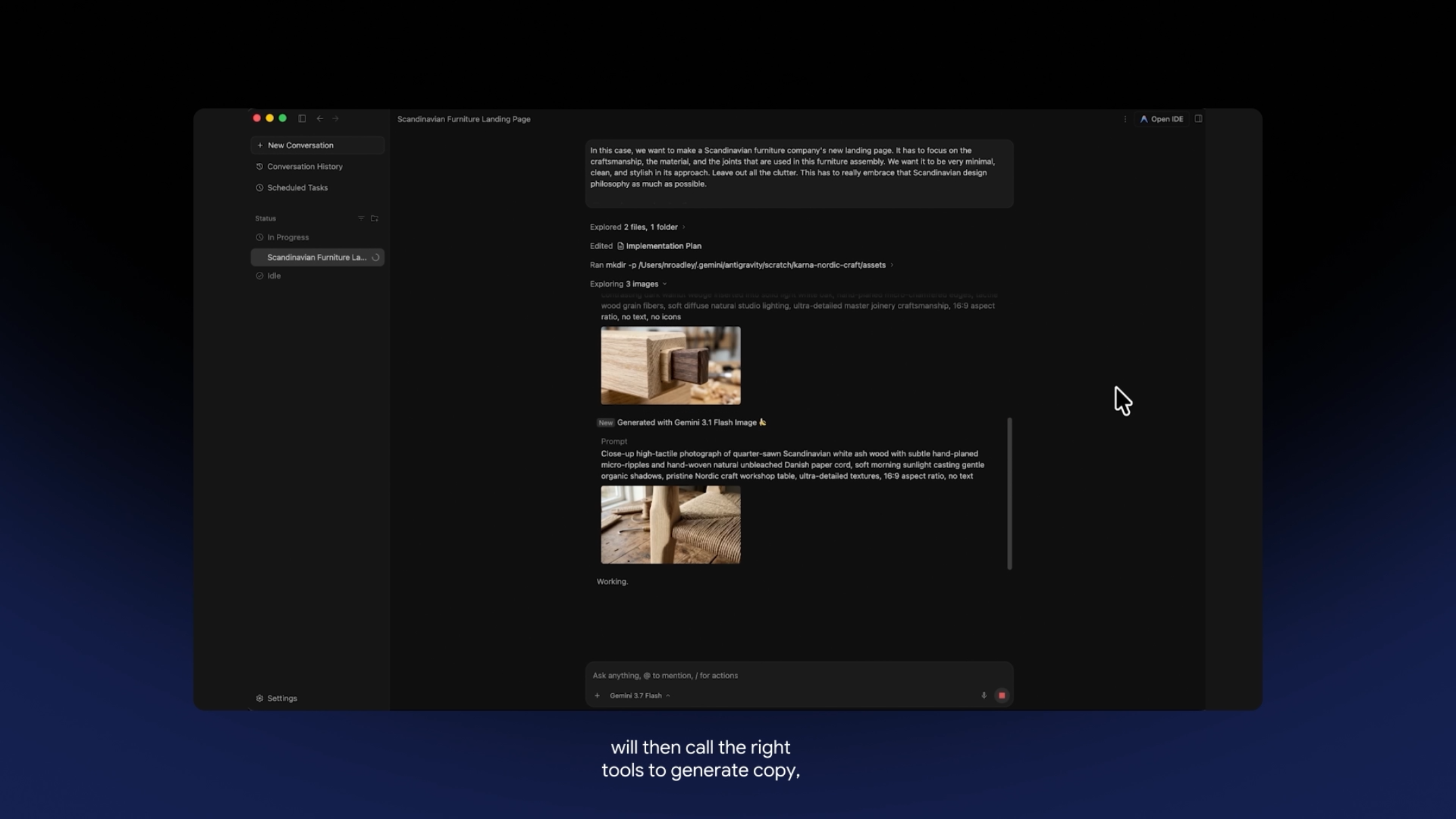
Gemini 3.7 Flash generating a world class landing page with posh visual effects from scratch:

Frontend Benchmarks:

  • 1588 Elo on WebDev Arena
  • 1588 Elo on Code Arena

These scores place Gemini 3.7 Flash ahead of competing models like Claude Sonnet 5 and GPT-5.6 Terra in frontend and full-stack application generation.

And these benchmarks evaluate more than visual appearance. High-performing models must create:

  • Responsive layouts
  • Multi-component interfaces
  • Consistent design systems
  • Functional application logic
  • Production-quality user experiences

As someone building real-world products, this means fewer revisions and better results for you from the very first prompt.

Incredible UI generation ability

You can give it:

  • Wireframes
  • Screenshots
  • Design systems
  • Existing interfaces
  • Product mockups

The model can then generate functional applications that closely match the provided designs.

Instead of hallucinating generic layouts, it is far better at preserving structure, styling, and user experience patterns.

The result:

  • Fewer prompts
  • Less back-and-forth
  • Faster prototyping
  • Quicker path to production-ready applications

Industry-leading Pricing

This is hands-down one of the biggest selling points.

Introductory Pricing (through December 31, 2026)

  • $0.75 per million input tokens
  • $3.75 per million output tokens

Standard Pricing (starting January 1, 2027)

  • $1.50 per million input tokens
  • $7.50 per million output tokens

Even at standard pricing, Gemini 3.7 Flash remains highly competitive.

At launch pricing, it is:

  • More than 60% cheaper than Claude Sonnet 5
  • More than 60% cheaper than GPT-5.6 Terra
  • Competitive or superior across several coding and web development benchmarks

This combination of performance and affordability makes it one of the strongest value propositions in the AI market today.

Far more than just a routine upgrade

It gives us major advances in:

  • Agentic planning
  • Self-correction
  • Software engineering
  • Web development
  • Frontend design

Combined with aggressive pricing, Gemini 3.7 Flash sets a new benchmark for cost-efficient AI.

For developers and startups building AI-powered products, it’s one of the most compelling models available today.

This new Google model beats both Claude & GPT-5.6 Read More »

This new AI tool from Anthropic just destroyed UI & web designers

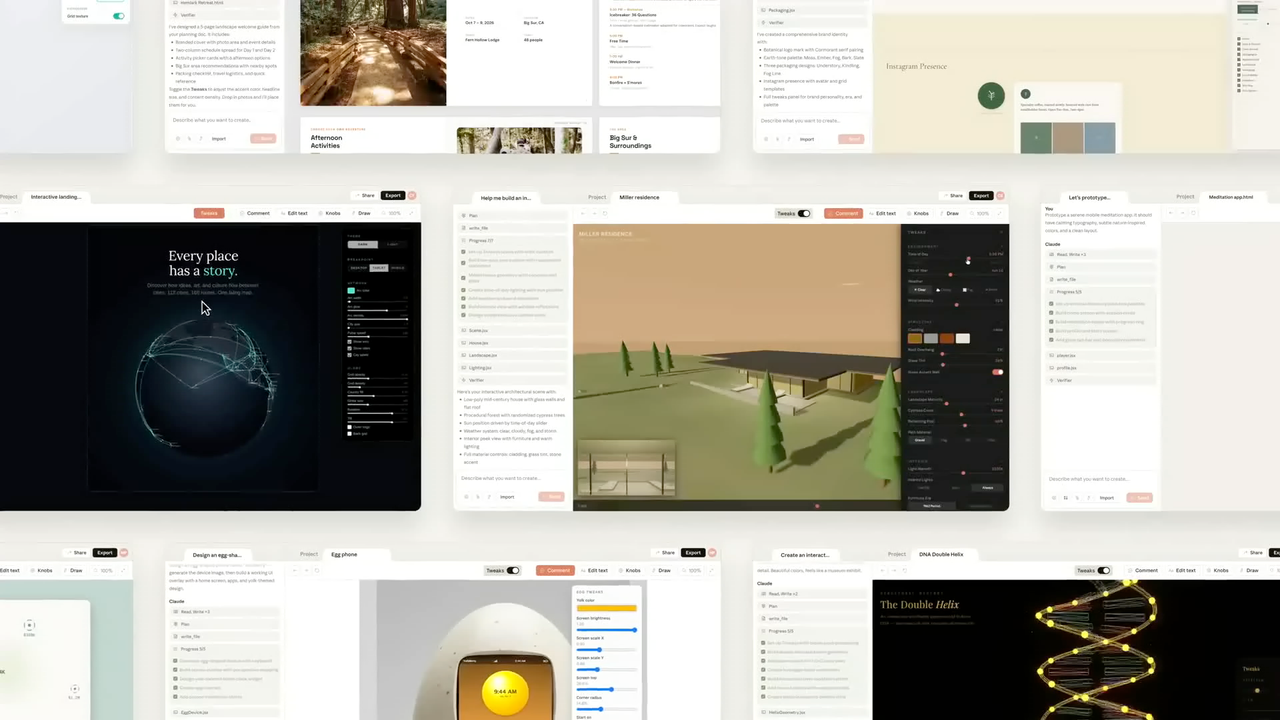
This new AI design tool from Anthropic is sending shockwaves across the entire web design industry.

Claude Design is well and truly here — with so many features that completely eliminate the need and cost of hiring a web designer in the vast majority of cases.

And it’s far more advanced that those one-time design generators — this is a full-blown collaborative design environment that helps you discover, refine, compare, and implement ideas faster than ever before.

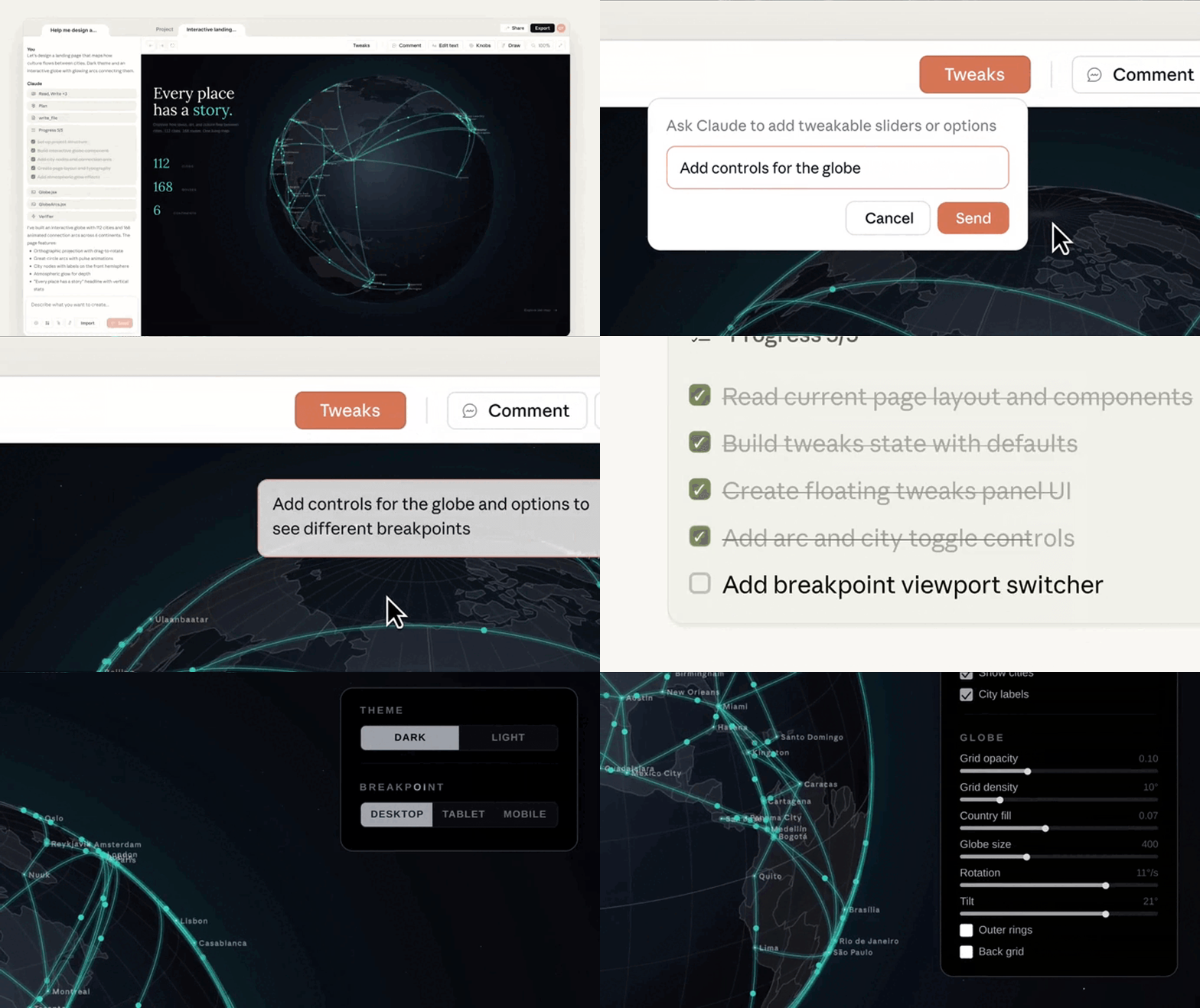
Generating a UI with dynamically generated controls using Claude Design:

And it works hand-in-hand with Claude Code — you can go from idea to design to full working code in no time at all.

Sophisticated dynamic tweaks panels

This is hands-down one of the most incredible features.

When Claude creates a design, it can automatically create visual controls tailored to that specific interface.

These controls can include:

  • Sliders
  • Toggles
  • Color palettes
  • Spacing controls
  • Typography adjustments
  • Density settings
  • Layout controls

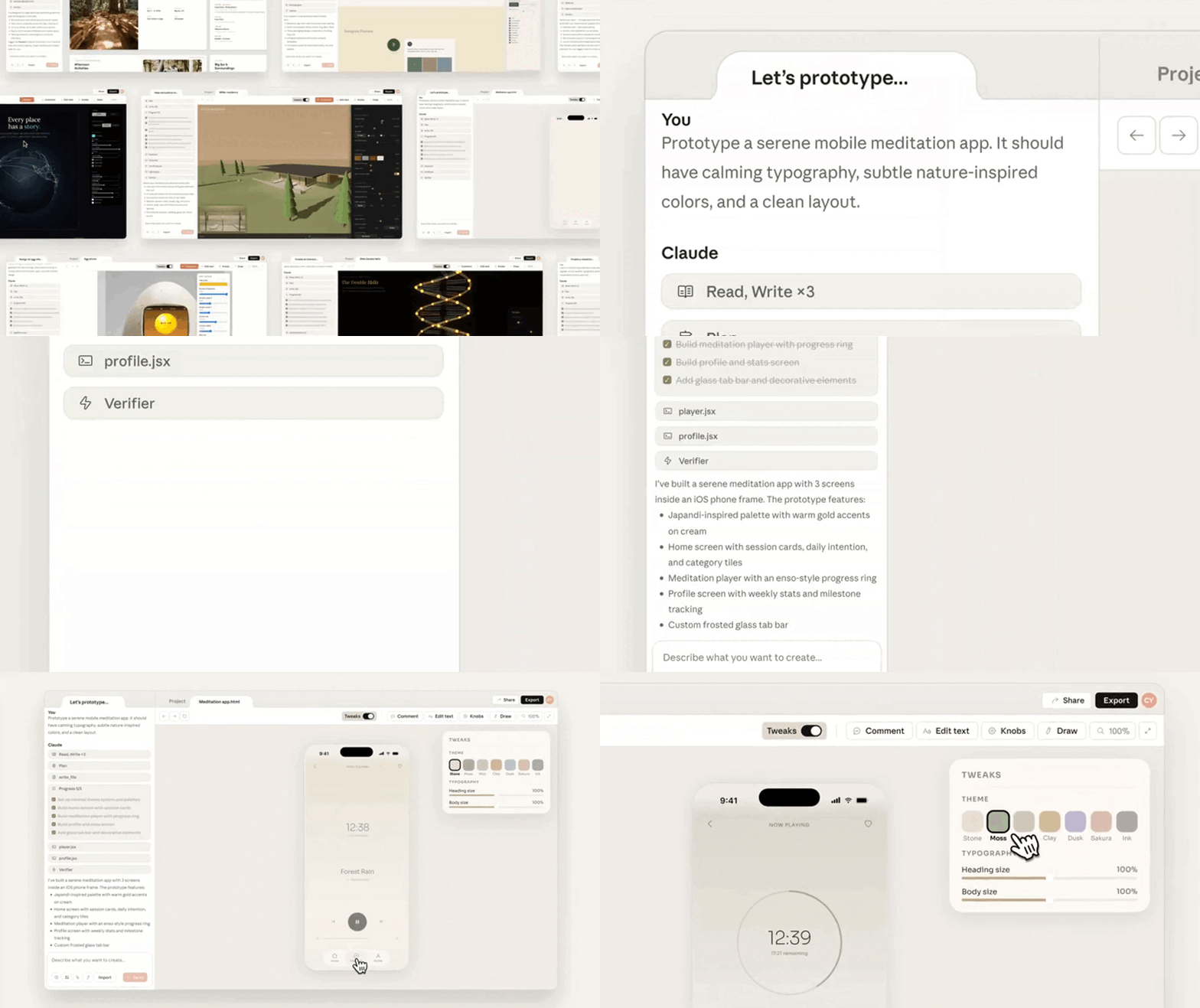
The generated design has its own custom tweaks that let you adjust the theme and typography:

Instead of typing:

“Reduce the padding by 20%.”

or

“Make the design feel more compact.”

You can adjust settings directly on the canvas and see changes instantly.

This instantly gives you:

  • Faster iteration
  • Fewer prompt cycles
  • Less token usage
  • More precise visual control

The experience feels closer to using professional design software than just chatting with an AI.

Guided design questionnaires

A major challenge with AI design tools is knowing what prompt to write.

Claude Design addresses this with guided questionnaires and visual discovery exercises.

Rather than presenting a blank canvas, it asks users questions like:

  • What are you building?
  • Who is the audience?
  • What style do you prefer?
  • Which layouts appeal to you?
  • What is the primary goal of the experience?

The platform can also present visual options and taste tests to help users identify preferences before design generation begins.

This approach offers several advantages:

  • Reduces prompt anxiety
  • Helps users clarify their vision
  • Produces more relevant designs
  • Makes design accessible to non-designers

Instead of guessing what to ask for, users are guided toward a solution.

Multi-option brainstorming

Traditional design workflows often focus on a single concept at a time.

Claude Design encourages broader exploration.

Rather than generating one design, it can produce multiple radically different approaches simultaneously.

For example, a landing page request might generate:

  • A minimalist concept
  • A bold marketing-focused layout
  • A highly visual creative direction
  • A data-heavy enterprise design

All options appear side-by-side on the same canvas.

This makes it easier to:

  • Compare ideas
  • Identify strengths and weaknesses
  • Gather stakeholder feedback
  • Combine the best elements into a final concept

Instead of asking for version after version, teams can evaluate several directions immediately.

Direct design-system syncing

Many AI-generated interfaces look impressive but are disconnected from real products.

Claude Design attempts to solve this through /design-sync.

/design-sync lets Claude connect to:

  • GitHub repositories
  • Storybook libraries
  • Existing applications
  • Internal design systems

Once connected, Claude can use:

  • Real React components
  • Company color palettes
  • Existing typography systems
  • Approved design patterns
  • Spacing and layout rules

This means prototypes are built using actual product assets rather than generic SaaS templates.

So you end up getting:

  • Better brand consistency
  • More realistic prototypes
  • Less redesign work
  • Faster implementation

Interactive canvas controls

Claude Design is not limited to text chat.

You can interact directly with designs through the canvas itself.

Capabilities include:

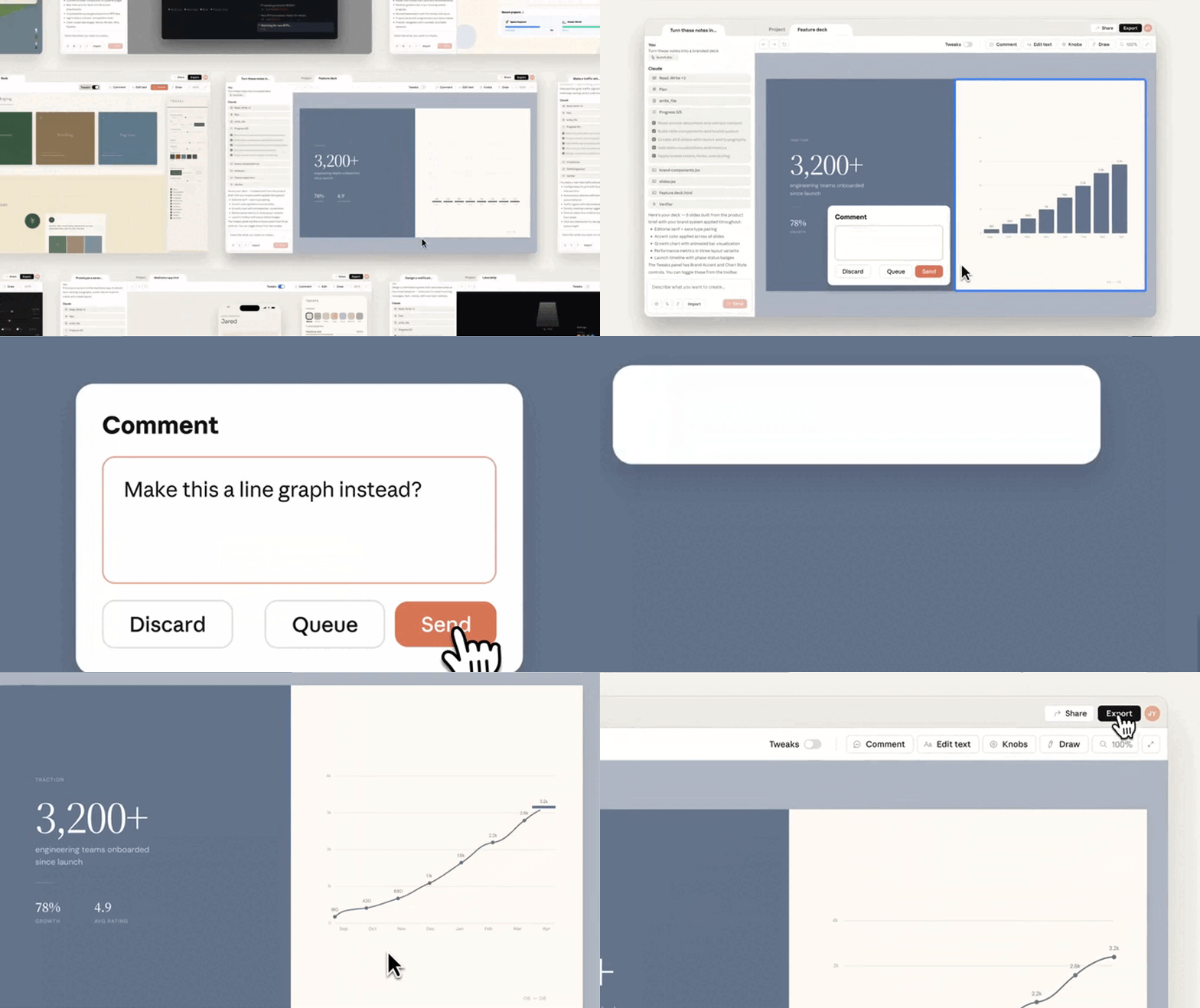
  • Pin-comments on individual elements
  • Drag-and-drop adjustments
  • Visual alignment changes
  • Layout refinements
  • Direct element manipulation

This hybrid workflow combines AI generation with traditional design interactions.

Not every design change should require a prompt.

Sometimes it is faster to simply move an element.

Claude Design supports both approaches.

Seamless handoff to Claude Code

The final stage of the workflow is where Claude Design becomes especially powerful.

Once a prototype is approved, Claude can package the project into a structured handoff bundle.

That bundle can flow directly into Claude Code or other AI-assisted development workflows.

This gives you a continuous pipeline:

Idea → Prototype → Refinement → Design-System Validation → Claude Code → Production Software

You end up getting:

  • Reduced designer-developer handoff friction
  • Less documentation overhead
  • Faster implementation
  • Better alignment between design and code

Instead of rebuilding requirements from screenshots or mockups, development can begin with the design context already intact.

Why it matters

Claude Design represents a shift from AI-generated mockups to AI-assisted product creation.

Its key differentiators include:

  • Dynamic Tweaks panels
  • Guided design interviews
  • Multi-option brainstorming
  • Design-system synchronization
  • Interactive canvas controls
  • Direct integration with Claude Code

Together these features help you and your team move from idea to implementation faster while maintaining consistency with existing products and design standards.

Rather than simply generating screens, Claude Design focuses on improving the entire journey from concept to production-ready software.

This new AI tool from Anthropic just destroyed UI & web designers Read More »

Meta’s new Claude Code competitor is absolutely insane

This is absolutely incredible.

Meta’s just released a revolutionary new AI coding agent.

The new Muse Code is so unbelievably cheap and intelligent — once again we see the clear trend of AI getting cheaper and cheaper.

And it comes with a revolutionary new approach to multi-agent collaboration, that could transform the workflow of so many developers.

Powered by their most powerful model ever — this is going to make major impact on the entire AI coding ecosystem.

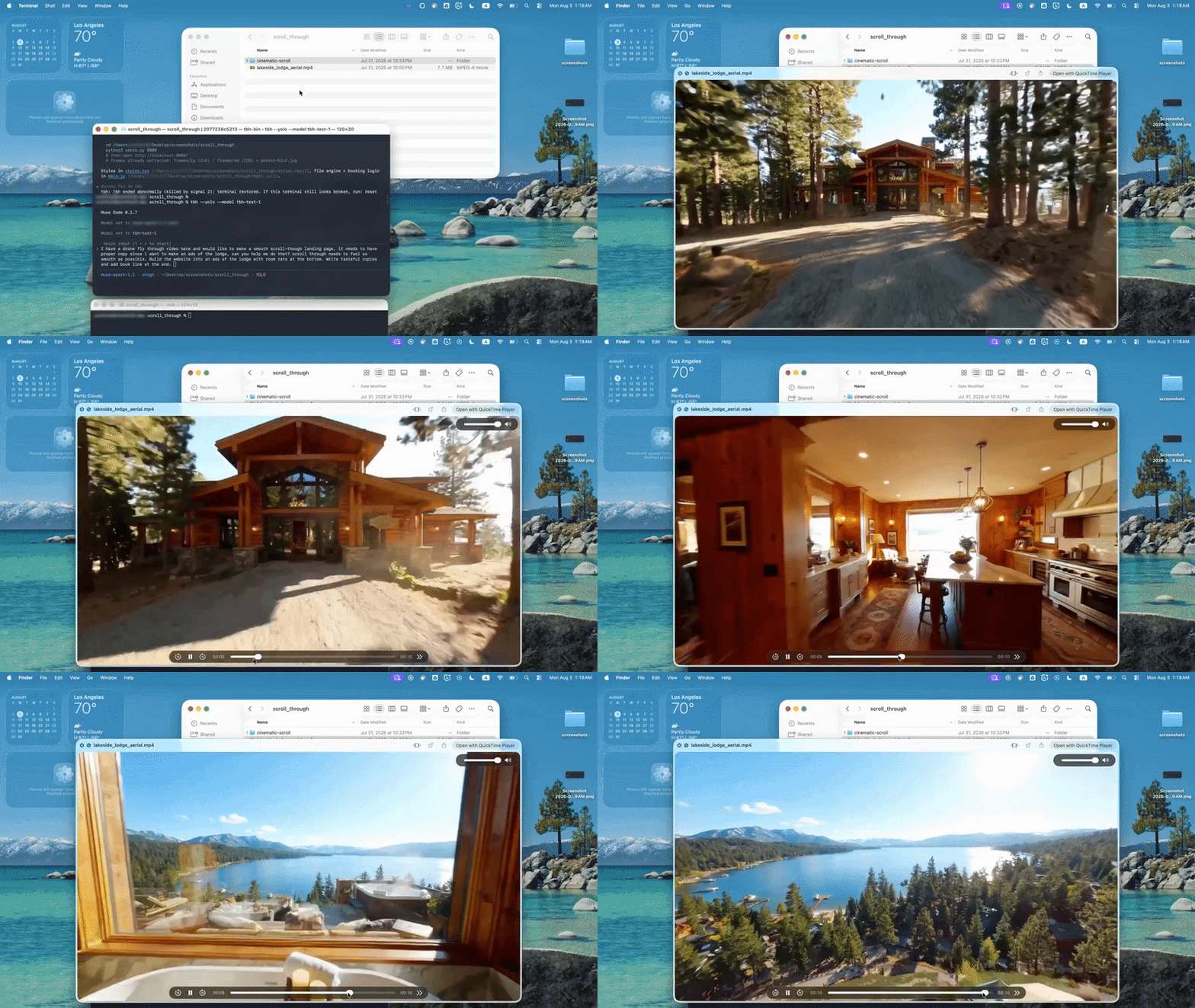
Demo stage #1: A drone fly through video to be given to Muse Code to integrate into a landing page:

Muse Code is a terminal-based agent designed from the group up to handle complete software engineering tasks across large repositories — putting it directly against tools like Claude Code and Codex.

But it’s not just yet another coding assistant in your terminal.

Meta is building it around a bigger idea: coding agents should work for hours, coordinate multiple workers, survive failures, and keep making progress autonomously.

Let’s check out all the most amazing features it comes with — including how incredibly inexpensive it is.

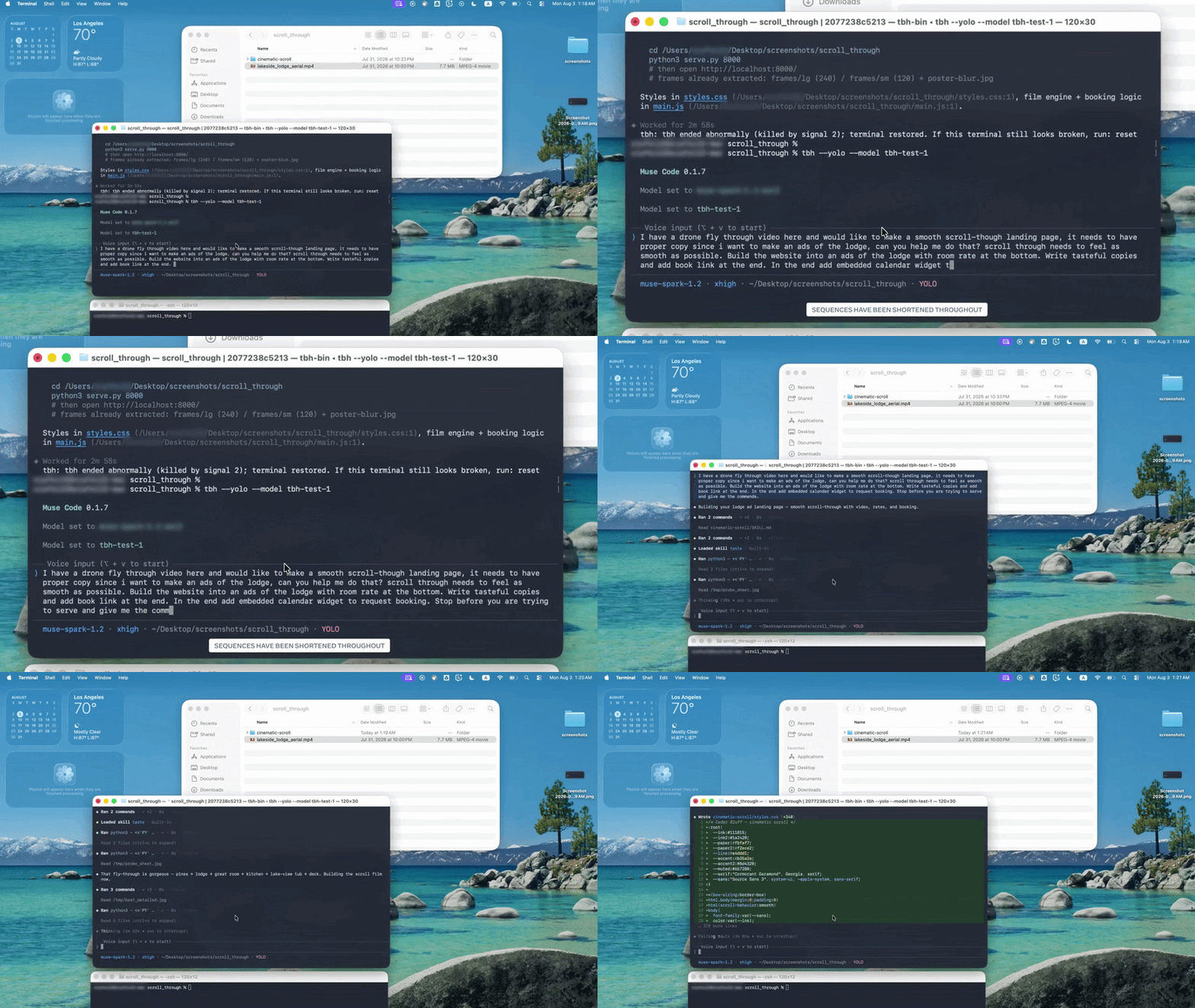
Demo stage #2: Asking Muse Code to integrate the video into the website with various marketing copies at different points in the video — directly from the terminal:

1. Persistent background agents — less repeated work

Most coding agents create a subagent, give it a task, collect the result, and destroy it.

Muse Code instead keeps asynchronous background agents alive throughout the session.

They can:

  • investigate different parts of the codebase
  • retain context they’ve already gathered
  • work while the main agent continues
  • report useful discoveries back later

For us developers, this means less repeated exploration of large repositories.

Instead of one agent repeatedly searching hundreds of files, you get specialized workers that gradually build knowledge of the project while the main agent keeps coding.

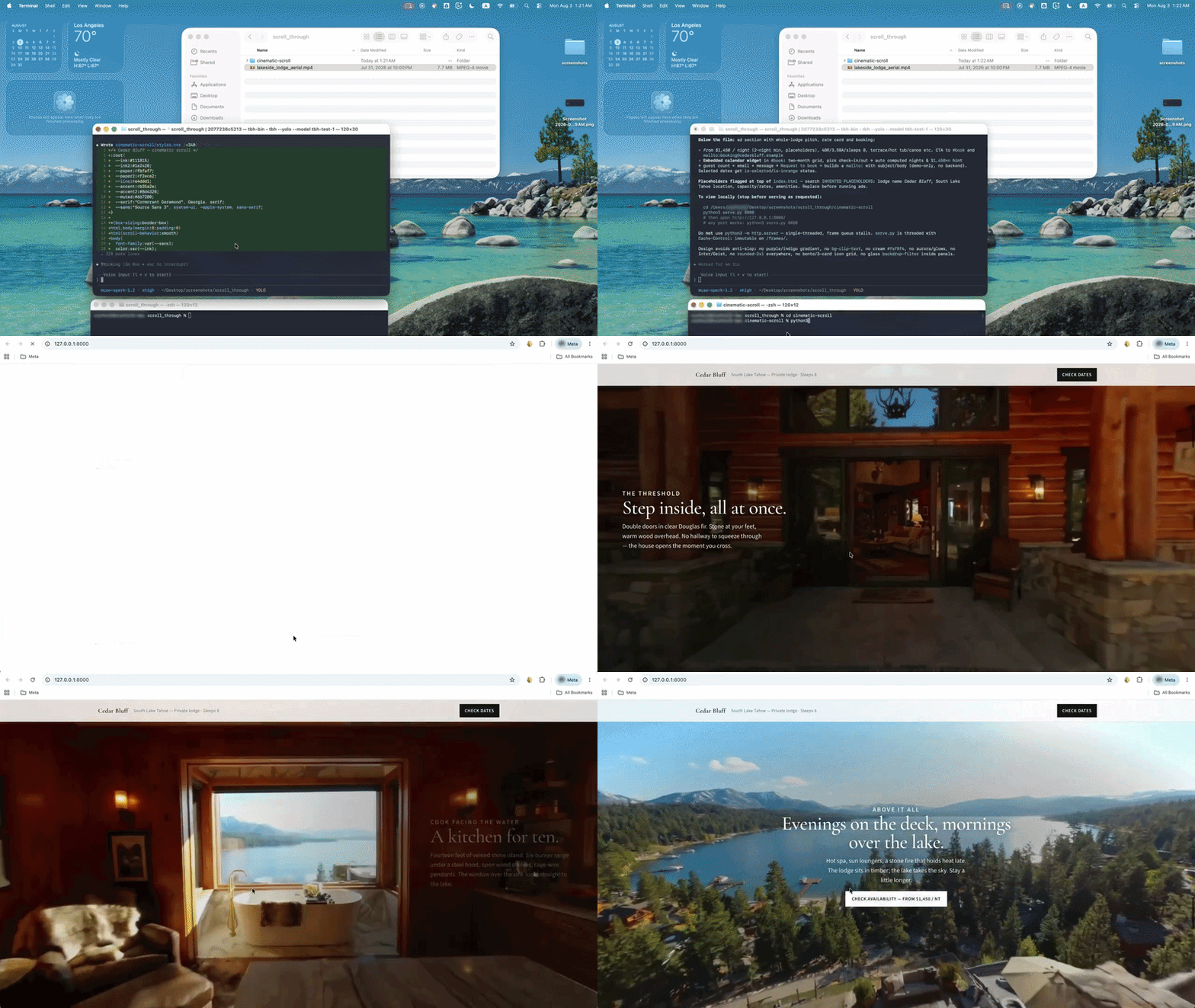
Demo stage #3: Muse Code intelligently integrates the video into the website, with all the marketing copies and the final call to action:

2. Incredible low cost — run coding agents for a fraction of the price

Meta is also being extremely aggressive on price.

Its Contributor tier can bring pricing down to as little as $0.20 per million output tokens — less than one-tenth of typical frontier-model rates.

One thing you need to know though — if you’re using this discounted tier, you have to agree to let Meta use your interactions, including generated code, to help improve its models.

If you’re comfortable with that, this could be huge for your cost savings.

Long-running agents can burn through enormous numbers of tokens. Making those tokens dramatically cheaper makes Muse Code’s hours-long autonomous coding loops and parallel agents much more practical to run regularly.

3. Muse Spark 1.2 — Meta now has a serious coding model

Muse Code is powered by Muse Spark 1.2, Meta’s new coding-focused model.

And interestingly Meta says the model and coding harness were co-trained — not something you see everyday from most other models.

Rather than wrapping an agent around a generic model afterward, Meta trained Spark using the environment and workflows it would eventually operate inside.

Some key benchmark results from Muse Spark 1.2:

  • Terminal-Bench 2.1: 82.9%
  • DeepSWE 1.1: 59.3%
  • Meta Internal Coding Bench: 70.6%

Meta hasn’t taken the coding crown (yet??) — but it’s clearly become a serious competitor.

4. Parallel worktrees — build multiple things at once

Muse Code can also fan large tasks out across multiple subagents running simultaneously in isolated Git worktrees.

Each agent gets its own workspace, allowing several agents to modify the same repository without constantly overwriting each other’s work.

Meta demonstrated this by having Muse Code build six game features simultaneously without collisions.

The practical benefit is speed.

Instead of:

feature A → feature B → feature C → feature D

you potentially get:

feature A + feature B + feature C + feature D

all being developed simultaneously.

AI coding starts looking less like one extremely fast developer and more like a small engineering team working in parallel.

5. Crash recovery — long-running agents don’t lose everything

Long-running agents create another problem: failure becomes increasingly expensive.

Imagine an agent researching, coding, testing, and debugging for three hours — then the process crashes.

Muse Code addresses this with a local append-only event log.

Model calls, tool executions, approvals, edits, and other actions are recorded as events. The runtime can replay them to reconstruct its previous state.

That makes executions restart-safe.

For five-minute coding prompts, this isn’t particularly important.

For autonomous tasks lasting several hours, it’s essential.

6. 24-hour coding runs — AI coding becomes a background process

Meta is clearly designing Muse Code for much longer tasks than normal prompt-and-response coding.

In one experiment, Muse Code optimized GPU kernels for NVIDIA Hopper hardware.

The agent repeatedly:

wrote code → compiled → profiled → analyzed → improved

It made more than 1,000 tool calls across runs lasting up to 24 hours.

That’s a very different model of AI-assisted development.

For optimization, migrations, debugging, test improvement, and other measurable engineering problems, you could define the goal, leave the agent running, and return later to the results.

What all this tells us

The most interesting part of Muse Code isn’t another benchmark score.

It’s everything surrounding the model:

Persistent agents. Parallel worktrees. Crash recovery. Thousands of tool calls. 24-hour autonomous runs.

The AI coding race is moving beyond “which model writes the best code?”

It’s increasingly about which system can reliably keep working until the engineering task is actually finished.

Muse Code is Meta’s answer.

Meta’s new Claude Code competitor is absolutely insane Read More »
This new open-source model beats both Fable 5 & Opus 4.8

This is incredible — Qwen 3.8 Max is seriously revolutionary.

A new open-source model that beats Claude Fable and Opus 4.8 — despite being several times cheaper. It’s even cheaper than Kimi K3.

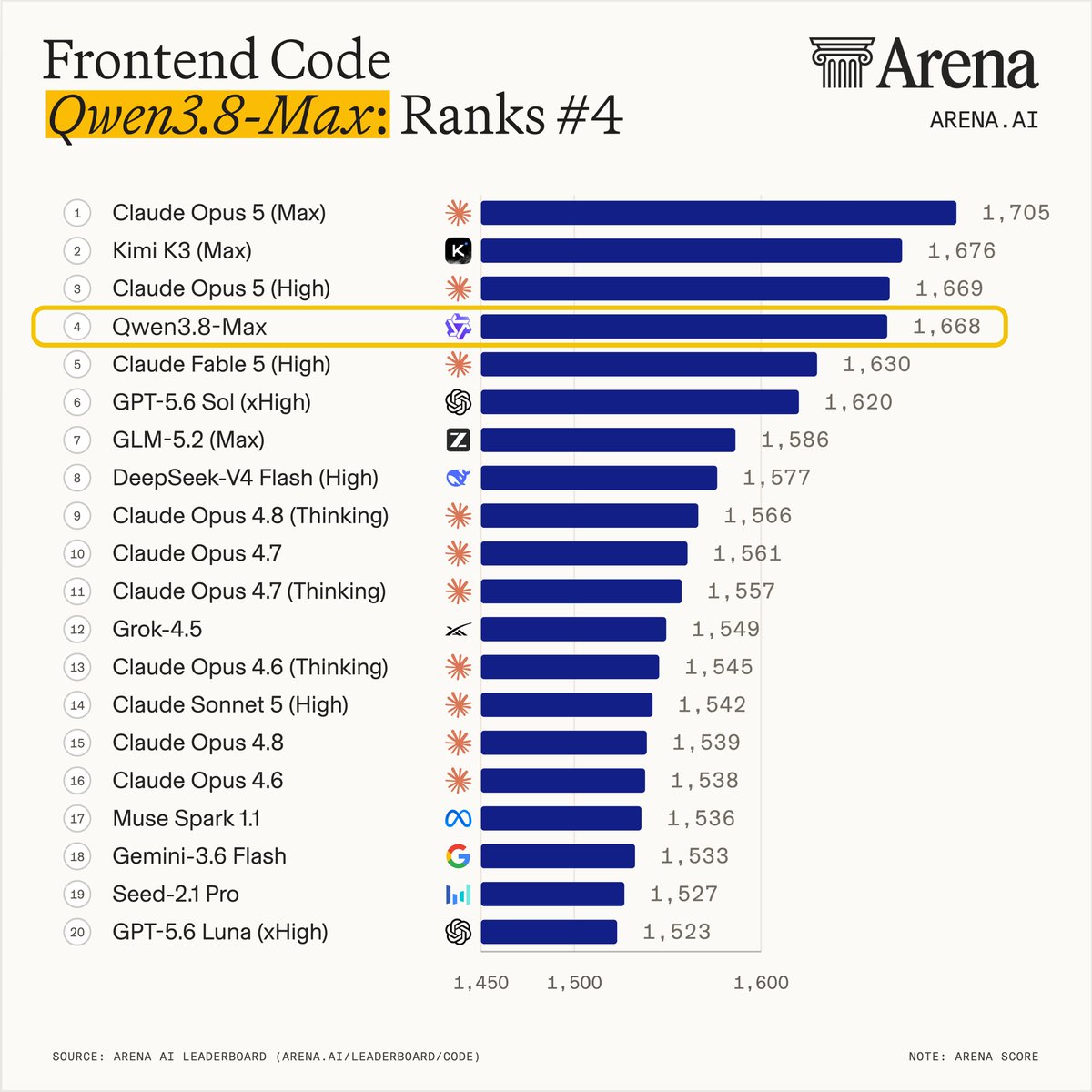
Only the second open-source model in history to rank Top 5 in the AI Arena Leaderboard.

Beats Fable comfortably — and look at the massive gap it has ahead of Opus 4.8 — next version 3.9 will very likely beat Opus 5 too:

Open-source has really started to dominate the AI ecosystem. The tide is turning rapidly. Long gone are the days of seeing them as weaker variants of the real deal.

We’ve seen the shocking results from Kimi K3, DeepSeek v4 — and now this.

Don’t be surprised if a few months from now all the top 5 models on any major leaderboard are all open-source.

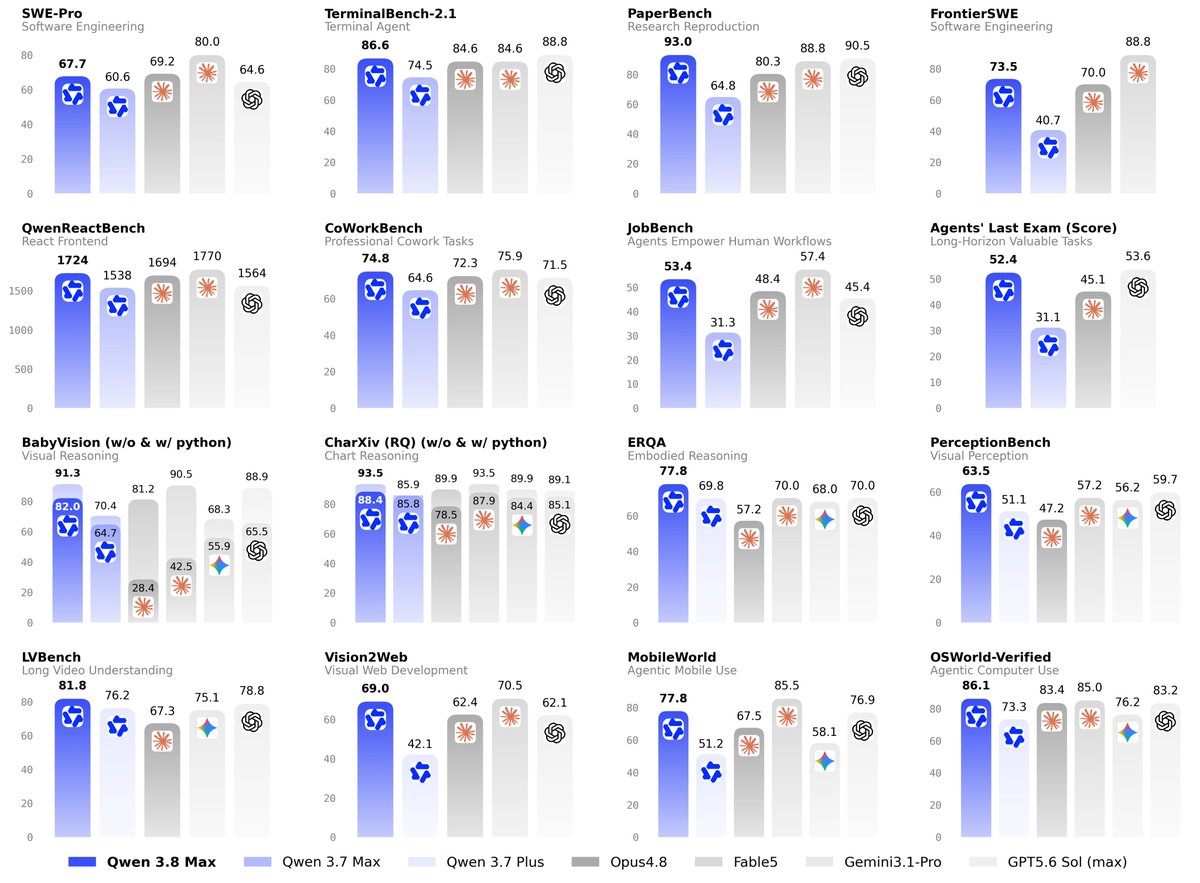
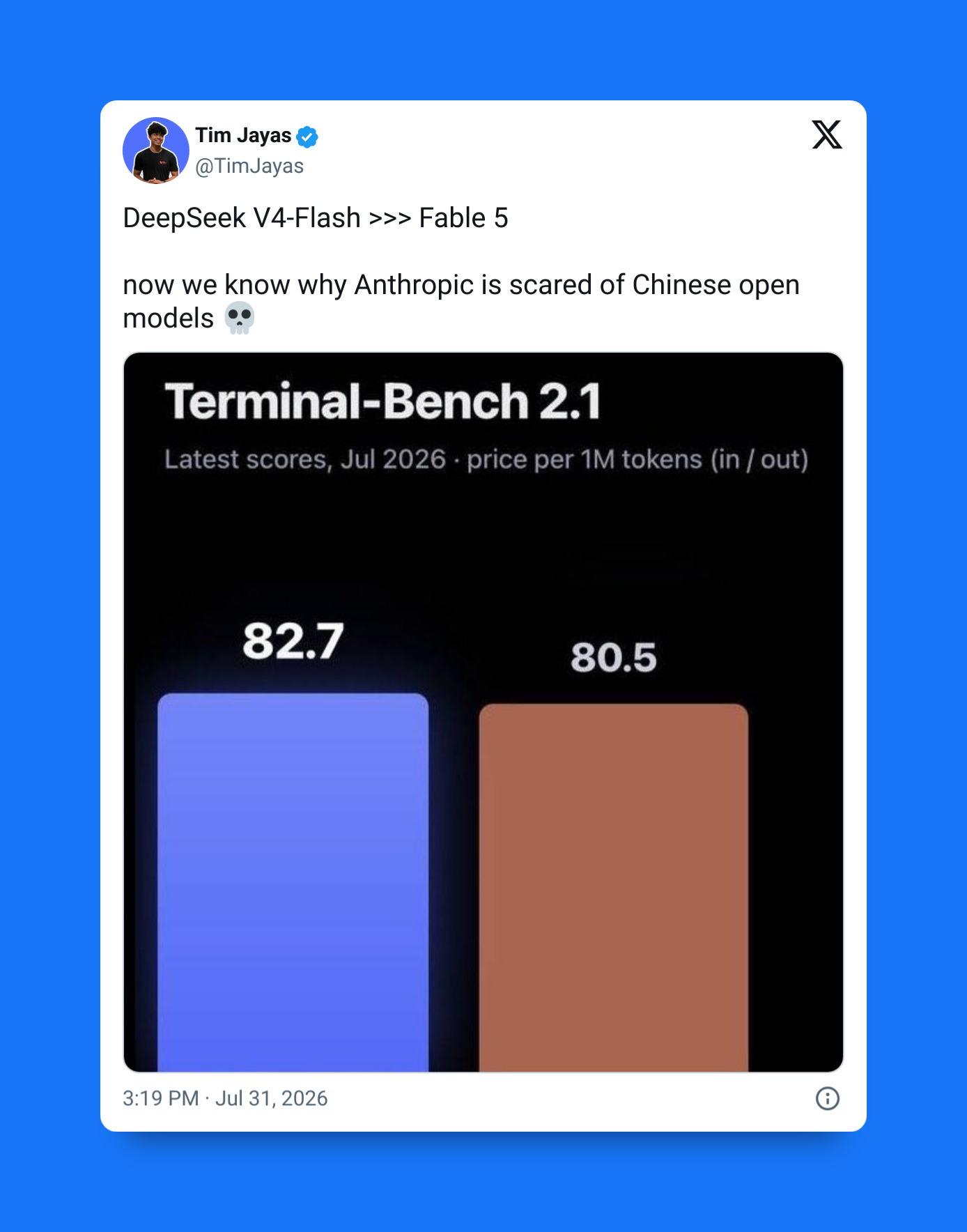
Qwen 3.8 Max scored 86.6 on Terminal-Bench 2.1, outperforming Claude Fable 5 (84.6) in one of the industry’s toughest evaluations of real-world, agentic terminal coding workflows

And open-source is also becoming contagious — before now the Max model in the Qwen series was never open-source. It was always the lesser models that had their weights made publicly available.

But things have changed completely now — now with Qwen 3.8 even the top-tier Max model is open-source.

AI is getting a lot cheaper and more accessible — both for coding and building AI-powered apps.

10+ days of non-stop coding…

We’ve gotten wild reports of the model being able to sustain 10+ days of autonomous project development — managing hundreds of Git commits while continuously improving software.

Qwen 3.8 Max has been heavily optimized for agentic software development — enabling it to tackle all your most complex engineering tasks from start to finish.

On PaperBench, which measures an AI’s ability to reproduce and understand machine learning research, Qwen 3.8 Max posted an impressive 93.0, comfortably ahead of Claude Opus 4.8 (88.8)

It’s been designed from the ground up for:

  1. Continuous scientific research
  2. Multi-hour data science tasks
  3. Long-horizon planning
  4. Extended agent workflows

Qwen 3.8 Max achieved 92.6 on GPQA Diamond—a benchmark of graduate-level scientific reasoning—surpassing Claude Opus 4.8 (91.0) while remaining competitive with the strongest frontier models

Perhaps most importantly, Qwen 3.8 Max maintains context remarkably well across lengthy sessions — reducing the looping and repetitive behavior that often appears during large refactoring projects.

Scary for the competition

Major improvements across software engineering and agent benchmarks.

Qwen 3.8 Max outperforms several competing frontier models on Terminal-Bench while remaining highly competitive on software engineering benchmarks like SWE-bench Pro and FrontierSWE.

State-of-the-art self-correcting model

One of the most interesting observations from early testers isn’t reflected in benchmark charts.

Developers report a noticeable improvement in reflective self-correction.

Rather than confidently pushing forward with flawed reasoning, Qwen 3.8 Max often:

  • Detects logic errors mid-generation
  • Backtracks when it finds faulty assumptions
  • Simplifies over-engineered architectures
  • Challenges poor software design instead of blindly agreeing

The result is a model that feels more deliberate and less eager to reinforce bad engineering decisions.

Sophisticated architecture for massive parameter size

Behind Qwen 3.8 Max is an enormous 2.4 trillion-parameter Sparse Mixture-of-Experts (MoE) architecture.

That makes it one of the largest publicly disclosed AI models ever built.

Key info:

  • 2.4 trillion total parameters
  • Sparse Mixture-of-Experts architecture
  • Second-largest disclosed AI model, behind Moonshot AI’s 2.8T-parameter Kimi K3
  • First Qwen model to exceed one trillion parameters

Unlike dense models, MoE architectures activate only the experts needed for each request, allowing Qwen to deliver frontier-level capability while keeping compute costs significantly lower.

Just as importantly, this is the Qwen team’s first trillion-scale multimodal model.

It can natively understand and reason across:

  • Text
  • Code
  • Images
  • Videos
  • Complex documents

That makes it suitable for enterprise knowledge management, software engineering, scientific research, and large-scale document analysis.

Qwen 3.8 Max represents one of Alibaba’s most ambitious AI releases yet.

Its biggest differentiators are clear:

  • Open weights for the first-ever Qwen Max model
  • Frontier-scale 2.4T-parameter architecture
  • Strong coding and multi-agent performance
  • Long-horizon autonomous reasoning
  • Lower deployment costs than many proprietary alternatives

It has massively raised expectations for what developers should expect from an open-weight frontier AI model.

This new open-source model beats both Fable 5 & Opus 4.8 Read More »

How this new Claude Code feature saves you from wasting tokens

Small features can change workflows massively — and the new /btw is definitely one of such.

❌ Before:

This is what many of us are used to right now — every question you ask an AI coding assistant becomes part of the same growing conversation thread:

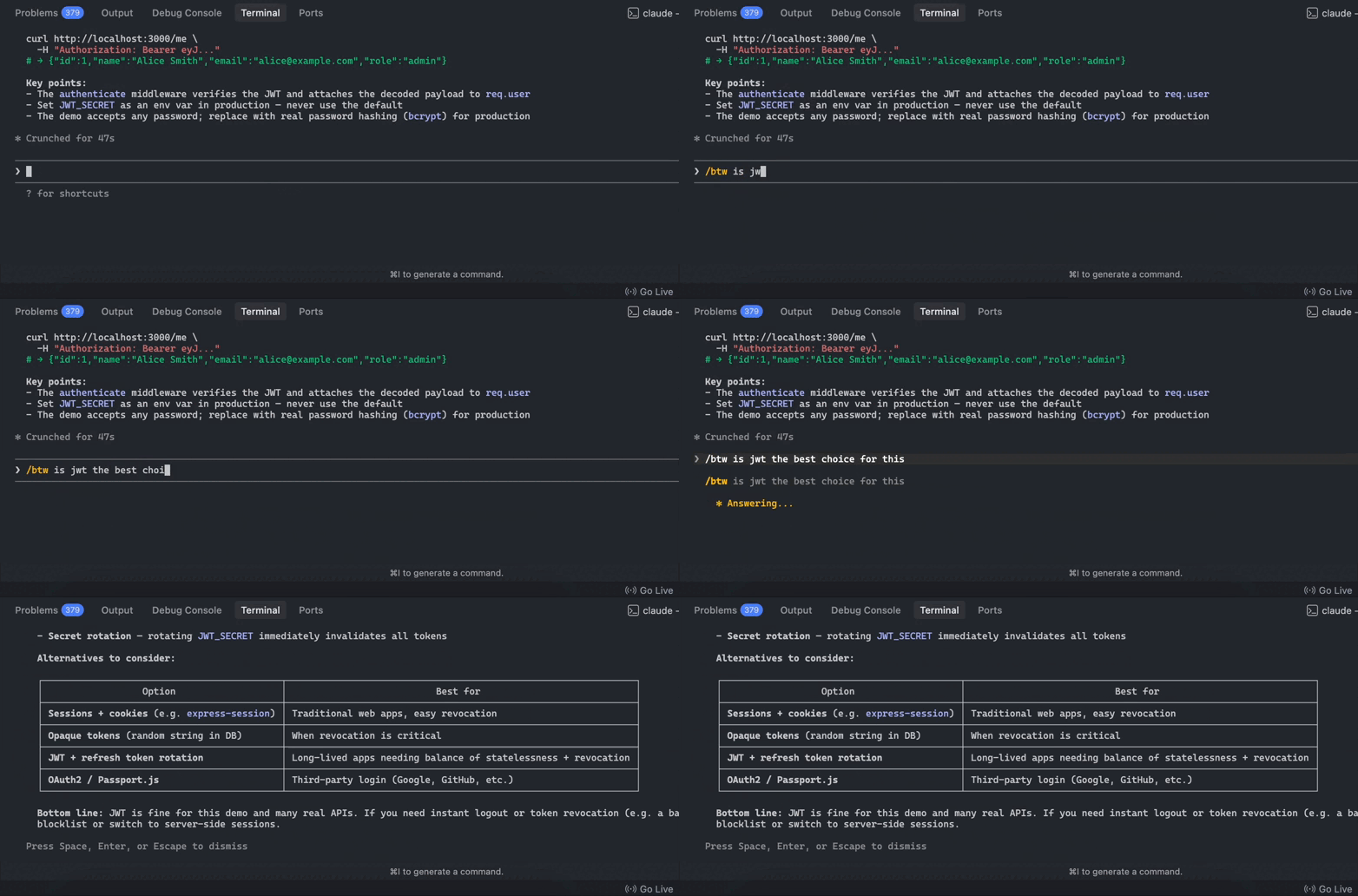
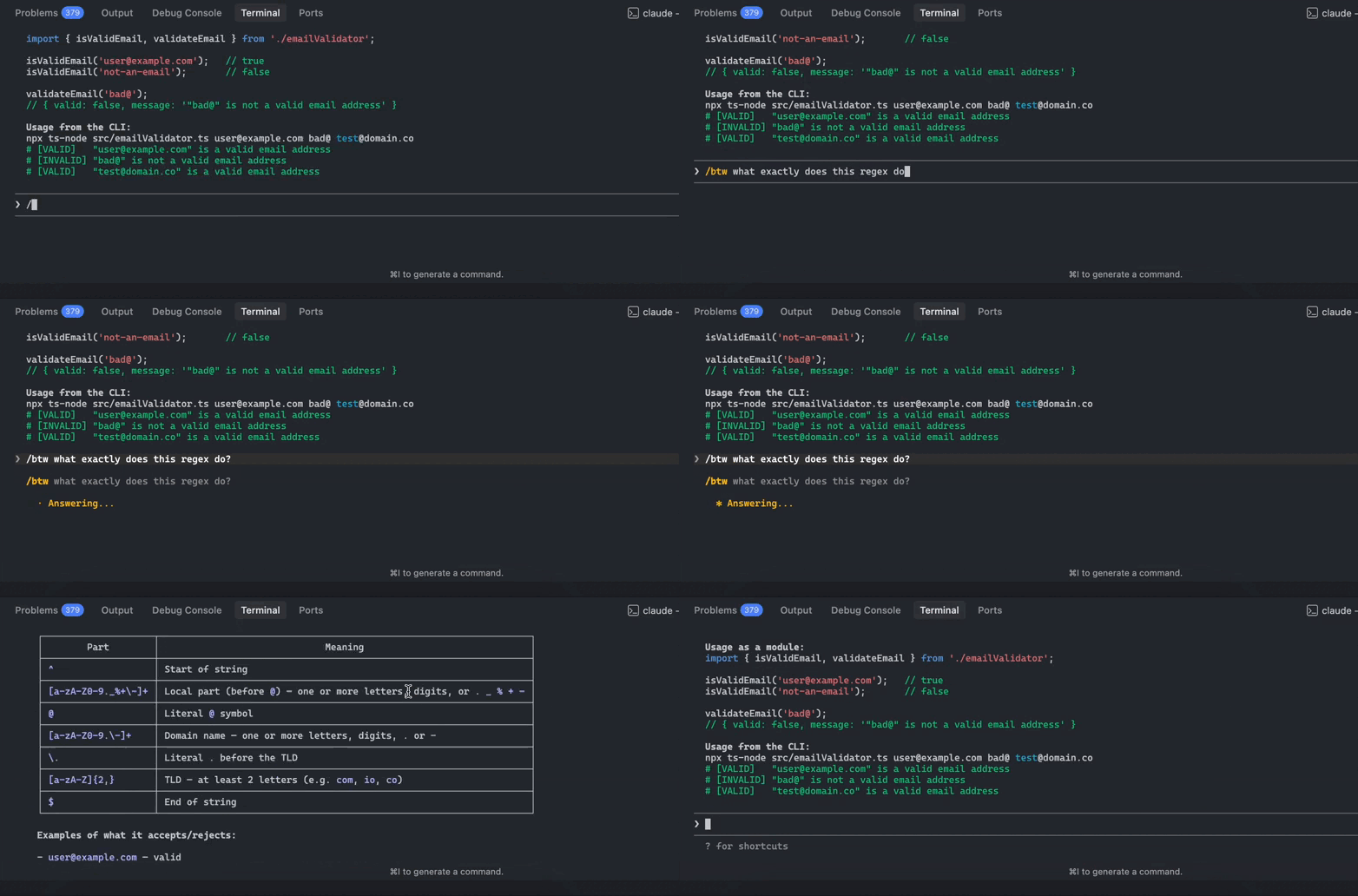
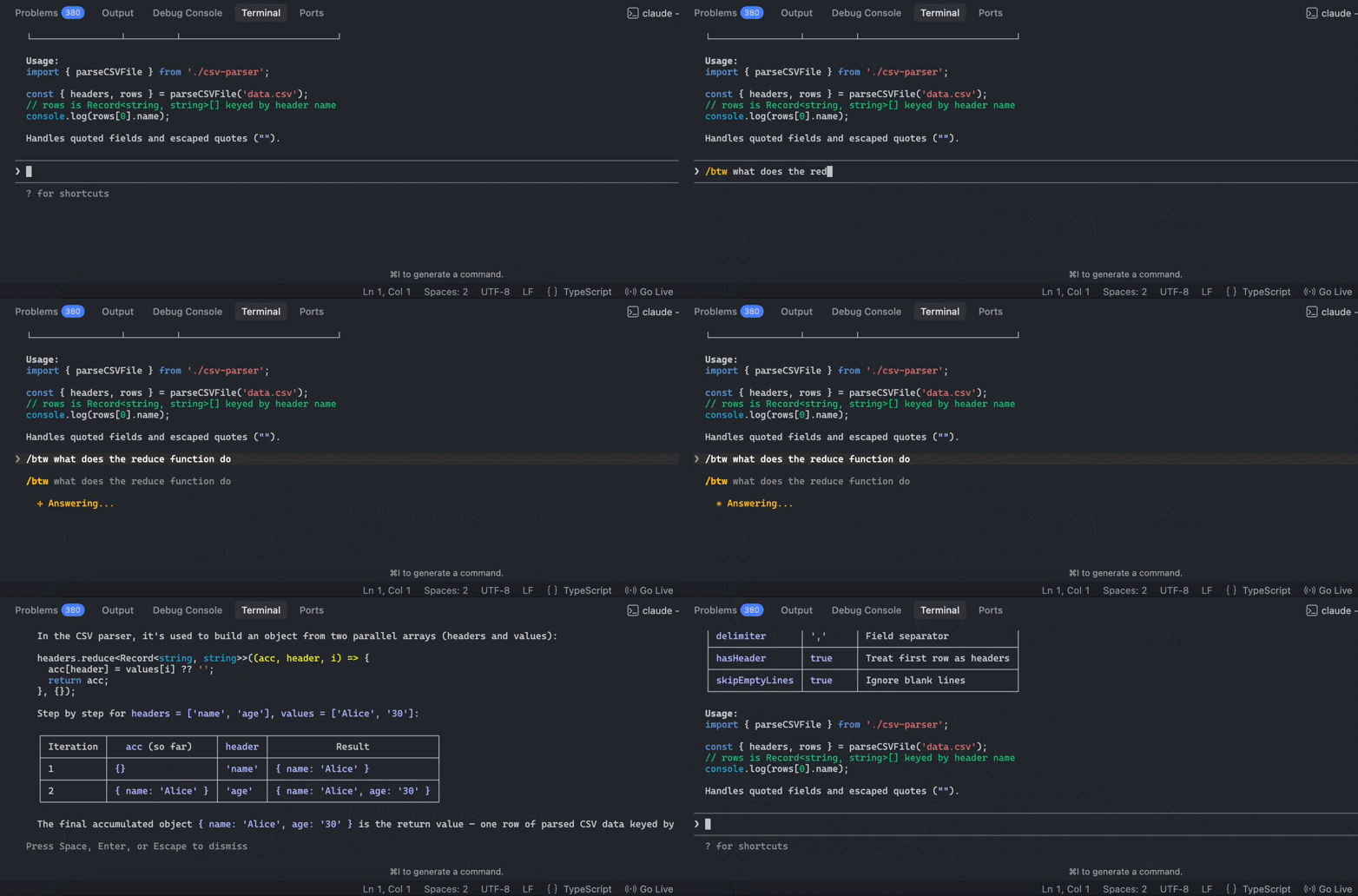
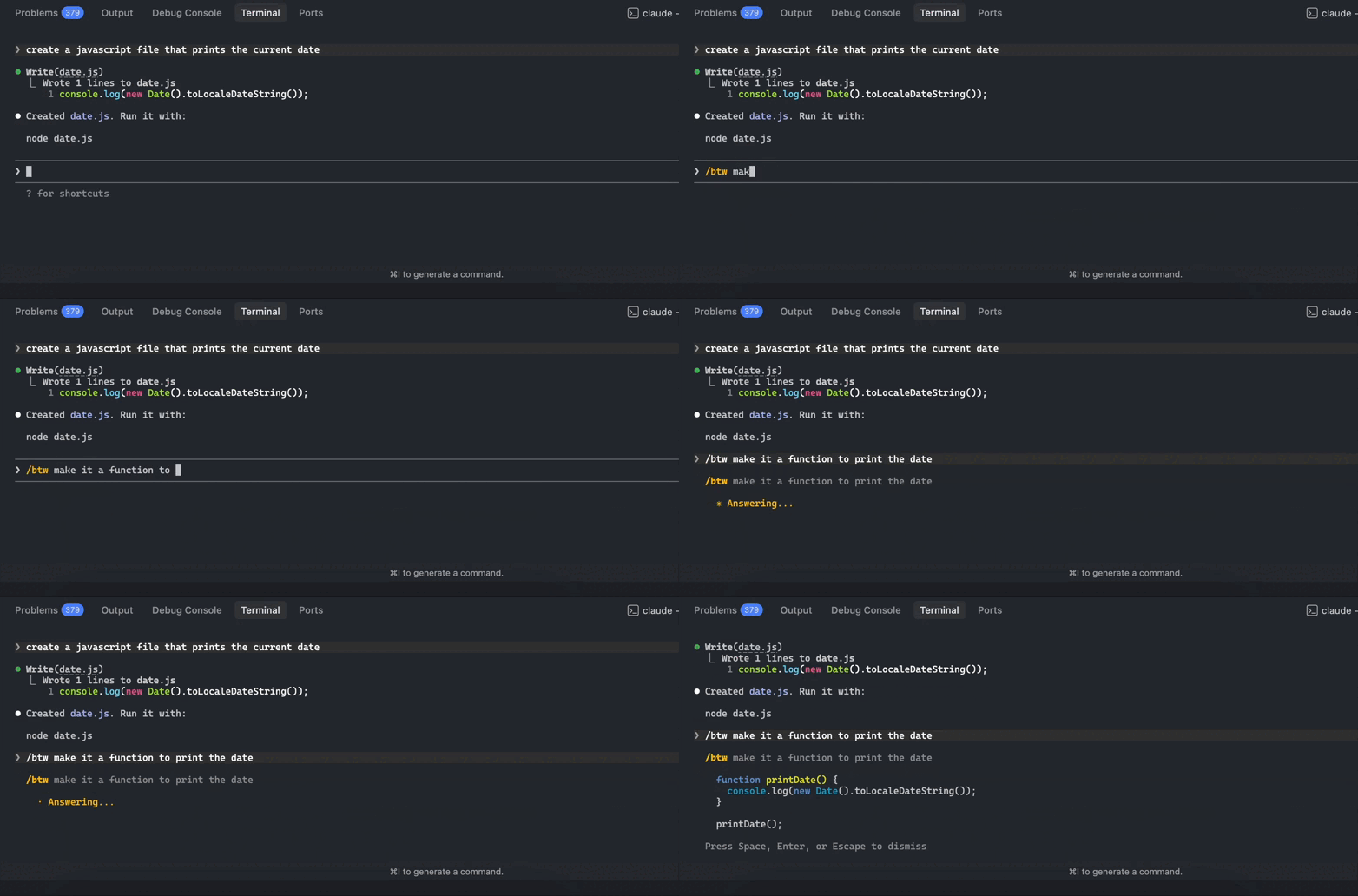
No /btw feature used to ask questions here 👇:

Which unfortunately leads to questions, clarifications, and quick reminders slowly cluttering the context — making sessions more expensive than ever.

✅ Now:

Now Claude Code’s new /btw command is here to change all that — by creating a lightweight lane for disposable, context-aware questions.

Making changes just before using /btw:

Asking questions on our changes with /btw:

When we press Enter, the btw message disappears and we’re back to our normal conversation:

It’s a simple but powerful feature that makes those long coding sessions cleaner and much more efficient.

What /btw actually is

/btw is a lightweight side-question feature inside Claude Code. It can see the current session context, meaning it understands the code, decisions, and task state already in play.

But unlike the main thread, it’s intentionally constrained.

1. Context-aware

/btw understands the active session.

That means you can ask questions tied to the current work, such as:

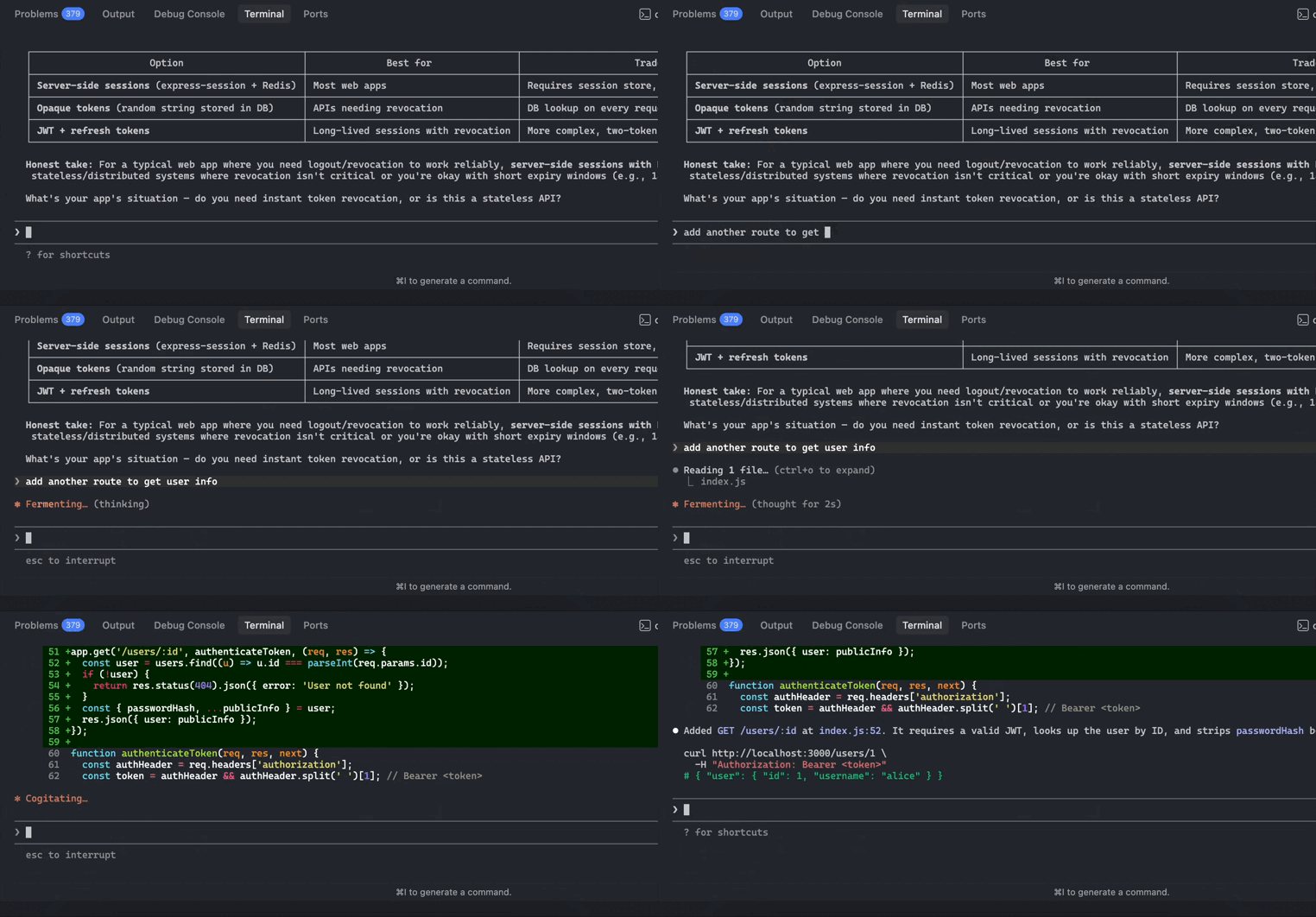
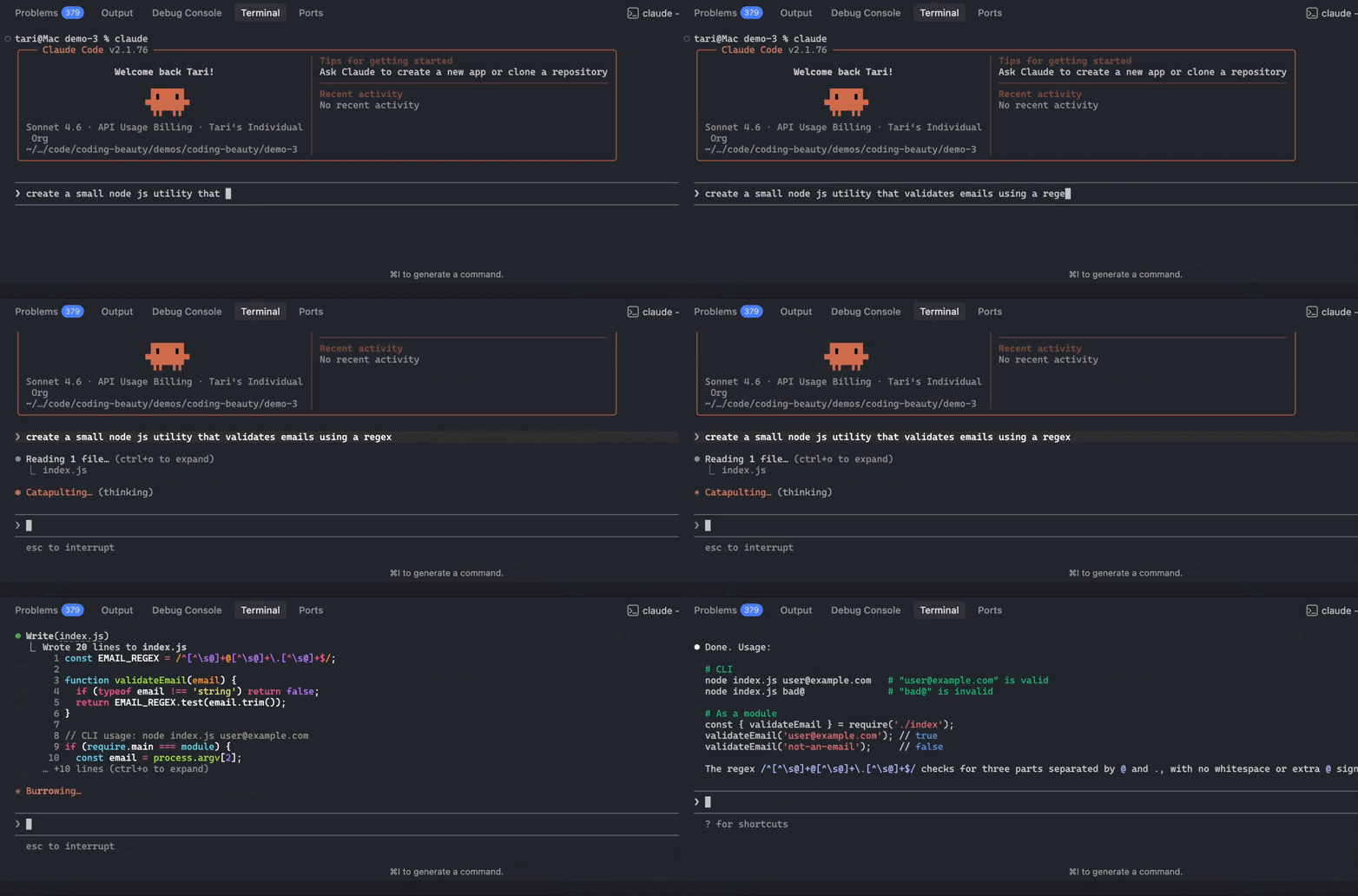
Making changes to our codebase:

  • “What does this regex do?”
  • “What is this helper function responsible for again?”
  • “Why did we choose this configuration pattern earlier?”

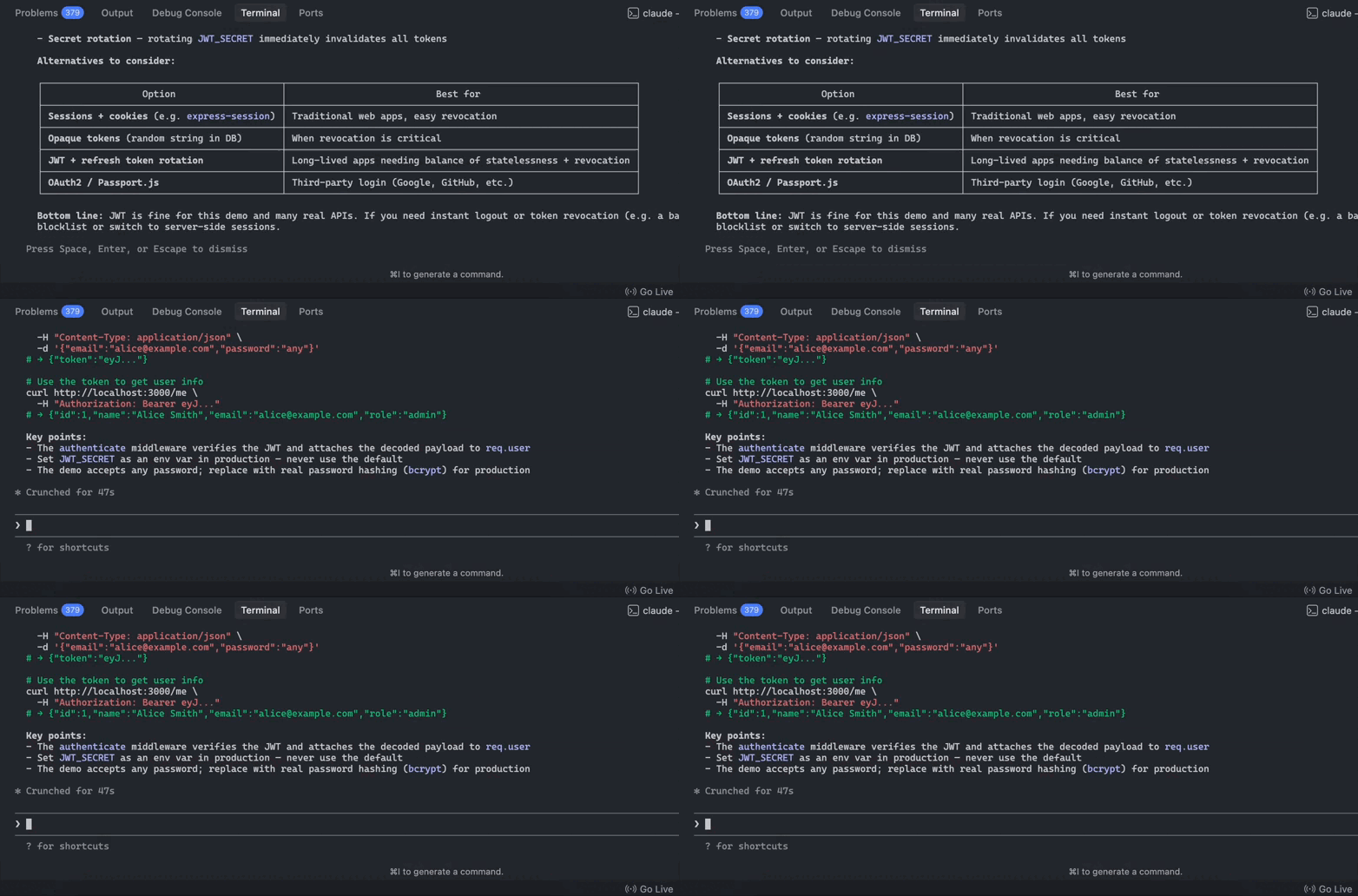
Using /btw to ask context-aware questions:

You’re not asking a model with zero memory. You’re asking from inside the active coding session, where the relevant context already exists.

That’s what makes /btw more useful than opening a separate AI chat.

2. Disposable history

The core idea behind /btw is that the interaction is temporary.

Your question and its answer do not become part of the main conversation history.

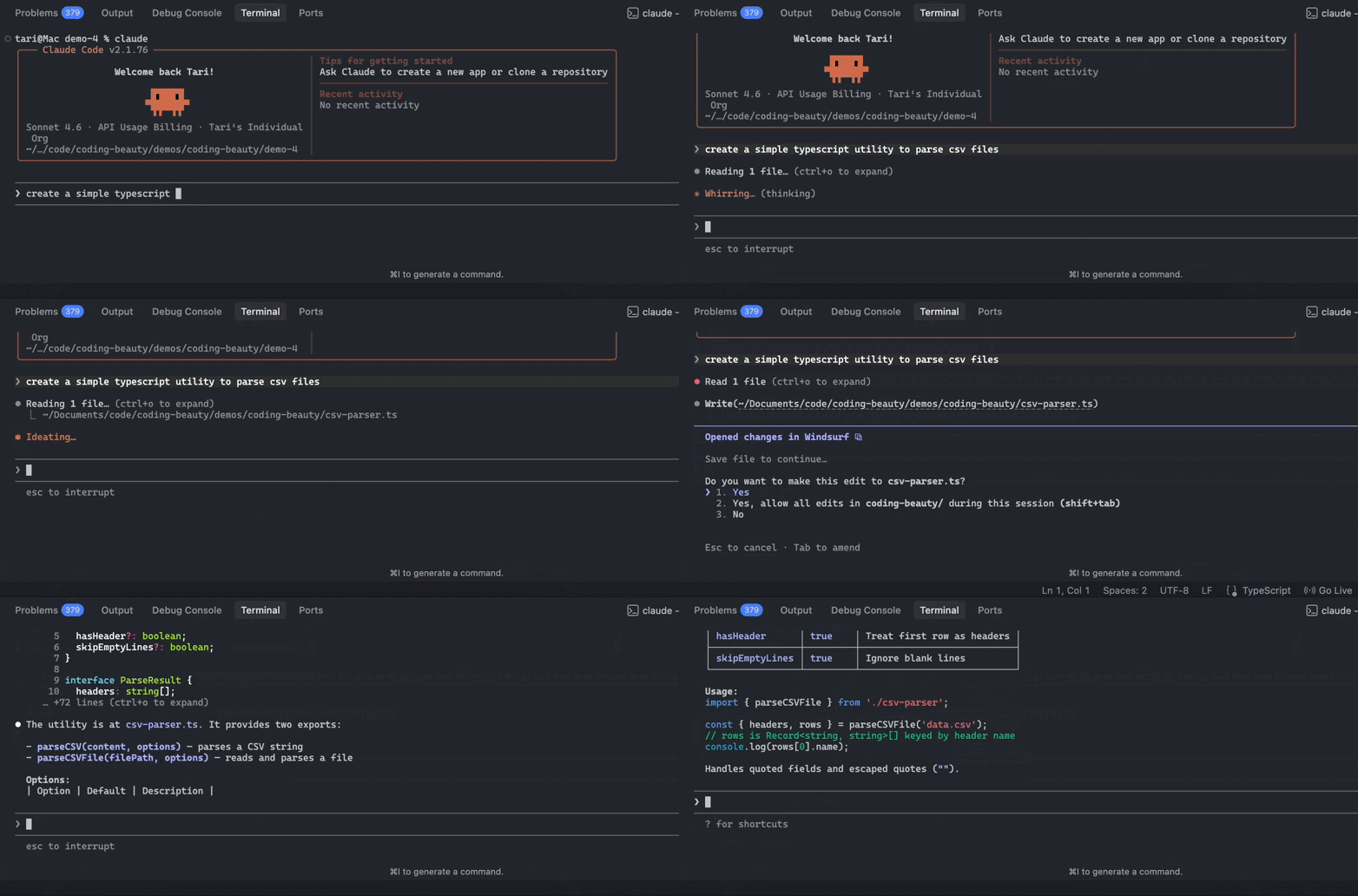
Making changes to our codebase:

Why this matters:

Many developer questions are momentary:

  • reminders
  • clarifications
  • quick explanations

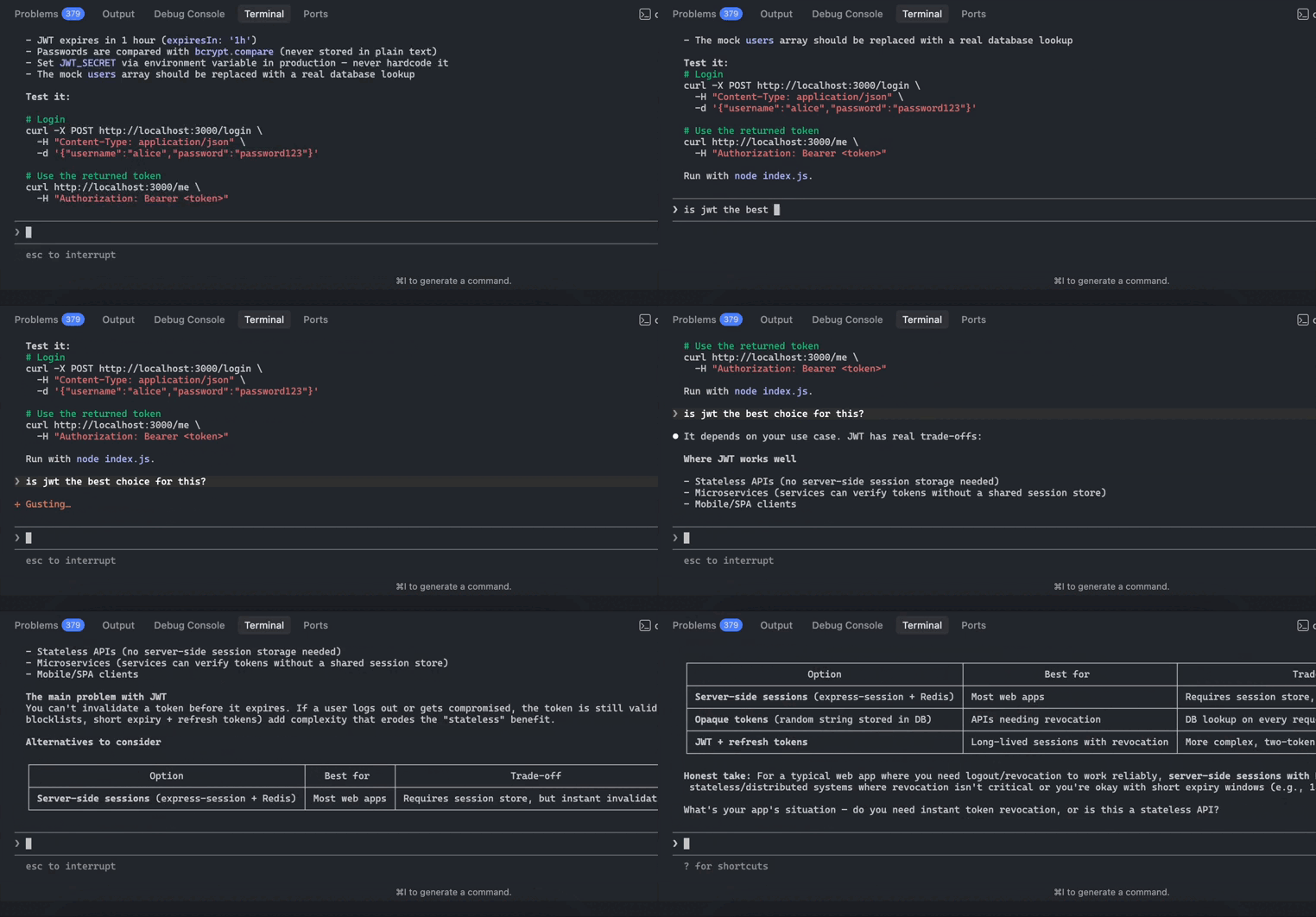
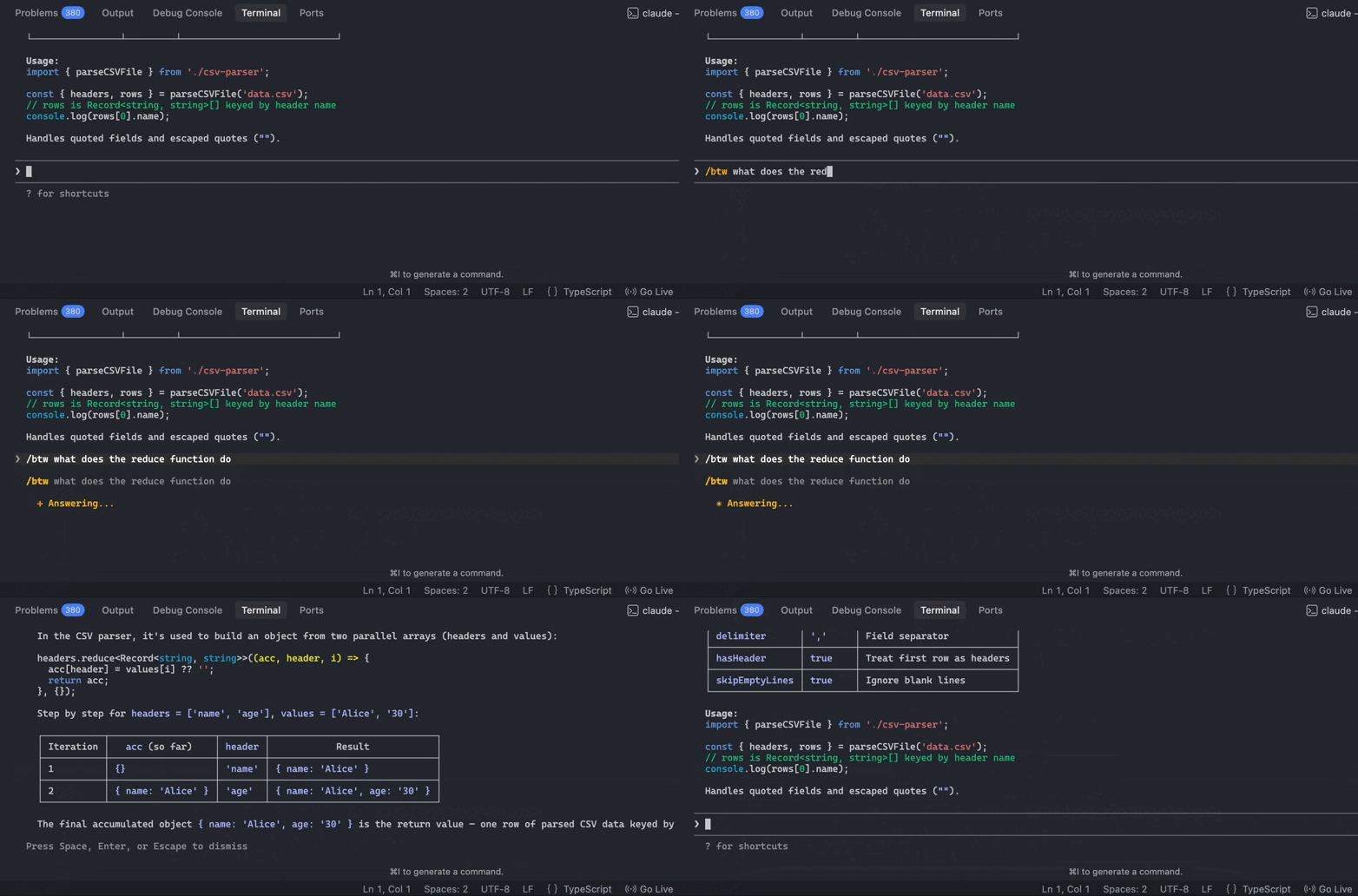
Using /btw to ask questions:

Claude Code doesn’t remember the previous /btw message:

You need the answer right now, but the agent doesn’t need to keep re-reading that exchange for the rest of the session.

Think of /btw as:

  • a sticky note, not a commit message
  • a side whisper, not a meeting transcript

3. Read-only

Another important constraint:

/btw cannot perform actions.

Making changes to our codebase:

It cannot:

  • edit files
  • run bash commands
  • use MCP tools
  • inspect new files

It can only talk.

Trying to make changes with /btw — it doesn’t work — it only shows a message containing the code at best:

This means /btw isn’t meant for implementation work. Instead, it’s meant for:

  • explanations
  • reminders
  • quick clarifications
  • contextual understanding

You use /btw to stay oriented while real work continues elsewhere.

4. Single-turn only

/btw also enforces a strict interaction model:

One question. One answer.

There’s no extended back-and-forth and no mini-thread forming inside the /btw window.

That constraint prevents it from turning into a secondary conversation.

It stays exactly what it’s meant to be: a quick aside.

How it helps us as developers

The real value of /btw isn’t the command itself.

It’s how it improves workflow during long, context-heavy coding sessions.

1. Massive token savings

Claude Code stays effective by remaining aware of the full conversation history.

But that also means every new turn in the main thread carries the cost of everything that came before it.

As sessions grow, small interruptions become expensive.

For example:

  • A 40-message thread means Claude rereads a large context every turn.
  • Adding clarification questions increases that cost quickly.

This is where /btw helps.

Instead of putting these into the main thread:

  • “What does this regex do?”
  • “What was this utility function for again?”
  • “What does this flag change?”

You route them through /btw.

The result:

  • fewer tokens in the main thread
  • less history to reread
  • significantly cheaper long sessions

Over time, this can cut total session costs dramatically.

2. It prevents context rot

Long AI conversations naturally degrade.

As threads grow, the context becomes noisy:

  • temporary explanations
  • side questions
  • dead-end ideas
  • minor clarifications

Eventually the model starts losing track of what matters.

Developers often see this as:

  • missed constraints
  • forgotten earlier decisions
  • weaker reasoning

This is essentially context rot.

/btw helps prevent this by enforcing separation:

Main thread

  • implementation
  • architecture decisions
  • debugging
  • planning
  • file edits

/btw

  • explanations
  • quick reminders
  • clarifications
  • trivia

Keeping those categories separate helps the main thread remain clean and focused, which maintains higher reasoning quality for longer.

3. Seamless multitasking

This is the most underrated benefit.

During long-running Claude tasks—like refactors or multi-file updates—you’ll often have small questions.

For example:

  • “What syntax does this function expect again?”
  • “What does that pattern mean?”
  • “Did we say this utility handles validation?”

Without /btw, you have two options:

  1. Interrupt the main thread and risk derailing the workflow.
  2. Hold the question in your head and slow yourself down.

/btw gives you a third option.

You can quickly ask the question without altering the agent’s working context.

This makes Claude feel less like a fragile chat log and more like a collaborator that can handle quick side questions while staying focused on the main task.

The real takeaway

The best way to think about /btw is this:

It’s a pressure-release valve for long Claude Code sessions.

It allows developers to:

  • ask context-aware questions
  • avoid polluting the main thread
  • reduce token usage
  • preserve reasoning quality
  • multitask more smoothly

For developer workflows, that’s not a flashy feature.

It’s just good interface design.

Most AI tools treat every interaction as permanent. /btw recognizes that real development doesn’t work that way.

Some questions matter long-term — others are just momentary.

Treating those differently is exactly why /btw matters.

How this new Claude Code feature saves you from wasting tokens Read More »
How Claude Code worktrees make you code so much faster

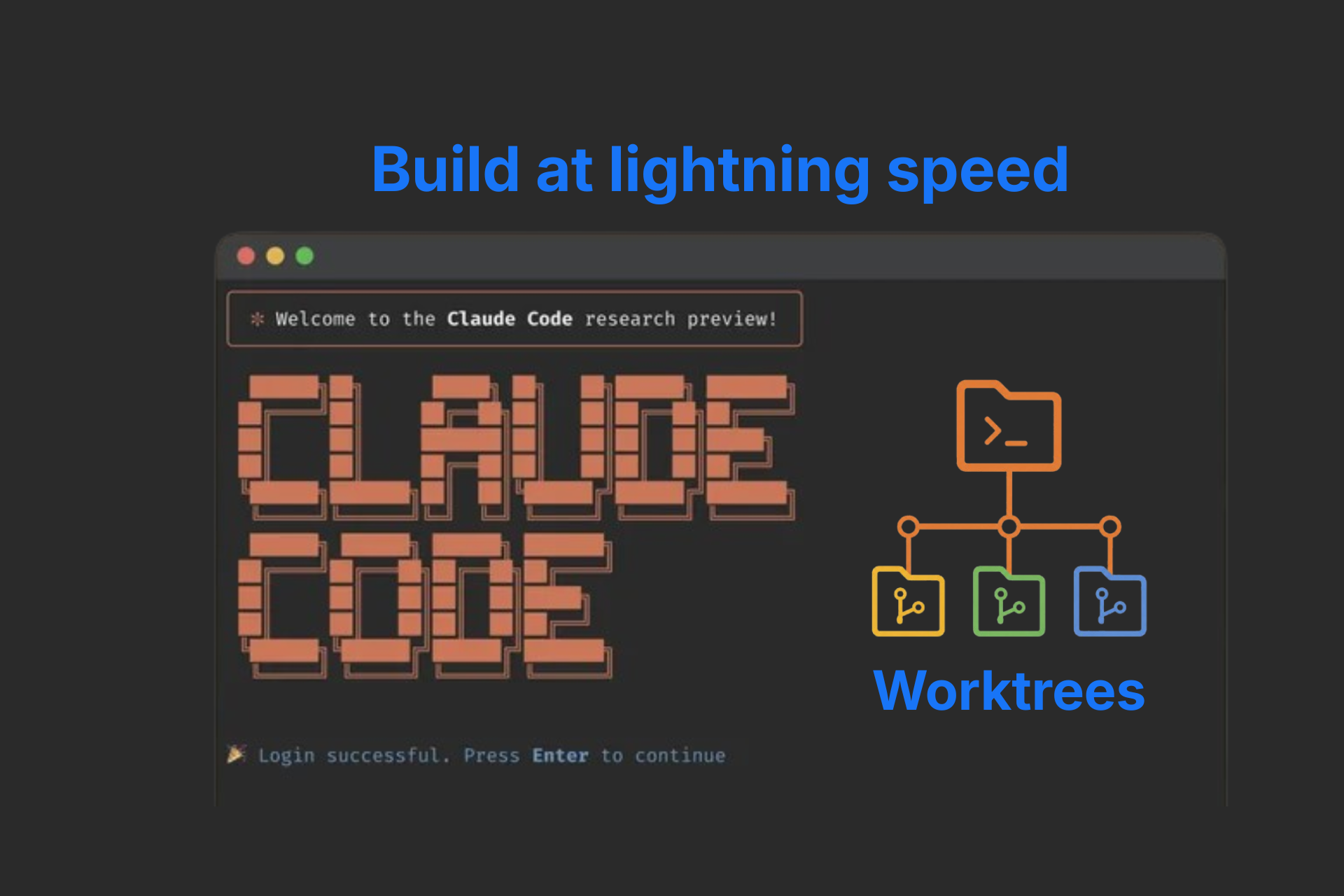
If you’re still AI coding with one agent at a time, you’re seriously wasting the incredible potential Claude Code gives you.

Learning how to develop with multiple agents at a time will massively boost your speed and productivity.

You can work on different features, bug fixes, and cleanups on your codebase all at the same — saving unprecedented amounts of time.

One critical challenge though — how do we keep all the agent sessions from interfering with each other?

How do we make them work simultaneously without tearing into each other’s changes?

Claude Code solves this brilliantly with the native Git worktree feature.

Instead of cloning your repository multiple times, it creates lightweight, isolated workspaces that share the same Git history while giving each session its own branch and working directory.

As a developer, this lets you easily:

  • Build multiple features simultaneously
  • Eliminate branch-switching headaches
  • Experiment safely without affecting ongoing work
  • Scale AI-assisted development with minimal overhead

Instant session isolation: Build multiple features without workspace conflicts

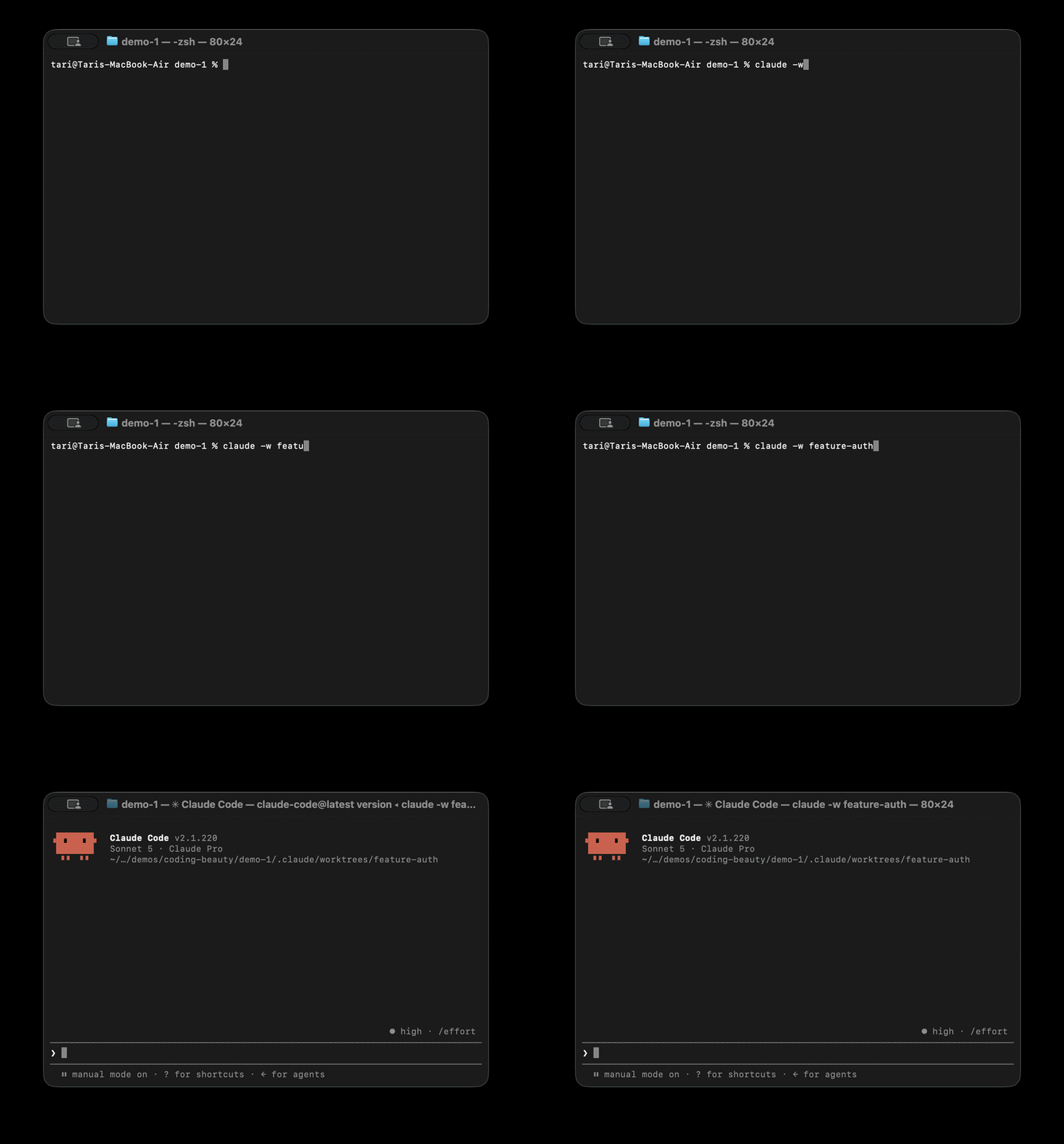
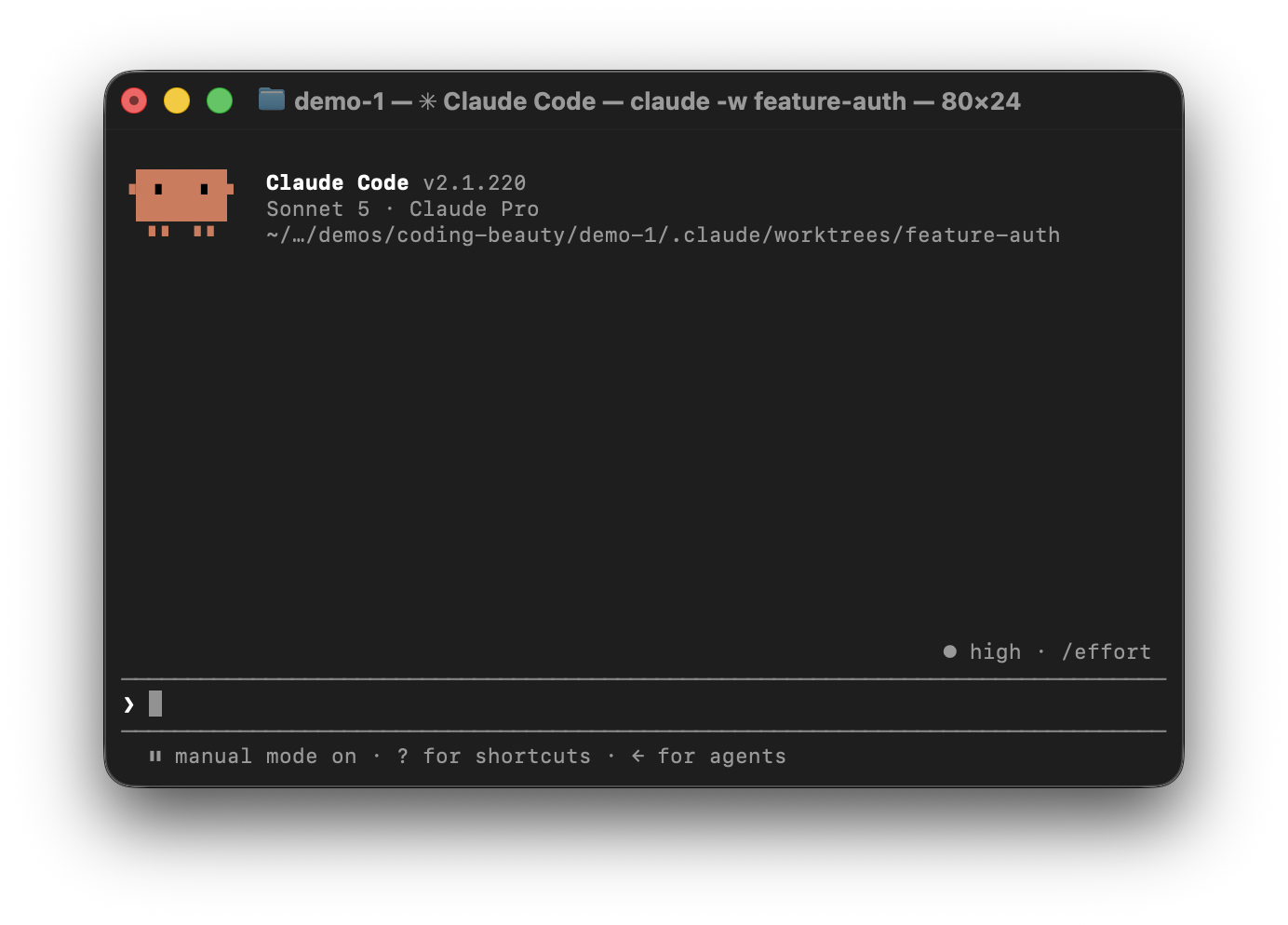
Launching Claude with the -w (or –worktree) flag instantly creates a dedicated worktree and Git branch.

claude -w [branch]

Each Claude session gets its own isolated environment, meaning edits in one terminal never affect another.

Isolated worktree environment in .claude/worktrees/[branch]

For example, you could have separate sessions working on:

  • Authentication
  • Dashboard UI
  • Payment bugs
  • Documentation
  • Test coverage

As a developer, this means:

  • No constant branch switching
  • No stashing unfinished work
  • No accidental file conflicts
  • True parallel development

Every task gets its own workspace, making it much easier to stay focused.

Automated worktree creation: Let AI agents manage their own workspaces

Worktree isolation isn’t limited to top-level Claude sessions.

When Claude Code delegates work to subagents, it can automatically create a dedicated Git worktree for each one.

Rather than sharing the parent’s workspace, every agent receives its own isolated environment where it can edit files, run commands, and validate changes independently.

Every time that agent runs, Claude automatically creates an isolated workspace — under .claude/worktrees/.

Instead of manually preparing worktrees before delegating work, the agent handles everything automatically.

This gives you:

  • Less setup
  • Less manual Git management
  • Safer parallel execution
  • Easier large-scale refactoring

This is especially useful when multiple agents are generating tests, updating documentation, or performing code migrations simultaneously.

Native context switching: Experiment without losing your session

Sometimes you want to try something risky without abandoning your current conversation.

Claude Code includes a built-in EnterWorktree capability that lets you switch into a new worktree mid-session.

Simply ask Claude:

  • “Create a worktree for this experiment.”
  • “Switch to the auth worktree.”

Claude creates — or enters — the requested workspace while preserving the existing conversation and context.

For developers, this encourages experimentation.

You can:

  • Prototype new ideas
  • Try alternative implementations
  • Test risky refactors

—all without restarting Claude or losing the context you’ve already built.

Zero repository duplication: Scale parallel development efficiently

Traditional parallel development often means cloning the same repository several times.

That duplicates:

  • Git history
  • Object databases
  • Repository metadata
  • Disk usage

Git worktrees avoid all of that.

Every worktree shares the same underlying Git database while maintaining its own:

  • Working directory
  • Checked-out branch
  • Staging area

Because the repository isn’t duplicated, creating a new Claude worktree is almost instantaneous—even for very large projects.

For developers, this means more AI sessions without paying the cost of multiple repository clones.

Intelligent lifecycle management: Stay organized without Manual cleanup

Temporary workspaces are useful — but only if they don’t pile up.

Claude Code helps manage their lifecycle automatically.

When a worktree finishes:

  • No changes? Claude removes it automatically.
  • Changes made? Claude asks whether you’d like to keep or delete it.

Background cleanup also helps remove stale temporary workspaces while preserving active branches.

For us developers, this means:

  • Less maintenance
  • Fewer abandoned directories
  • Cleaner repositories
  • More time spent building instead of cleaning up

Final thoughts

Git worktrees have existed for years, but Claude Code transforms them into a seamless workflow for AI-assisted development.

Instead of treating AI as a single coding assistant, you can coordinate multiple isolated agents working on different parts of the same project.

The benefits are clear:

  • Faster feature development
  • Safe parallel workflows
  • Lightweight isolated environments
  • Less Git overhead
  • Cleaner development workflows

As AI becomes a larger part of software engineering, worktrees provide the foundation for running multiple coding agents efficiently — without the chaos of shared workspaces.

How Claude Code worktrees make you code so much faster Read More »
DeepSeek v4 Flash is absolutely insane

Imagine having a model that’s 30 times cheaper than Claude models — yet just as intelligent?

China just turned the entire AI race on its head with the new DeepSeek v4 Flash model. This is unbelievable.

We are talking cents here — it’s not even up to 1 dollar per million tokens. It’s not even up to 50 cents.

We’ve never seen something like before.

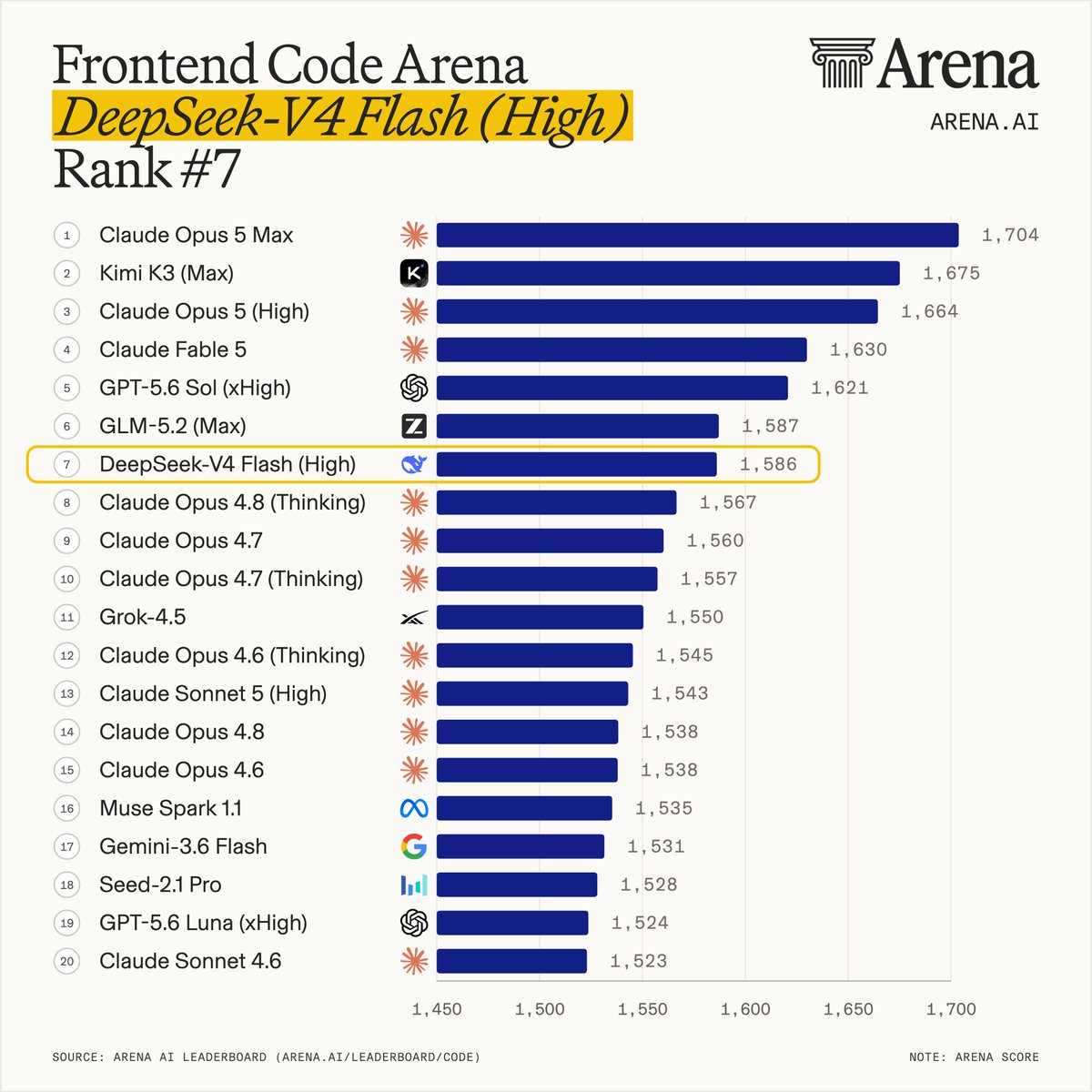
It even dominates almost all the Opus in some benchmarks — like the Frontend Code AI Arena — and keep in mind that it’s at least 35 times cheaper than all the close-sourced models that rank above it here:

And this shockingly cheap intelligence is just one of the many things that make this new model so incredible.

It uses a state-of-the-art thinking system that makes it exponentially more efficient and powerful than models of a similar size.

It uses a sophisticated token processing system that dramatically improves the quality of the 1 million token context window it has.

This is going to be a major major game changer for so many developers.

Insane coding and agentic ability and incredible results

It was clearly built from the ground up and optimized for AI agents and software engineering.

The model gives us significant gains on several challenging coding benchmarks.

DeepSeek V4 Flash achieved 79.0% on SWE-bench Verified, finishing within 1.8 percentage points of Claude Opus 4.7 (80.8%) and 1.6 points of DeepSeek V4 Pro (80.6%) while delivering significantly lower inference costs.

DeepSeek also reports a 12+ percentage point reduction in hallucination rates compared to previous generations.

For autonomous agents, that means:

  • fewer incorrect commands
  • more reliable tool usage
  • better multi-step execution
  • less manual intervention

These improvements also make v4 Flash a more than excellent choice to use with Claude Code and OpenClaw.

Ridiculously cheap pricing

You’re basically paying next to nothing:

  • $0.14 per million input tokens
  • $0.28 per million output tokens

Compare to that Claude Opus 5 and see the massive difference:

  • $5.00 per million tokens (35 times more expensive)
  • $25.00 per million tokens (90 times more expensive)

Those numbers alone make V4 Flash one of the most affordable frontier-class models available.

The real game changer, however, is the 98% prompt cache discount on the first-party API.

Cached input tokens cost just $0.0028 per million tokens.

For AI agents that repeatedly process the same:

  • system prompts
  • codebases
  • documentation
  • conversation history

…this dramatically reduces operating costs.

Instead of paying to reprocess identical context on every request, cached prompts become almost free — making long-running coding agents and autonomous workflows far more economical.

State-of-the-art architecture keeps it lightweight & efficient

On LiveCodeBench, DeepSeek V4 Flash achieved an impressive 91.6%, coming within just 0.1 percentage points of Gemini 3.1 Pro (91.7%) while outperforming Claude Opus 4.6 (88.8%)—placing it among the world’s top coding model

On paper V4 Flash is enormous — it contains 284 billion total parameters.

Yet it activates only 13 billion parameters per token thanks to its Mixture-of-Experts (MoE) architecture.

Instead of running the full model every time, it dynamically selects only the experts needed for each token.

This gives us:

  • lower compute requirements
  • faster inference
  • reduced serving costs
  • frontier-level capability with lightweight performance

DeepSeek also introduced native MXFP4/FP8 mixed-precision quantization, allowing community-built GGUF versions to run locally on capable consumer hardware.

That makes experimentation and self-hosting much more accessible without requiring enterprise GPU clusters.

Sophisticated token processing system for 1 million tokens

Long-context reasoning has become one of the biggest challenges for modern language models.

Rather than relying solely on traditional Multi-Head Attention, V4 Flash introduces a Hybrid Attention architecture combining:

  • Compressed Sparse Attention (CSA)
  • Heavily Compressed Attention (HCA)

This enables a native 1 million-token context window while significantly reducing:

  • KV-cache memory usage
  • per-token compute (FLOPs)

For us developers this means entire codebases, large document collections, research archives, and long-running conversations can remain in a single context without the heavy performance penalties typically associated with extremely long inputs.

Dynamic thinking budgets

Another standout feature is DeepSeek’s configurable reasoning system.

We can now choose how much reasoning the model performs before generating a response.

Available modes include:

  • Non-Think – optimized for low latency, structured outputs, and simple chat.
  • Think High – allocates additional reasoning for debugging, planning, and more complex coding tasks.
  • Think Max – provides the largest reasoning budget, allowing V4 Flash to approach the reasoning quality of much larger frontier models on difficult problems.

This flexibility lets developers balance intelligence, latency, and cost based on the task instead of paying for maximum reasoning on every request.

DeepSeek V4 Flash represents a different direction for frontier AI.

Its combination of:

  • industry-leading API pricing
  • a 98% prompt cache discount
  • strong agentic and coding performance
  • 284B total parameters with only 13B active per token
  • a 1 million-token context window
  • configurable reasoning budgets

makes it one of the most compelling production-ready AI models available today.

For developers building AI agents, coding assistants, or enterprise applications, V4 Flash loudly shows us that frontier-level intelligence no longer has to come with frontier-level costs.

DeepSeek v4 Flash is absolutely insane Read More »
Too much context makes Claude Code dumber. This feature prevents that.

Many developers think giving Claude Code more context automatically means greater accuracy.

But that’s completely wrong.

In reality too much context can actually work against you — especially bloated context — having all sorts of irrelevant, redundant, and outdated information.

You need to be aware of features and techniques that keep your context as high-quality as possible — to ensure equally high-quality code.

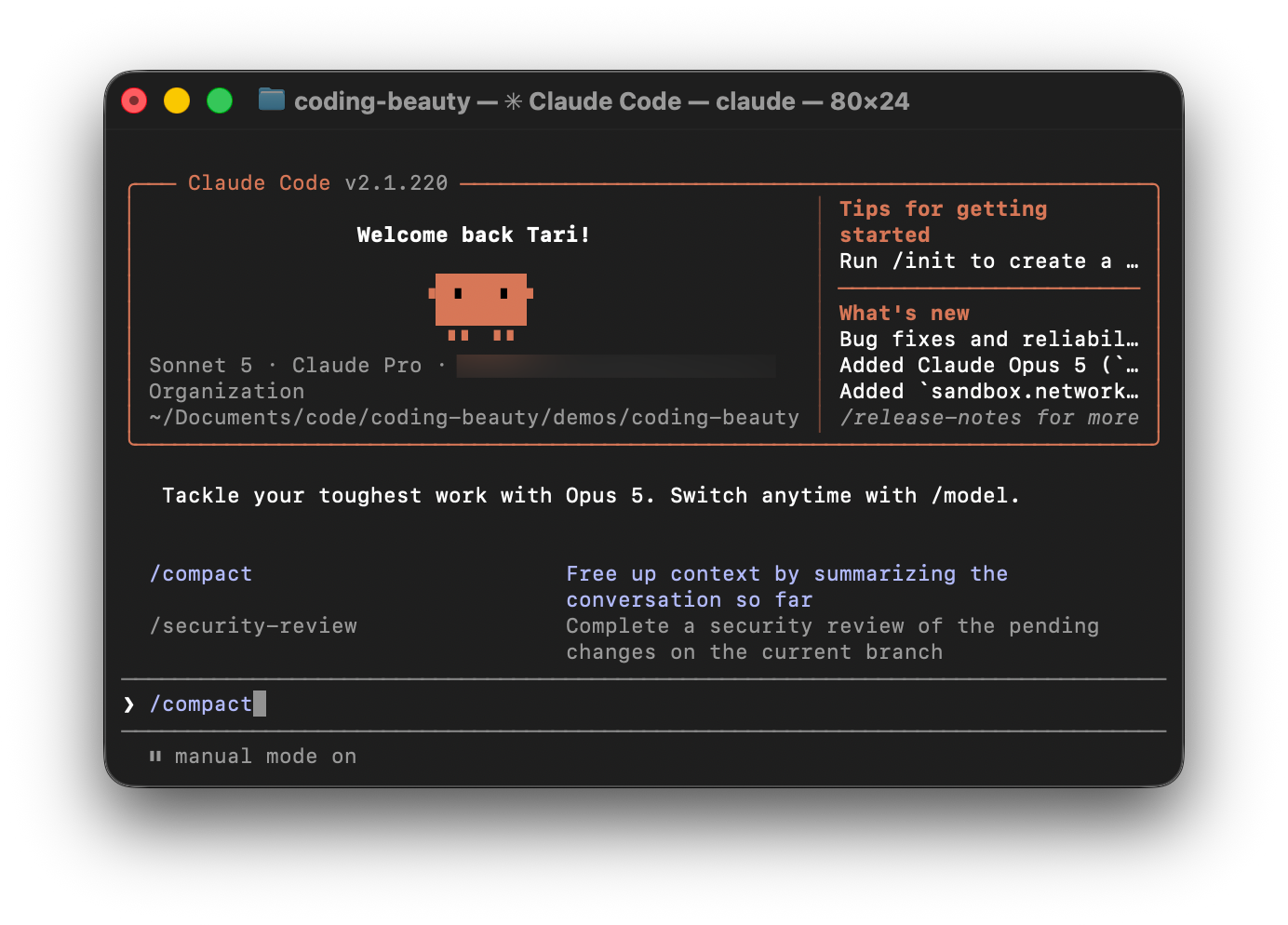
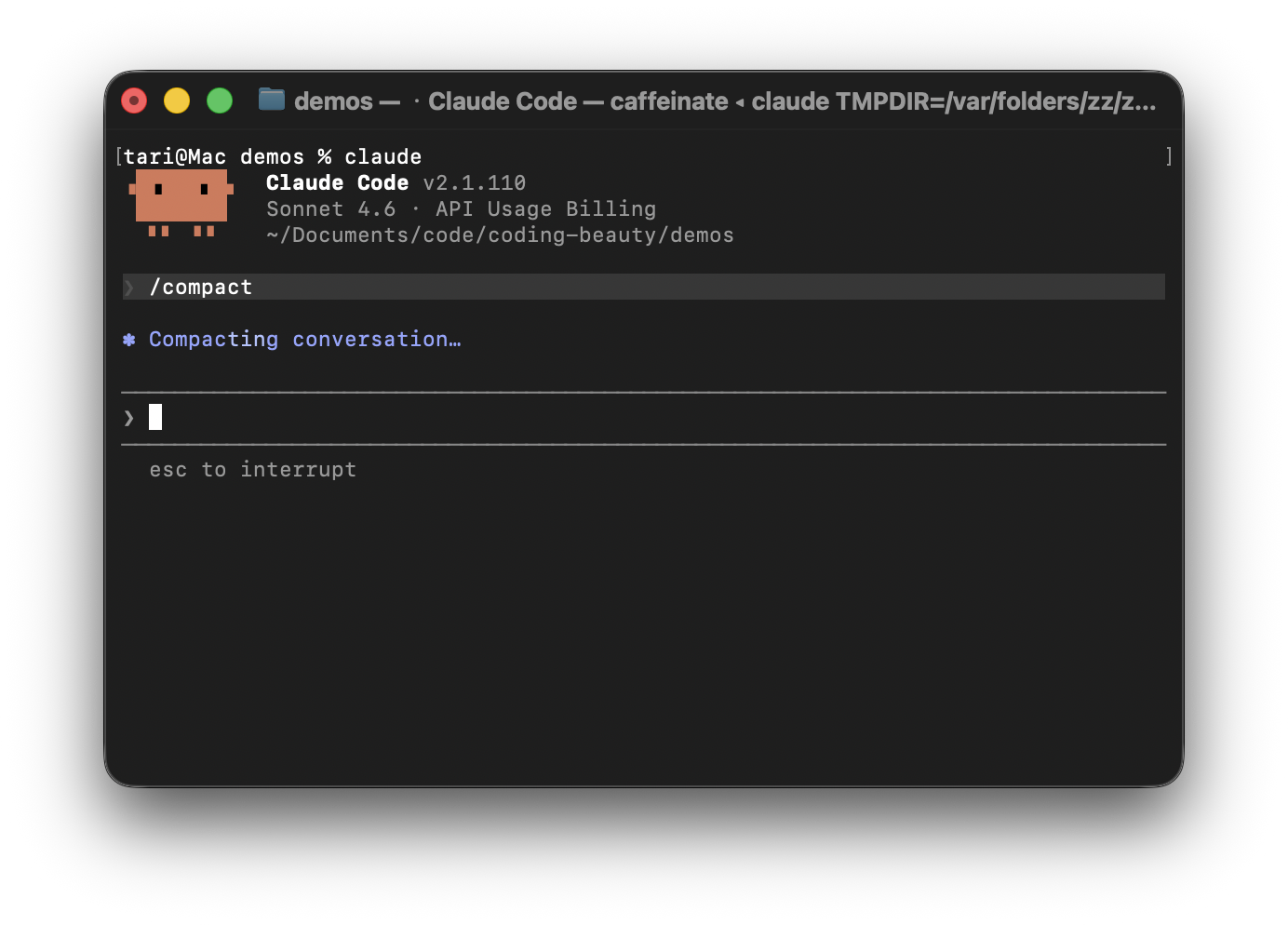
One such feature we have in Claude Code is the frequently ignored /compact command.

/compact doesn’t just make your conversation history smaller.

It completely transforms the core context structure to give the agent a deeper understanding of your codebase and goals.

Many AI tools simply truncate old messages when context windows become full — Claude Code treats compaction as a state-preservation system designed to keep long-running coding sessions as coherent as possible.

Sophisticated features like deterministic file rehydration and custom compaction take this from simple summarization to the ultimate boundary between an agent that actually finishes the job and one that collapses under its own weight.

The /compact command is Claude Code’s built-in context management system.

Running:

JavaScript
/compact

compresses the current conversation into a smaller working state so the session can continue without storing an excessive amount of low-value context.

Instead of carrying thousands of messages, tool calls, terminal outputs, and discussions forward indefinitely, Claude creates a advanced condensed representation of the project and current task.

Many AI chat tools handle full context windows by either truncating old messages or generating generic summaries.

The problem is that important decisions disappear.

Claude Code approaches compaction differently. Instead of just producing a simple text-derived recap, it tries creating a reconstruction-grade working state.

This specialized summary preserves:

  • The current goal
  • Important technical decisions
  • Problems already solved
  • Current implementation progress
  • Immediate next steps

Instead of remembering:

We implemented authentication, two bugs were fixed after several tries.

Claude tries to preserve the crucial details that really matter in the overall software engineering process and timeline.

Authentication was moved into middleware to avoid duplicating validation logic across route handlers.

That’s the difference between remembering outcomes and preserving reasoning.

And it doesn’t just “summarize” like normal text. Traditional summarization works poorly for coding.

A standard summary might remember the high-level story — like “we fixed an auth bug” — but it wipes out the exact code, leaving the AI with total amnesia about what the file actually looks like.

Claude Code solves this through rehydration.

When you compact your history, the CLI throws away the “clutter” (thousands of lines of conversational back-and-forth) to free up memory.

But immediately after wiping the slate clean, it silently re-reads your active files directly from your local disk back into its short-term memory.

The messy chat history gets compressed, but the fresh code is instantly placed right back in front of Claude’s eyes, allowing it to resume working with zero loss of momentum.

Claude Code actually manages context at three different layers.

Microcompaction

The system continuously removes low-value information such as:

  • Build logs
  • Dependency installation output
  • Large terminal responses

Auto-compaction

When context usage becomes too high, Claude can automatically compact the session and continue working.

Manual compaction

This is the user-controlled version and is best used at logical boundaries:

  • Completing a feature
  • Finishing a refactor
  • Solving a bug
  • Switching tasks

Custom compaction

You don’t have to let Claude decide everything.

You can provide instructions directly:

Plain text
/compact Focus on API changes
Plain text
/compact Preserve database schema decisions

These hints help Claude prioritize what survives compression.

For long-term project memory, use CLAUDE.md.

This file can contain architectural principles, coding standards, and project rules that should persist regardless of how many times the conversation is compacted.

The 60% rule

Many users wait until Claude warns them that the context window is nearly full.

That’s usually too late.

A better approach is to compact proactively at around 60–70% context utilization.

At that point:

  • Earlier decisions are still highly accessible
  • The conversation remains organized
  • Claude can create a cleaner, more accurate working state

Think of compaction as preventative maintenance rather than emergency cleanup.

Too much context makes Claude Code dumber. This feature prevents that. Read More »
New Claude Opus 5 just changed everything

Anthropic just shocked the world with with this absolutely incredible model.

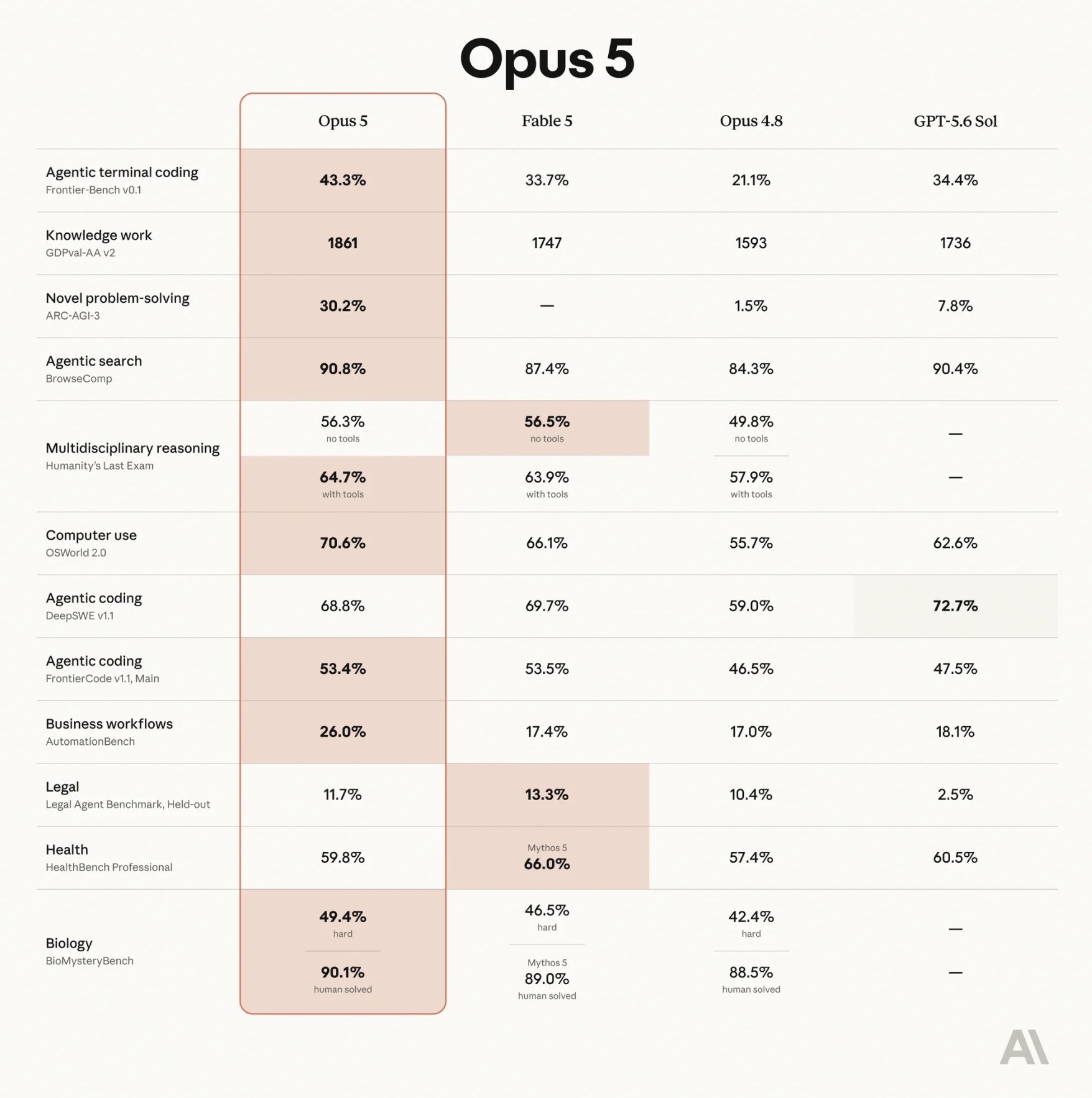
It’s more powerful than Fable 5 in several critical areas — yet a whopping 50% cheaper.

You’re literally slashing your token costs in half just by swapping models.

Unbelievable — Opus 5 completely generated this AAA first-person shooter game from scratch — it didn’t use a single external asset — everything is generated by code:

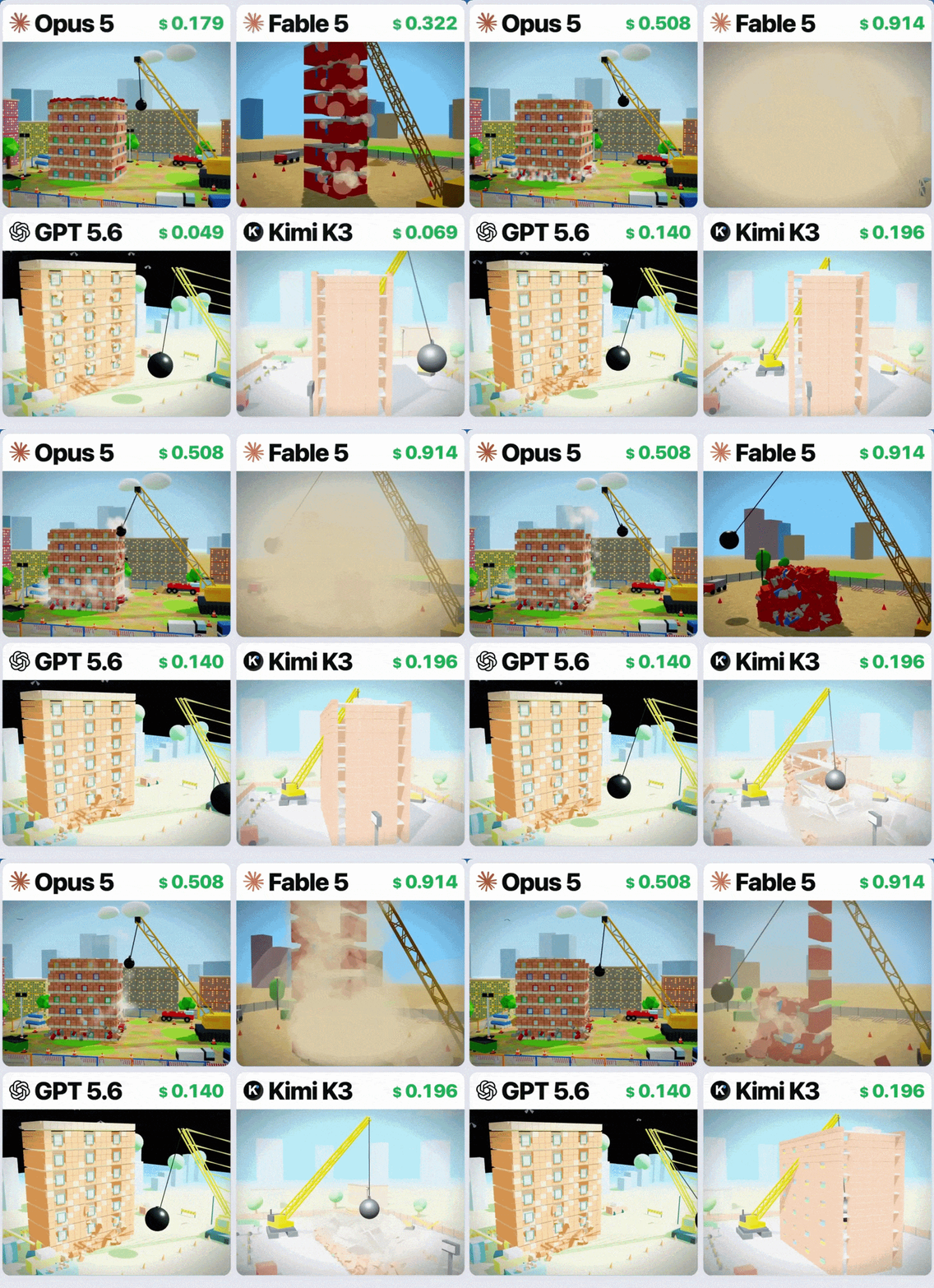
“A wrecking ball demolishing an apartment block” — Opus 5 shows superior physicals and design ability in this 3D generation test:

On CursorBench 3.2, at max effort, the model performs within 0.5% of Fable 5’s peak score, but at half the cost per task; it also achieves greater performance at a given cost than all other models on high, xhigh, and max effort
— Anthropic

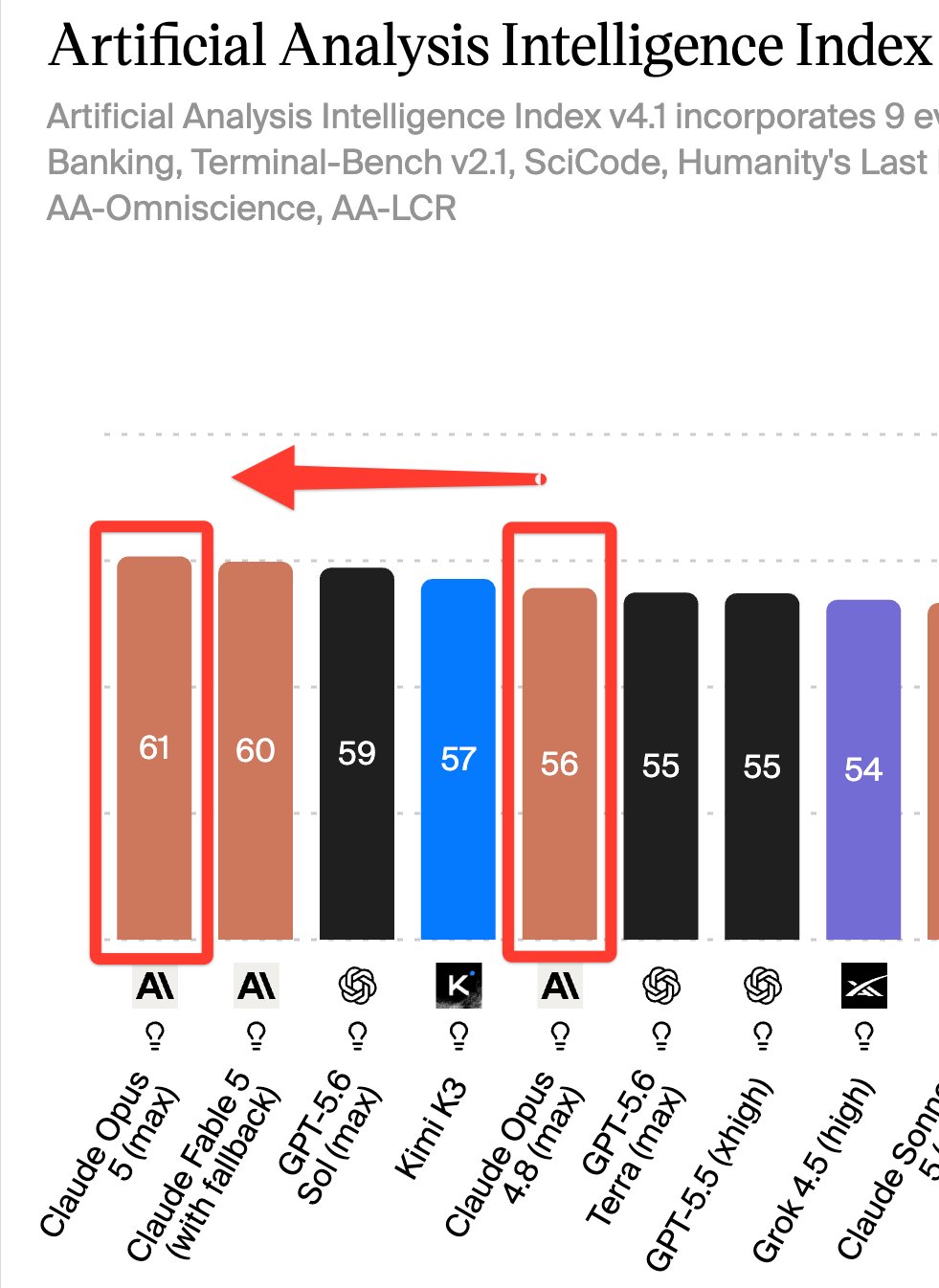
One week ago Opus 4.8 was losing to Kimi K3. Now Anthropic holds the top two spots on the leaderboard:

Just imagine how scary the upcoming Fable 5.1 is going to be.

They’ve made so many massive improvements in coding.

Opus 5 dominated in several tough coding benchmarks, like:

  • ARC-AGI 3: Around 3× higher performance than previous leading models on novel abstract reasoning tasks.
  • Frontier-Bench v0.1: 43.3% pass rate, more than double Opus 4.8’s score on complex terminal coding.
  • CursorBench 3.2: Within 0.5% of Claude Fable 5 despite costing half as much.

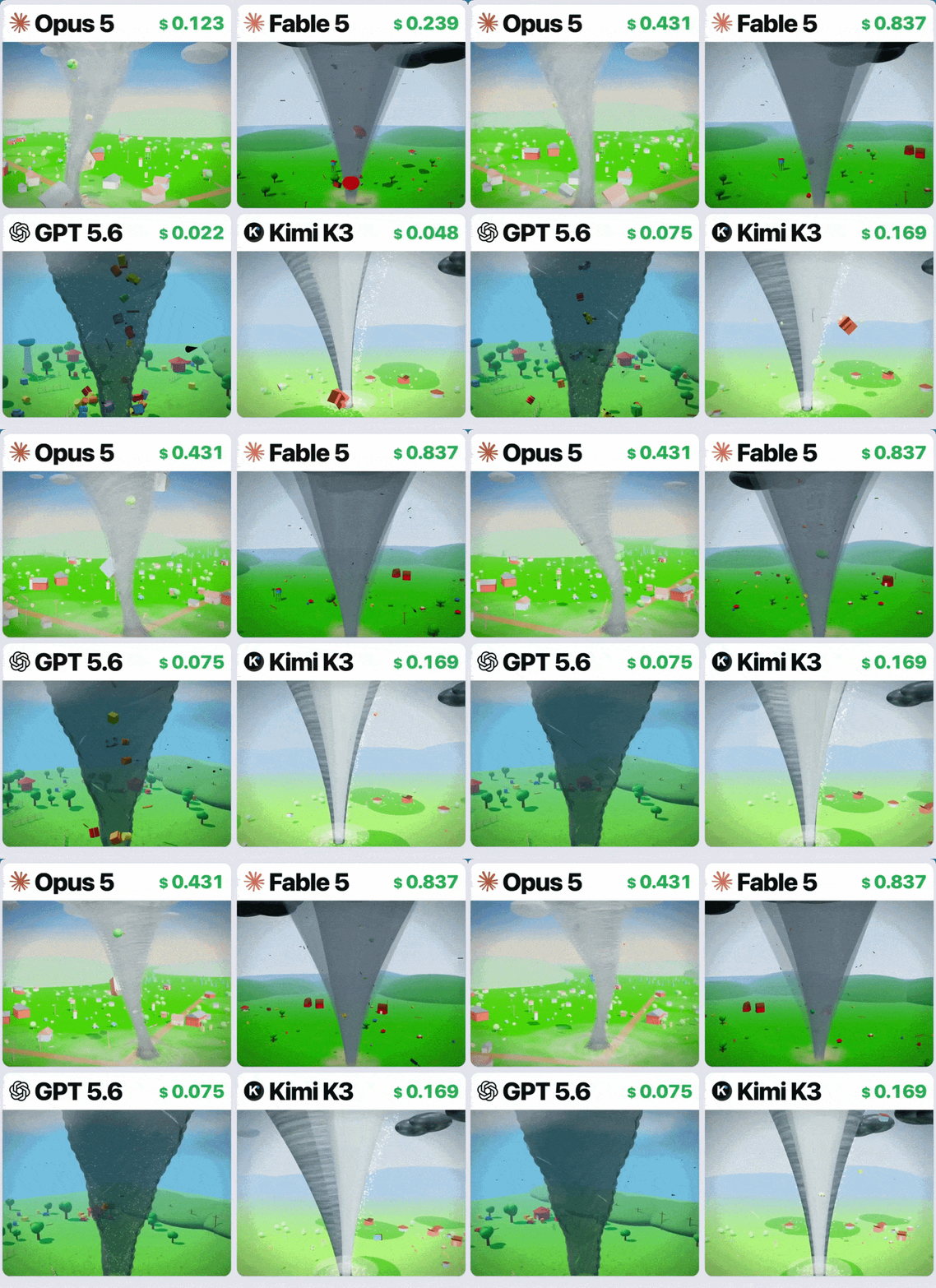
“Generate a tornado that sucks in a whole field” — Opus 5 displayed superior physics and design ability compared to other models:

Opus 5 plans before coding, understands large repositories, maintains consistency across files, and produces cleaner implementations that require fewer revisions.

It’s also now much more powerful in visual reasoning and UI generation.

It can generate rich, interactive artifacts directly in chat, including:

  • Interactive SVG and Canvas applications
  • Scientific simulations
  • Educational visualizations
  • Data exploration tools
  • More polished UI prototypes

Iterative design is noticeably better, too.

The model accepts feedback, updates layouts, and preserves styling with far fewer broken elements or visual artifacts than previous generations.

It also has incredible long-horizon ability now — and it’s so good at persisting at a task until it finally gets it right.

It doesn’t just give up when it faces the most difficult problems — it deploys several techniques to work through them.

Key capabilities that let it do this:

  • Root-cause debugging: Finds and fixes underlying issues instead of applying temporary patches.
  • Self-written tools: During testing, it built its own computer vision pipeline to analyze raw pixel geometry when standard tools weren’t available.
  • Automatic self-verification: Checks branch states, reruns tests, and validates its own work before finalizing changes.

Prompts like “double-check your work” or “verify the output” become unnecessary because the model already does it automatically.

And now its tool usage just become so much more sophisticated.

We now have dynamic mid-conversation tool management when using Claude API with Opus 5.

You’re no longer locked in to fixed set of tools for an entire session — we can now:

  • Add new tools between conversion turns
  • Update existing tool definitions
  • Remove tools when they’re no longer needed
  • Preserve conversation context and prompt caching throughout the session

It’s a small API change with a big impact for anyone building AI agents or complex developer workflows.

This is hands-down one of the best coding models we’ve seen in a long time.

New Claude Opus 5 just changed everything Read More »