
This game-changing Claude Code plugin gives infinite context capacity to all your coding agents.
With the Billion Context plugin, you can code for weeks and months without constantly losing context or needing fresh sessions.
And it’s not just about the capacity — it also uses specialized techniques to reduce the token costs that your context consumes in general — by as much as 80%.
Get started in Claude Code:
/plugin marketplace add ranxianglei/billion-context

/plugin install billion-context@billion-context

/billion-context:bili-setup
Model-driven compression helps your agent stay focused without forgetting important details
Most coding agents wait until their context window is almost full before compressing older messages.
They often end up removing subtle but crucial information and nuances your agent still needs for high-quality results.
Billion Context takes a completely different approach.
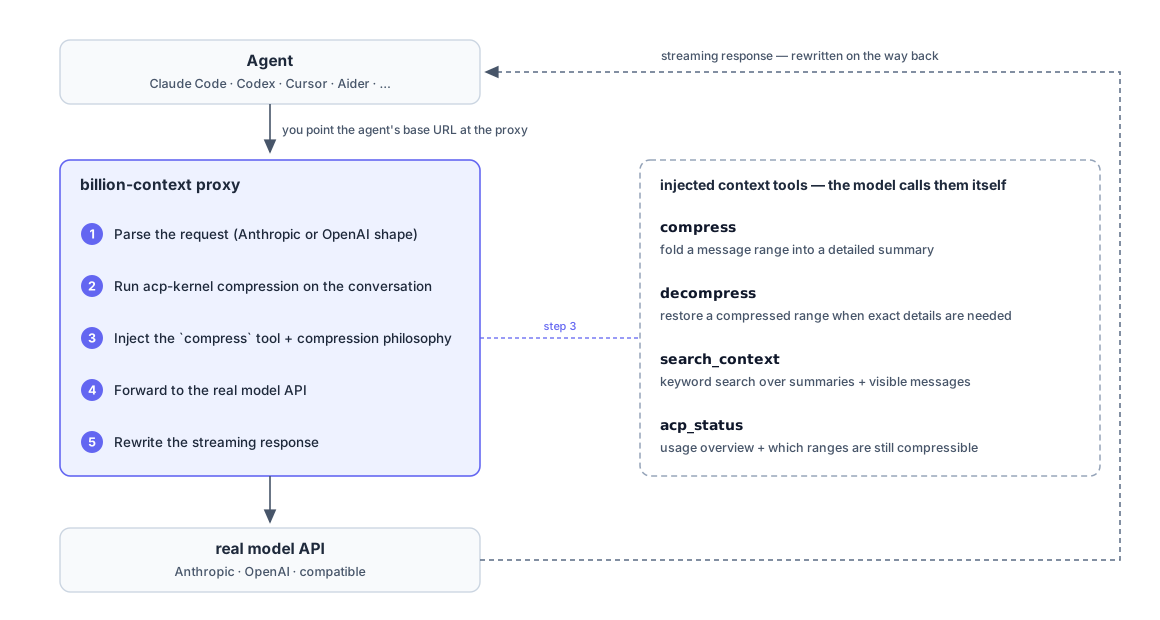
It works as a proxy between your coding agent and the LLM API. It supports Anthropic and OpenAI-compatible endpoints.
Instead of following fixed rules about when to compress, it lets the AI decide what to compress and when.
Say your agent is fixing an authentication bug. It can keep the error logs and relevant code in view while compressing older conversations about unrelated features.
This helps your agent focus on the current task without losing important context halfway through.
Reversible compression lets you bring back old details whenever you need them
Normally when an AI agent summarizes a long conversation some details disappear from its working memory.
Billion Context handles this differently. It breaks your conversation into smaller sections and compresses them separately.
It gives your agent four tools:
- compress: Turns older messages into shorter summaries.
- decompress: Brings back the original messages when needed.
- search_context: Searches old summaries and recent messages.
- acp_status: Checks how much context the agent is using.
How the Billion Context works and injects tools into your agent:
Say you designed your database two weeks ago and your agent now needs to check why you chose a particular structure.
Instead of asking you again it can search the old conversation and bring back the exact discussion.
So even after compressing thousands of messages your agent can still find details from earlier work.
Smarter prompt caching can cut your AI coding costs by roughly 5×
Long coding sessions can get expensive because your agent keeps sending old conversation history to the model.
Prompt caching helps by reusing parts of that history instead of processing everything again.
But normal context compression can break this cache when it replaces large chunks of messages with new summaries.
Billion Context tries to avoid that by using a specialized technique that compresses the cache into neatly managed structured ranges.
This technique has led to as high as 96%–99% cache hit rates with compression overhead at around 2% or less.
It also gives you as much as 5× lower token usage during long sessions.
Your actual savings will depend on your model and workload. But this could make running coding agents for hours or days much cheaper.
Month-long sessions mean you don’t have to keep restarting your coding agent
If you’ve used AI coding agents for large projects then you know how annoying it is to start a fresh session and explain everything again.
Billion Context aims to solve this by keeping the active context small while saving older conversations for later.
In its published tests the project reports:
- 4.5 months of testing.
- 174,327 model calls.
- 18.76 billion cumulative input tokens.
- Zero context-window violations with 204,800-token windows.
That doesn’t mean the model reads billions of tokens at once. It means Billion Context manages the growing history so the agent can keep working within its normal context window.
For us developers this means we could work on the same project for weeks without constantly resetting our agents or explaining the architecture again.
Protected rules and tool states stop your agent from losing critical instructions
Not everything should get compressed.
Think about your agent’s current to-do list or important architecture decisions. Losing these could mess up an ongoing task.
Billion Context gives us two ways to protect them.
protectedLatestTools keeps the latest results from tools like task trackers in the active context. Older versions can still get compressed.
acp_rule lets your agent save important instructions that stay protected from compression.
Say you tell your agent that every database migration must work with older app versions. It can save that rule and keep it available throughout the session.
This helps your agent remember important project requirements even after many rounds of compression.
Billion Context shows that we don’t always need bigger context windows to keep AI coding agents working longer. We need agents that can manage their memory better so we can spend less time restarting sessions and more time building.