Blog

How Claude Code Loops make you so much more powerful

You think Claude Code makes you code faster — but you don’t realize you’re barely scratching the surface.

Just sending prompt after prompt to Claude Code will get you nowhere.

When you ignore features like Loops, you end staying far behind what your potential could be — in speed and accuracy and everything that moves you closer to your goals as a developer.

Loops are like the holy grail of AI automation.

You’re no longer just manually prompting and hoping to get exactly what you want.

Now Claude will actually do the prompting for you — over and over until it gets the exact prompt that meets your exact requirements.

It’s an absolute game changer.

You are going from regular prompt engineering — to full-blow loop engineering.

No more step-by-step instructions — now you define precise goals, verification criteria, and stopping conditions.

And it doesn’t stop at prompting.

What are Claude loops exactly?

Claude Code loops are the iterative execution cycles in which Claude repeatedly:

  • Reads the current project context
  • Uses tools such as terminal commands or file editing
  • Evaluates the results
  • Repeats the process until a predefined stop condition is met

Instead of acting like a one-shot chatbot, Claude functions as an autonomous background agent capable of completing tasks with minimal human intervention.

The four types of loops

Claude Code gives you four primary loop patterns.

1. Turn-based loops — Complete everyday tasks reliably

Every prompt already runs inside a turn-based loop by default.

Claude gathers context, performs edits, executes tools, verifies its work, and returns a response.

Example:

Scenario: Fixing a bug in a login form.

Prompt:

Fix the bug preventing users from logging in with Google OAuth.

What Claude does:

  • Reads the authentication code
  • Identifies the issue
  • Updates the implementation
  • Runs relevant tests
  • Returns the completed fix

The loop ends once Claude has finished your task and gives you a response.

These loops are ideal for everyday tasks such as debugging, refactoring, and implementing small features.

2. Goal-based loops — Make sure Claude explicitly finishes the job

Goal-based loops continue working until a measurable objective has been achieved.

Example:

Scenario: Eliminate all failing tests.

Prompt:

Keep working until every unit test passes.

Do not stop if tests fail—fix the issues and rerun the test suite until all tests are green.

What Claude does:

  • Runs the test suite
  • Finds failing tests
  • Makes code changes
  • Reruns the tests
  • Repeats until every test passes

Instead of stopping after one attempt, Claude keeps iterating until the success criteria are met.

Rather than generating a single answer, Claude keeps iterating until the defined outcome is reached.

3. Time-based loops — Easily automate recurring development tasks

Time-based loops execute on a schedule, similar to cron jobs.

For example:

Scenario: Monitor a pull request throughout the day.

Command:

/loop 15m check my open PR, address any new review comments, rerun CI, and commit fixes if needed.

What Claude does every 15 minutes:

  • Checks for new reviewer comments
  • Updates the code
  • Runs tests
  • Verifies the build
  • Waits until the next scheduled run

This is similar to a cron job, except the scheduled task is powered by an AI agent rather than a static script.

Claude periodically revisits the task without requiring another prompt.

4. Proactive loops — Let Claude continuously maintain your projects by itself

Proactive loops are the most autonomous.

Instead of waiting for your instructions, they continuously handle repetitive engineering work.

For example:

Scenario: Automatically maintain a repository.

Workflow:

Every once in a while, Claude:

  • Scans the repository for outdated dependencies
  • Opens upgrade pull requests
  • Fixes simple merge conflicts
  • Runs the test suite
  • Closes duplicate issues
  • Updates documentation if APIs have changed

No developer prompt is required. The workflow runs continuously based on a schedule or repository events, keeping the project healthy with minimal manual intervention.

This shifts AI from reactive assistance to proactive software engineering.

Evaluator-driven verification — Reduce bugs by making Claude prove its work

One of the biggest challenges with language models is premature satisfaction—assuming a task is complete before proving it works.

Claude Code addresses this with external verification.

Instead of relying on Claude’s confidence, an evaluator checks the outcome using objective signals like:

  • Unit tests
  • Linters
  • Browser automation
  • Performance checks

If verification fails, Claude automatically returns to work until the required checks pass.

Cron-like AI workflows — Turn Claude into a scheduled engineering assistant

Time-based loops effectively turn Claude into a scheduled AI engineer.

A recurring loop can:

  • Review open pull requests
  • Respond to new review comments
  • Apply fixes
  • Re-run tests

You can step away while Claude continuously manages routine engineering work in the background.

Deterministic API control — Build reliable autonomous agents that stop at the right time

Claude Code loops are controlled by structured API signals rather than natural-language responses.

States such as stop_reason: "tool_use" and stop_reason: "end_turn" determine whether Claude should continue working or exit the loop. This deterministic control flow reduces premature exits and prevents runaway execution.

Tiered cost optimization — Scale long-running AI workflows while keeping costs low

Long-running loops can become expensive if every iteration relies on a frontier reasoning model.

To reduce costs, routine tasks—such as gathering context or running shell commands—can be delegated to smaller, faster models. More capable models are reserved for complex reasoning and code changes, making autonomous workflows more efficient.

Loops are the future — Spend less time prompting and more time shipping software

With loops, instead of waiting for prompts, Claude can monitor repositories, manage pull requests, triage issues, and perform continuous maintenance with minimal supervision.

By combining iterative execution, automated verification, deterministic control flow, and scheduled automation, loop engineering enables AI agents that work toward measurable outcomes—not just generated responses.

The result is an AI that behaves less like a chatbot and more like a persistent engineering teammate.

How Claude Code Loops make you so much more powerful Read More »
Claude Code Dynamic Workflows will change AI coding forever

Claude Code Dynamic Workflows will change the way developers code with AI forever.

It fixes all the problems we’ve had to deal with when trying to use the same agent to do everything — or when trying to make multiple agents work together.

It combines hard-coded code and dynamic LLMs in a way we’ve never seen before — to get the absolute best of both worlds.

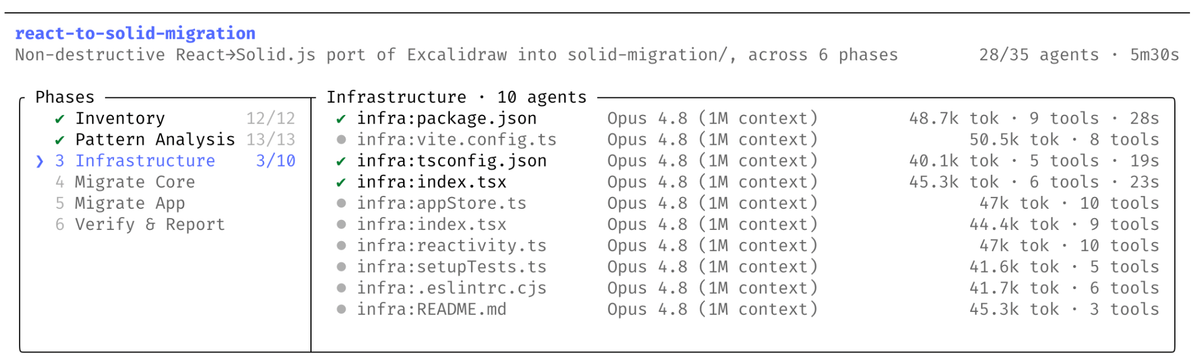
Dynamic Workflows allows Claude write its own JavaScript orchestration scripts on the fly and spin up tens to hundreds of parallel subagents to tackle giant tasks end-to-end.

It doesn’t just spawn sub-agents randomly — it deploys them in incredible structured and sophisticated ways.

And the sub-agents are not just doing simple divide-and-conquer code generation like we’ve been seeing.

They are intelligently combining themselves in a way that’s perfectly customized to whatever massive task we give them.

Some of them might aggressively review the code another agent generated — some might be there to pick the best code generated among a set of other agents.

Let’s dive deeper into Dynamic Workflows and see all the ways it can level up the workflows of so many developers.

1. Fixes all the biggest failures of single-context LLMs

Traditional AI agents operate inside a single conversation, which creates three major failure modes.

Defeating agentic laziness

Give one agent a task like reviewing 50 files for a security issue and it eventually becomes difficult to track progress.

Tasks get summarized, details are missed, and the model may prematurely declare success.

Dynamic Workflows solve this through decomposition. Instead of one agent handling 50 files, Claude launches 50 focused subagents. Each agent sees only one file and one objective, while the orchestration layer manages the larger task.

Crushing self-preferential bias

In traditional workflows the same model often generates and reviews its own work.

Dynamic Workflows separate these responsibilities. One agent builds, another reviews, and a third may challenge both. Because reviewers operate in independent contexts, they evaluate outputs against the requirements rather than defending previous reasoning.

Preventing goal drift

Long conversations cause important constraints to disappear over time.

Requirements like maintaining backwards compatibility or preserving performance gradually get compressed out of context.

Dynamic Workflows keep agent conversations short and purpose-built, ensuring every worker remains tightly aligned with the original objective.

2. JavaScript-powered deterministic decomposition

This is one of the biggest breakthroughs with Dynamic Workflows.

Claude doesn’t just spawn agents on the fly — it first writes a custom orchestration program.

LLM’s are great but they can be unpredictable — and there is no guarantee on how they tackle a huge goal.

With this JavaScript orchestration layer, the workflow’s structural control flow is 100% deterministic and predictable.

The file calls multiple JavaScript functions, like agent():

  • agent(prompt, options): Spawns an isolated subagent. Can enforce structured JSON data using a schema

We know exactly what is going to happen at the high-level — while letting the individual sub-agents decide how they go about the lower-level tasks distributed among them.

Instead of thinking and generating everything on the fly, Claude generates a JavaScript workflow that determines:

  • How work is divided
  • Which agents are created
  • How outputs are verified
  • How failures are handled
  • How results are synthesized

Because these workflows are standard artifacts, developers can save, modify, version-control, and rerun them. Over time, teams can build libraries of reusable workflow harnesses and custom agent networks tailored to their engineering processes.

3. Advanced multi-agent design patterns

Dynamic Workflows can combine sophisticated agent architectures on demand.

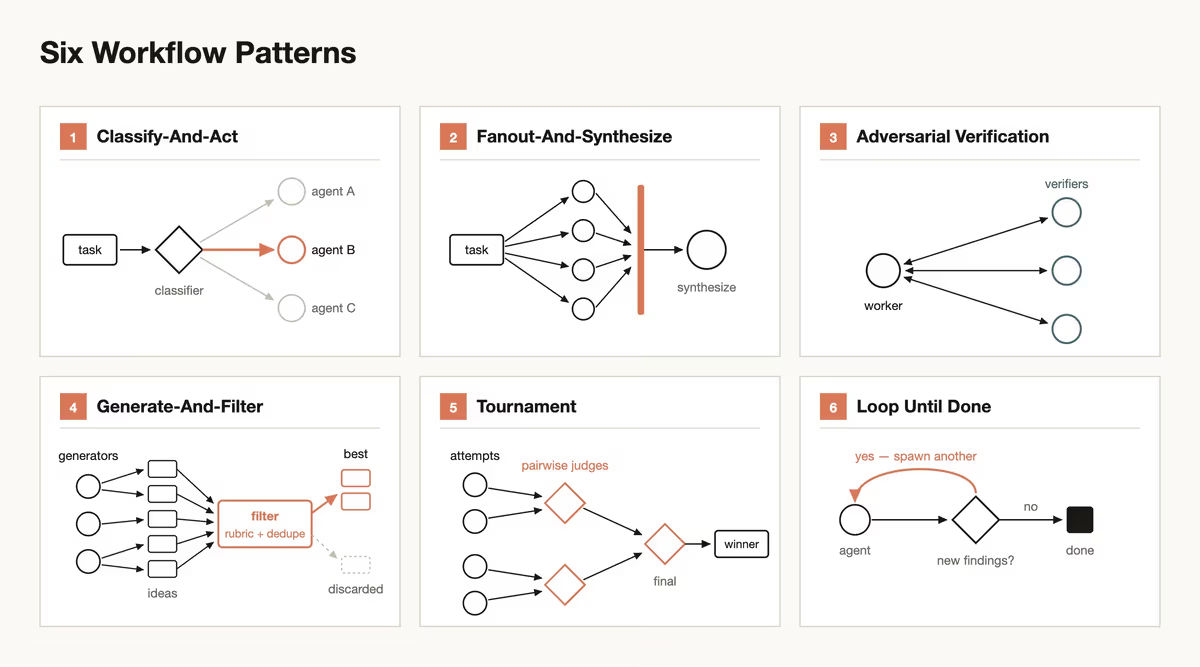
Tournaments

Multiple agents attempt the same problem using different approaches. A separate judging agent evaluates the candidates and selects the strongest solution.

Adversarial verification

A dedicated reviewer is created with one goal: reject the output.

This agent actively searches for security vulnerabilities, logic flaws, hidden assumptions, and edge cases, creating a far more rigorous review process than self-evaluation.

Fan-out-and-synthesize

For large-scale tasks, Claude distributes work across dozens or hundreds of parallel agents operating independently. Once completed, the workflow pauses and synthesizes all outputs into a unified result.

This pattern is ideal for migrations, audits, documentation generation, and repository-wide code changes.

4. Powering massive engineering projects

The scale enabled by Dynamic Workflows is difficult to overstate.

It’s really hard to overstate the sort of massive scale you could get from using Dynamic Workflows.

A prominent example is the Bun runtime migration from Zig to Rust. Using workflow-driven orchestration, approximately 750,000 lines of Rust code were generated while maintaining roughly 99.8% compatibility with the existing test suite.

Projects that would traditionally span multiple quarters can increasingly become automated jobs running in the background for hours or days.

5. Built-in resumability and safety

Long-running workflows require operational reliability.

The runtime continuously tracks workflow state and subagent progress. If a crash or disconnection occurs, execution resumes from the last checkpoint rather than restarting from scratch.

To prevent runaway costs, the system also provides visibility into workflow execution, token consumption, and resource usage, while enforcing limits that stop recursive workflows from spiraling out of control.

Dynamic Workflows represent a shift from prompt engineering to orchestration engineering.

Rather than asking a single AI agent to solve increasingly complex problems, Claude generates a custom execution harness, launches specialized workers, verifies their outputs, tracks state, and synthesizes results.

The future of AI development is not single super-agent.

It’s dynamically generated teams of specialized agents coordinated by software the AI writes for itself.

Claude Code Dynamic Workflows will change AI coding forever Read More »

Claude Code just got a massive Auto Mode upgrade

This is incredible.

Anthropic just made an insane change to Claude Code that will massively improve your productivity as a developer — although it might seem scary at first.

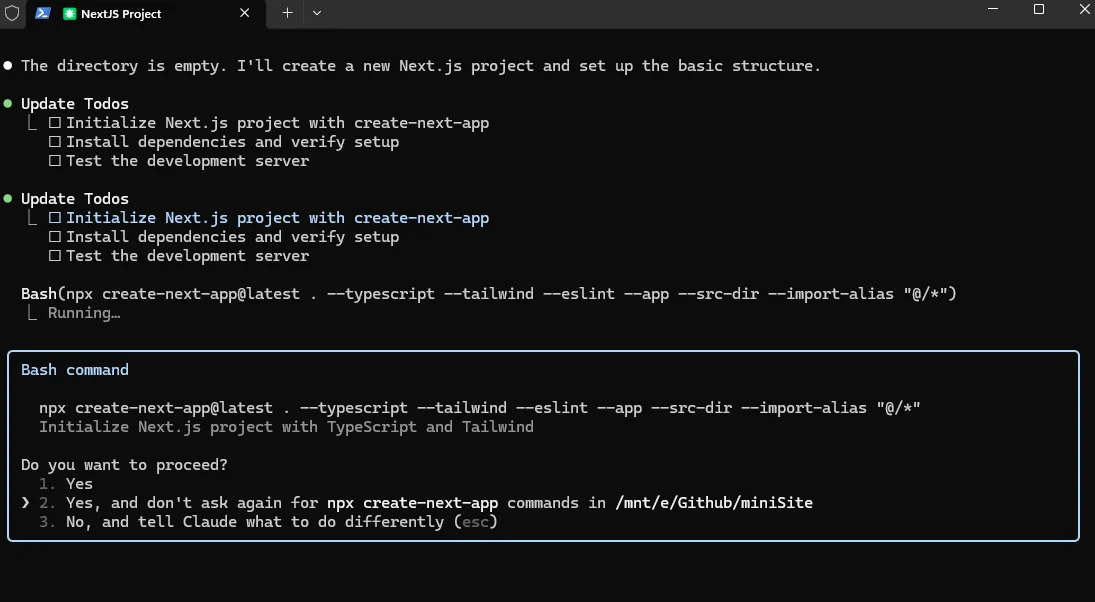
Claude Code now automatically executes commands and make tools calls by default when coding — no more stopping to ask for permission.

It won’t do this anymore:

And I know at first glance some developers will be seriously worried about this — won’t this potentially lead to disaster like file/database wipeouts or corruption from unsafe tool calls?

But actually this line of thinking is completely wrong — especially from what Anthropic discovered from their internal research.

In internal testing conducted by Anthropic across 1,053 paid participants, humans caught disguised dangerous commands only 13.6% of the time. After 50 consecutive permission prompts, detection dropped to roughly 5% as approval fatigue kicked in.

So it looks like it’s actually we humans we need to be concerned about when it comes to verifying commands.

So Claude Code now uses a background classifier to automatically know which commands are safe and which aren’t.

And the difference was absolutely insane — the automatic system was almost 7 times better at catching dangerous commands

Claude Code’s background classifier demonstrated a substantial security advantage, identifying and blocking 89% of destructive commands that might otherwise have been executed.

So of course once they saw the massive improvement it only made sense to make it the default in versions of Claude Code — Pro, Max, and Team.

And this change gives us so many benefits beyond just security.

Claude Code is no longer going to stall in its execution just to ask you to approve a command — you can finally experience the full value of long-horizon autonomous coding.

Anthropic reports that teams using it ship roughly 25% more pull requests because long-running agents can continue working without repeatedly waiting for human approval.

I found it pretty annoying at times — I would give Claude a prompt and expect it to be done when I come back — only to find out that it has barely even done anything — all because it’s waiting for me to approve a command.

I’m not the only one too:

Now I will have complete certainty that when I come back I will see results.

And also the background classifier is completely free — zero cost on all the complex logic or token usage of checking if a command is safe or not.

And free for all plans too.

Anthropic fully absorbs the computational cost of Claude Code’s background classifier, allowing Pro, Max, and Team users to benefit from continuous automated security checks without consuming any additional usage allocation.

So you don’t need to spend more just to be able to code with peace of mind.

And Auto Mode isn’t only looking for obviously dangerous shell commands — also helps defend Claude against indirect prompt injection.

So like if Claude reads a third-party package, webpage, or scraped file that has hidden instructions telling it to ignore the user and steal credentials.

Claude could potentially interpret those instructions as legitimate.

So this new Auto Mode adds another security boundary — the classifier always makes sure to compare Claude’s proposed action with the user’s original intent.

And this is especially important for autonomous agents because the more information they take in from the outside world, the larger their prompt-injection attack surface becomes.

Of course an AI supervising another AI creates its own problem — what happens when the security classifier repeatedly blocks Claude due to false positives?

Anthropic took this into consideration and built in an escalation mechanism.

If the classifier blocks three consecutive commands or reaches 20 blocked actions during one session, Claude Code automatically exits autonomous execution and returns control to the human.

One rejection might simply mean Claude chose a risky approach.

Twenty means something probably deserves human attention.

Auto Mode isn’t perfect tho — Anthropic still recommends human oversight for high-stakes production operations.

But the direction is really fascinating.

We originally put humans in the loop because we didn’t trust AI — then humans started clicking “Approve” without reading.

So now Anthropic has decided to put another AI in the loop to supervise the first one.

Claude Code just got a massive Auto Mode upgrade Read More »

Claude Code is secretly wasting your tokens. This feature fixes that.

Most developers don’t realize just how many tokens Claude Code wastes by default in just trying to understand your codebase.

Every noisy search result, duplicate reference, and irrelevant file eats into your context before the real work even begins.

Increasing your API costs and slowing down responses significantly.

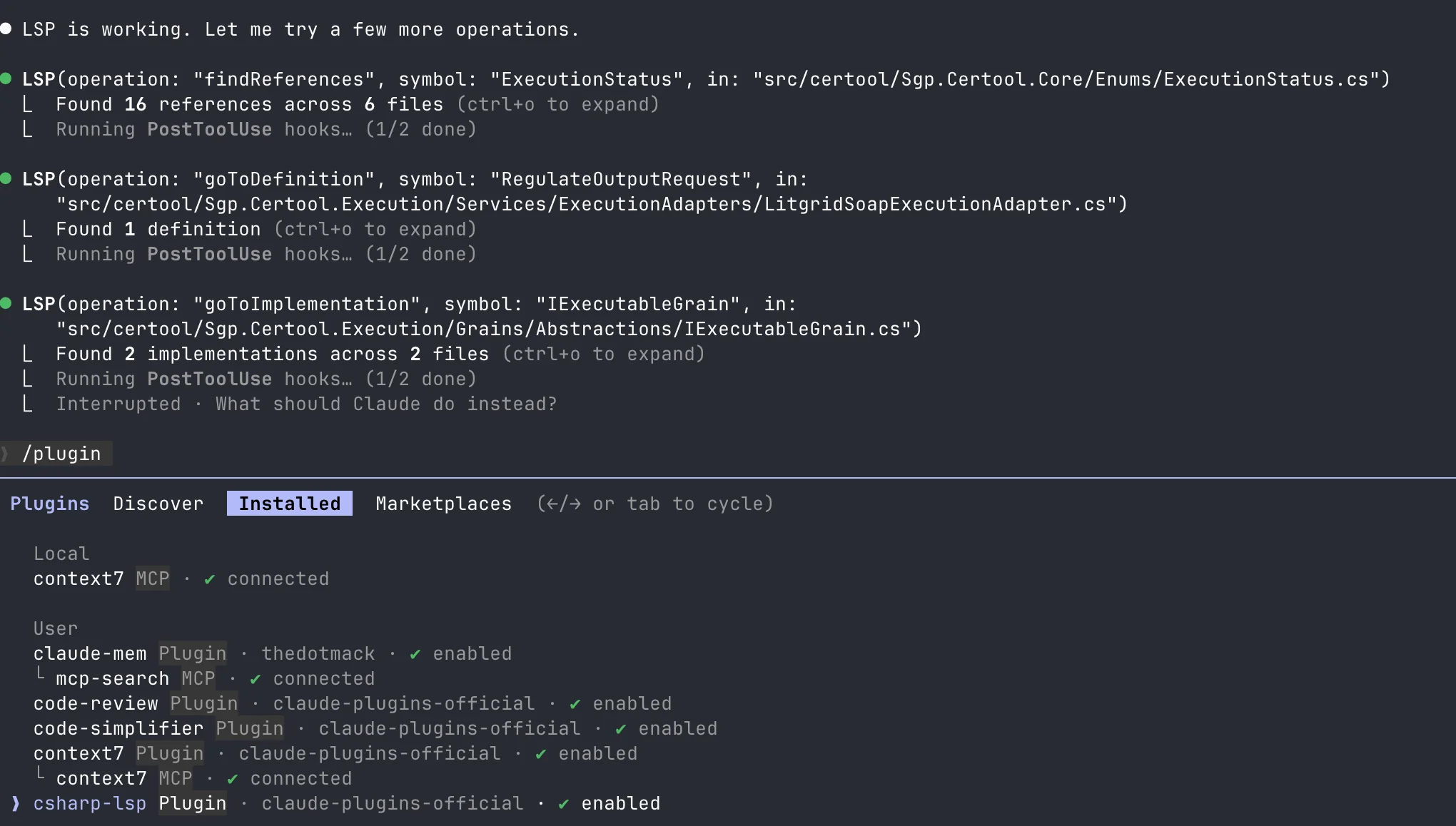
But luckily, we now have the incredible Language Server Protocol (LSP) integration to fix all this.

It’s one of the least talked about features that dramatically transforms how Claude processes your code and makes changes.

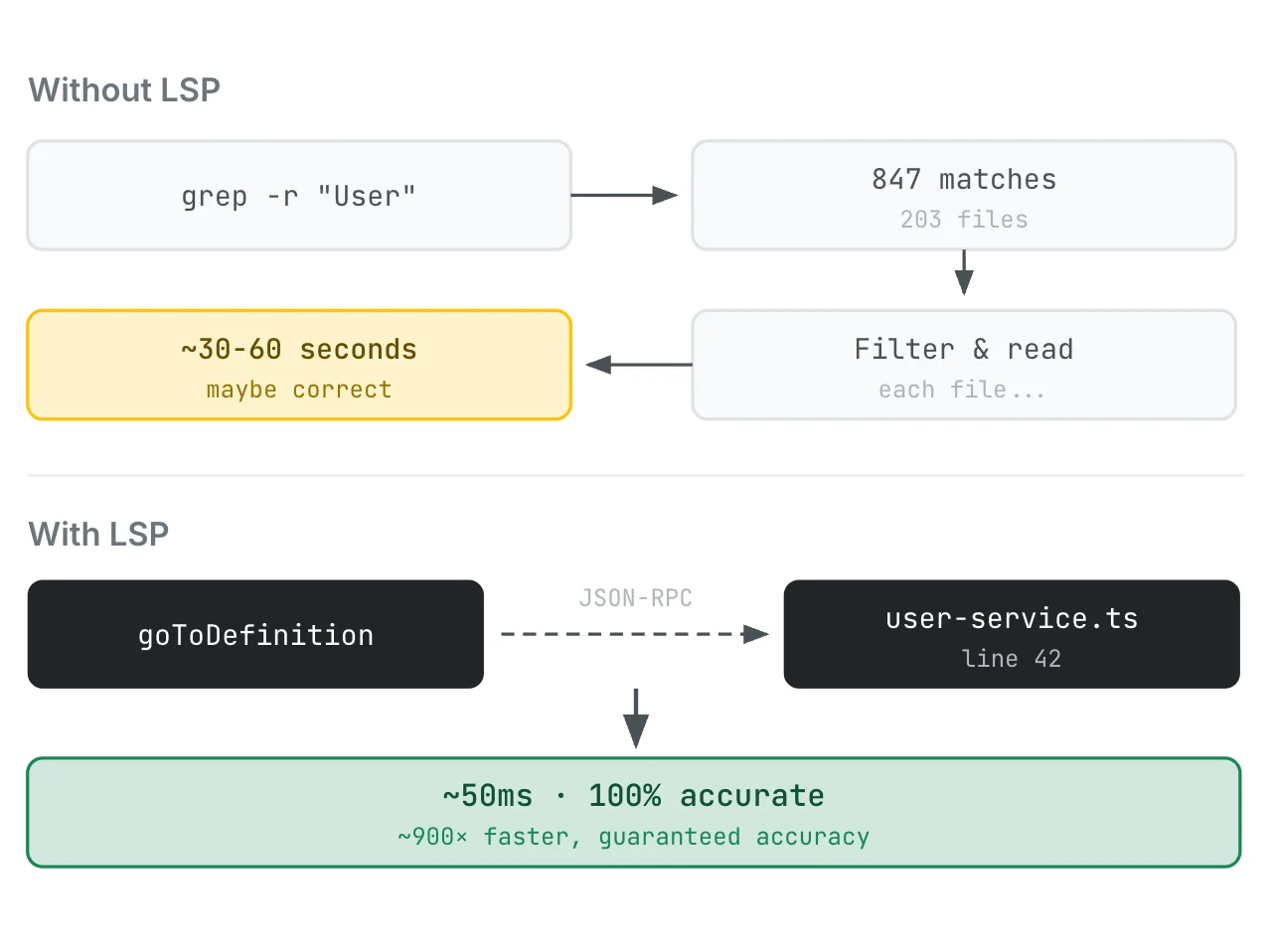
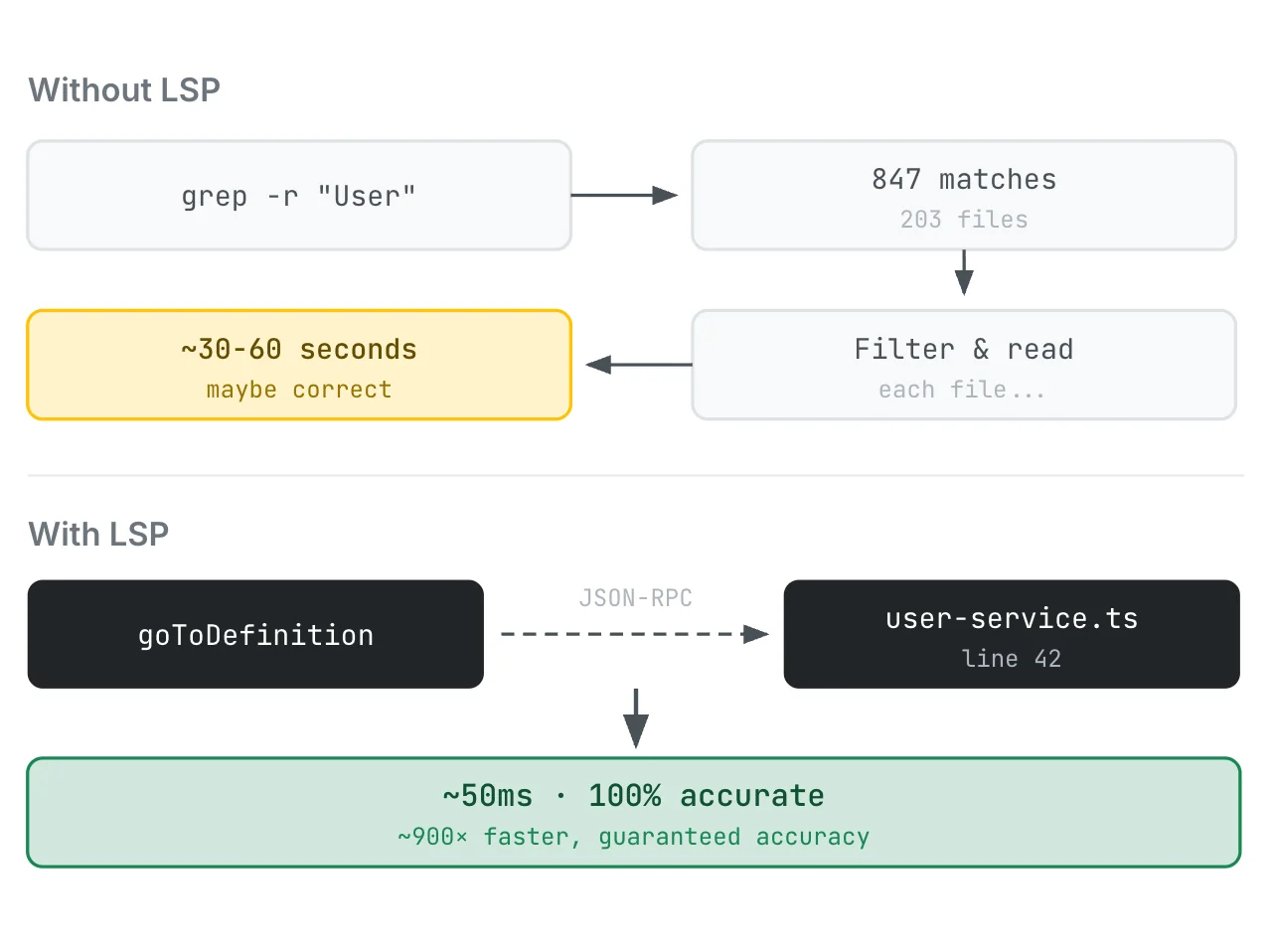
By swapping heavy text searches for instant AST queries, LSP cuts lookup times from 30–60 seconds down to a 50-millisecond response, delivering up to 900x faster code navigation speeds

With LSP Claude Code stops relying on text searches — it directly queries a language server that already understands your project’s structure. What you get is an AI assistant that behaves much more like a modern IDE than a just a chatbot. You get the best of both worlds.

LSP powers many IDE features we’ve been using to code everyday years before AI came around, like:

  • Go to Definition
  • Find References
  • Rename Symbol
  • Type checking
  • Error diagnostics
  • Hover documentation

Rather than treating code as plain text, LSP exposes semantic information such as symbols, types, inheritance, and references.

Imagine asking:

“Where is UserRepository used?”

Without LSP, Claude performs a text search that may return:

  • the definition
  • dozens of call sites
  • comments
  • documentation
  • test files
  • unrelated string matches

Claude must read all of that before determining what actually matters.

With LSP, Claude asks the language server for the symbol’s references and receives only the precise locations where that symbol is used. Instead of searching text, it navigates your code semantically.

The difference becomes even more valuable in large repositories.

Enterprise projects often contain:

  • thousands of files
  • millions of lines of code
  • hundreds of packages

Traditional searches repeatedly scan those files. Language servers already maintain indexes of definitions, references, implementations, and type information. Claude simply queries those indexes, making navigation faster and far more precise.

One of the most underrated advantages of LSP integration is token savings.

Every line of search output consumes tokens, increases latency, and costs money. Text searches often return much more information than Claude actually needs, including comments, documentation, duplicate references, and unrelated matches. Claude has to spend part of its context window filtering that noise.

LSP eliminates most of this overhead. Instead of returning pages of search results, it provides only the relevant semantic information, such as:

  • the symbol definition
  • exact references
  • implementation hierarchy
  • type information

In large codebases with heavily referenced symbols, LSP-driven navigation can produce tool outputs that are 2–3× smaller than equivalent text searches.

That means:

  • lower API costs
  • faster responses
  • less wasted context
  • more room for Claude to reason about your code

LSP also makes refactoring much safer.

Suppose you rename a class called PaymentProcessor.

A simple text replacement could accidentally modify comments, documentation, string literals, or unrelated variables. A language server understands symbols rather than text, allowing Claude to rename only the actual class and its legitimate references.

Another major advantage is immediate diagnostics.

After Claude edits a file, the language server can instantly report:

  • syntax errors
  • missing imports
  • unresolved identifiers
  • type mismatches

Instead of waiting for a build or CI pipeline to fail, Claude can identify and fix problems immediately.

Sometimes people confuse LSP with the Model Context Protocol (MCP), but they complement each other rather than compete.

  • LSP helps Claude understand your source code.
  • MCP helps Claude interact with external tools such as GitHub, Slack, databases, and cloud services.

Together they allow Claude to understand both your application and the ecosystem around it.

LSP shifts Claude from simply reading code to actually understanding it. Rather than treating a repository as a collection of files, Claude reasons about symbols, relationships, types, and program structure.

The result is:

  • faster navigation
  • safer edits
  • better refactoring
  • immediate feedback
  • lower token usage

LSP integration may not be as flashy as autonomous agents, but as a developer working on real-world codebases, it’s one of the most meaningful ways to level up your Claude Code workflow.

Claude Code is secretly wasting your tokens. This feature fixes that. Read More »

Claude Code Skills vs MCP vs Plugins: The real difference most developers confuse

Many developers confuse them a lot — but they’re actually not interchangeably in any way.

They all extend Claude Code but they do it very differently and for very different reasons.

First let’s understand what each of them are on their own.

A Skill is a reusable set of instructions, knowledge, and workflows that Claude can load when performing a task. Skills help Claude apply project-specific standards, follow established processes, and consistently execute repeatable tasks.

Model Context Protocol (MCP) is an open protocol that enables Claude to connect to external tools, services, databases, APIs, and other software systems. MCP servers let Claude discover available tools and interact with connected resources.

A Plugin is an installable extension for Claude Code that packages one or more components — like Skills, MCP servers, Hooks, Agents, and configuration — into a reusable, shareable unit.

Here’s a real-world scenario that illustrates the crucial difference:

Imagine having a chef that learns your family’s special cake recipe.

Skills: the mental playbooks, checklists, and habits stored in your brain.

Now they know how to cook it.

But they still only have the ingredients already in the kitchen.

MCP: The physical tools you use to achieve goals in the real world.

Now the chef gets access to:

  • the pantry
  • grocery delivery
  • refrigerator inventory
  • supplier catalog

The chef can actually obtain new ingredients.

Plugins: the entire kit containing everything you need to know and every tool you need to achieve your goal.

Instead of manually giving every new chef:

  • recipes
  • supplier accounts
  • kitchen procedures

You hand them one onboarding kit containing everything.

A Skill adds knowledge.

An MCP adds capability.

A Plugin adds distribution.

A skill teaches Claude Code how to do things — specialized knowledge and edge cases it needs to be aware of, and the optimal manner of approach to take in solving a task.

MCP lets Claude Code actually do those things — make pull requests on GitHub, read databases, process analytics data, etc.

Plugins bundle MCPs and Skills into a single package. It can contain multiple mcps and multiple skills.

As a software engineer in your new company:

A Skill is training.

“Here’s how we review pull requests.”

An MCP is company access.

GitHub credentials.

Jira.

Slack.

AWS.

A Plugin is the setup package you get as a new hire:

Laptop.

VPN.

GitHub access.

Internal documentation.

Team tooling.

Training, permissions, and installation are three different problems.

Why you need all of them

Imagine a situation where Claude keeps writing API endpoints differently from your team.

The problem isn’t missing capability — Claude already knows how to write code — it simply doesn’t know your conventions.

That’s where a Skill comes in.

But how about when Claude needs to query your production database?

No amount of instructions can magically let Claude access that database.

That’s where MCP shines.

But then we still need every engineer on your team to receive:

  • the database connection
  • deployment workflow
  • code review standards
  • security checks

You don’t want everyone configuring these individually.

That’s a Plugin.

Can one replace the other sometimes?

No.

A Skill cannot replace an MCP because instructions cannot grant access to systems Claude cannot reach.

An MCP cannot replace a Skill because having access to a system doesn’t teach Claude your team’s preferred workflow.

A Plugin doesn’t replace either one—it simply packages them together

The easiest way to remember the distinction is this:

  • Skills lets Claude follow your team’s processes
  • MCP lets Claude access external systems
  • Plugins lets other install everything easily

Claude Code Skills vs MCP vs Plugins: The real difference most developers confuse Read More »

How the I Have ADHD Skill saves tokens & boosts your productivity

This Skill is a game changer for Claude Code.

The I Have ADHD Skill massively upgrades the quality and clarity of Claude’s responses by encouraging it to communicate in a much more direct, structured, and action-oriented way.

It removes all the fluff and goes straight to the point — saving you so much token costs and improving your mental model of the task at hand — which let’s you move faster and get things done.

The crucial problem it’s here to solve

AI coding assistants often answer simple questions with long explanations before getting to the solution.

That style can be useful for learning — but when you’re debugging, shipping features, or reviewing code, it creates unnecessary friction.

The “I Have ADHD” skill solves that by encouraging Claude to prioritize the next action instead of lengthy context.

How the Skill works

The skill dramatically changes how Claude structures its responses.

Instead of long introductions, it’s encouraged to:

  • Start with the immediate next step.
  • Break work into numbered tasks.
  • Remove unnecessary filler.
  • Show progress throughout a task.
  • Finish with one clear next action.

You end up getting an AI that isn’t just intelligent, but also extremely easy to work with.

Why so many developers love it

The project quickly gained over 10,000 stars on GitHub within days of launch.

Because it addresses a frustration many developers have long had with AI assistants: too much explanation and not enough execution.

Whether you’re debugging, refactoring, or navigating a new codebase, concise responses reduce cognitive load and help you stay focused.

How to get started with the I Have ADHD skill

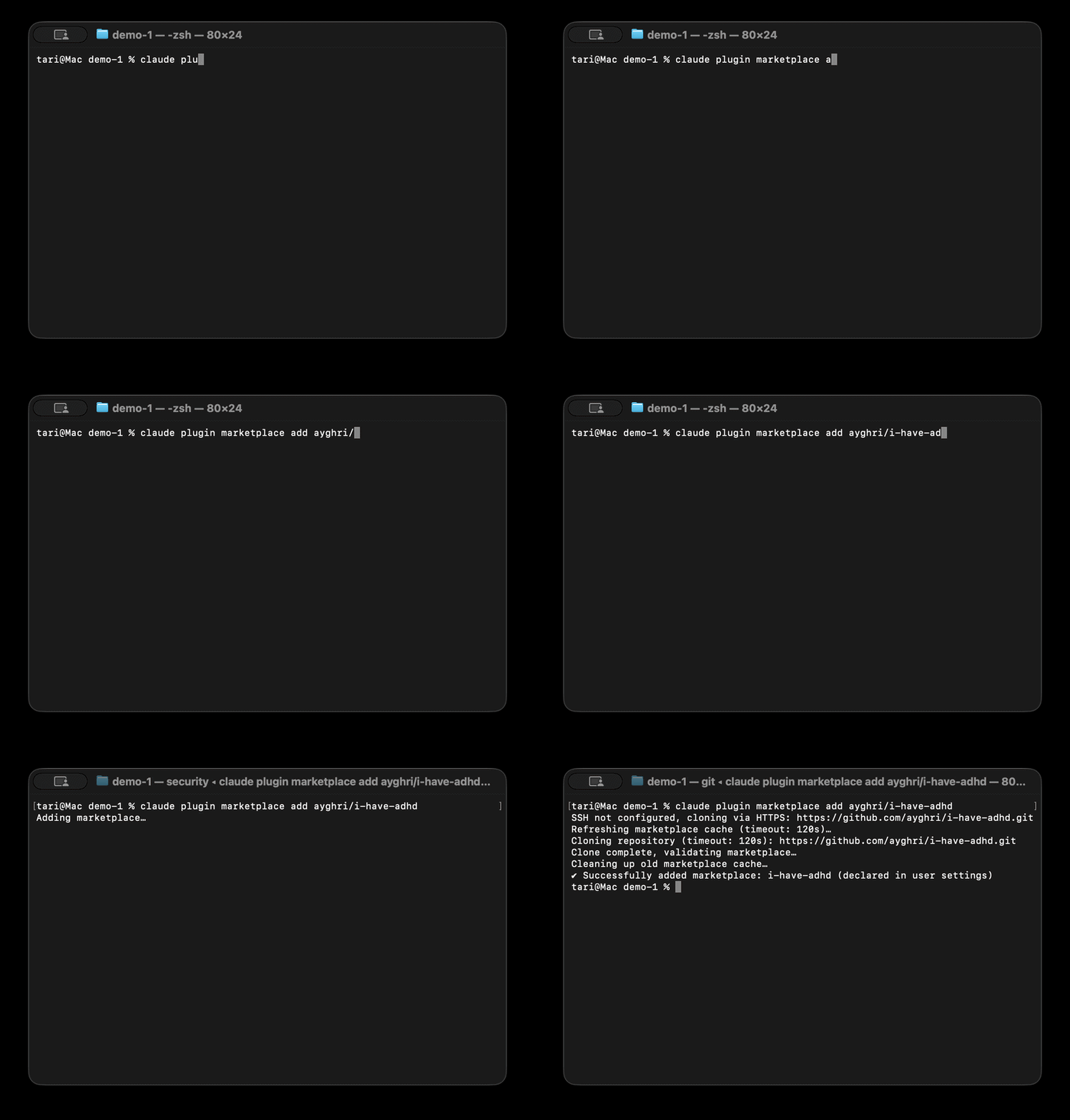
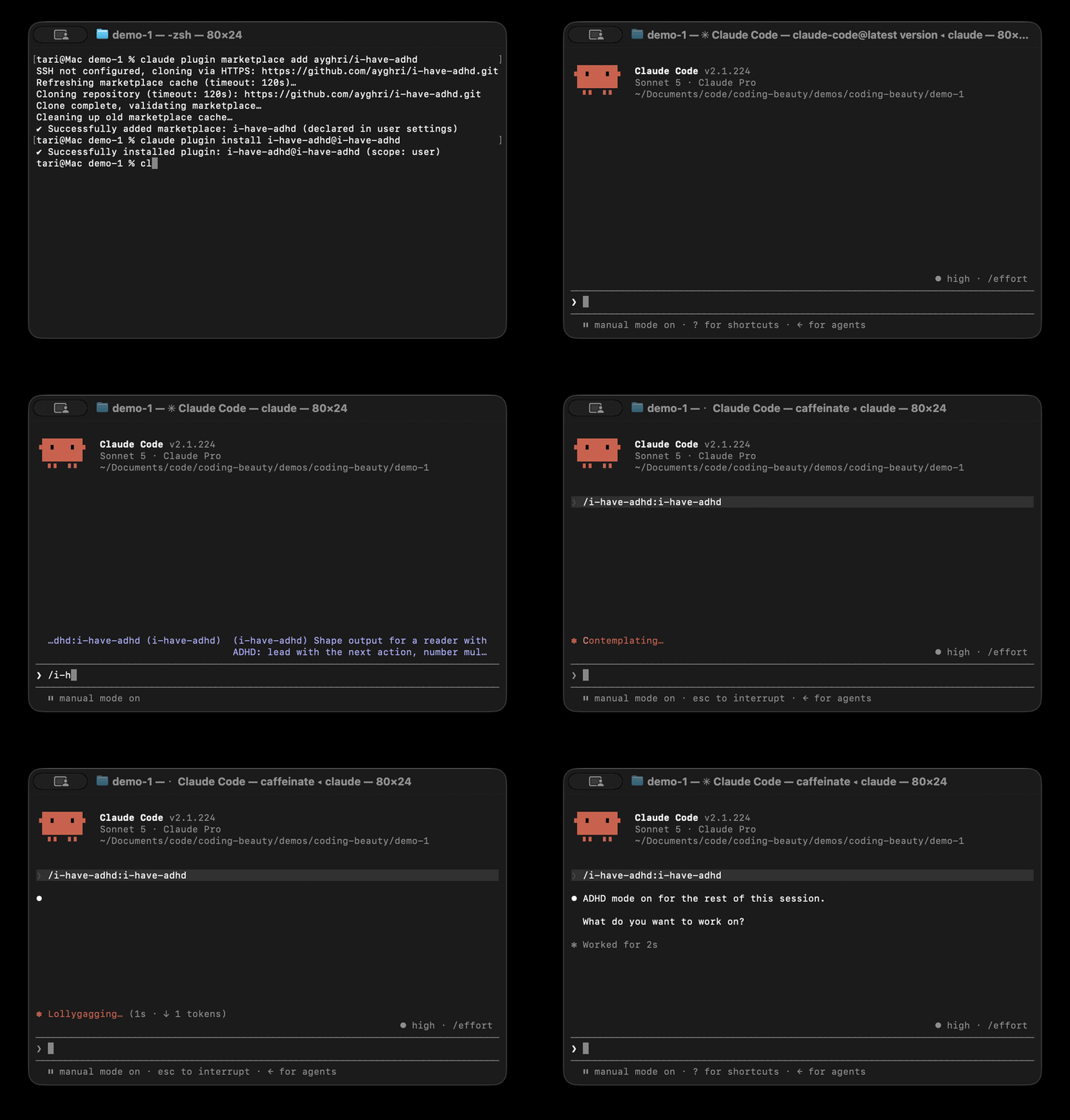
Install it easily with these commands:

JavaScript
claude plugin marketplace add ayghri/i-have-adhd claude plugin install i-have-adhd@i-have-adhd

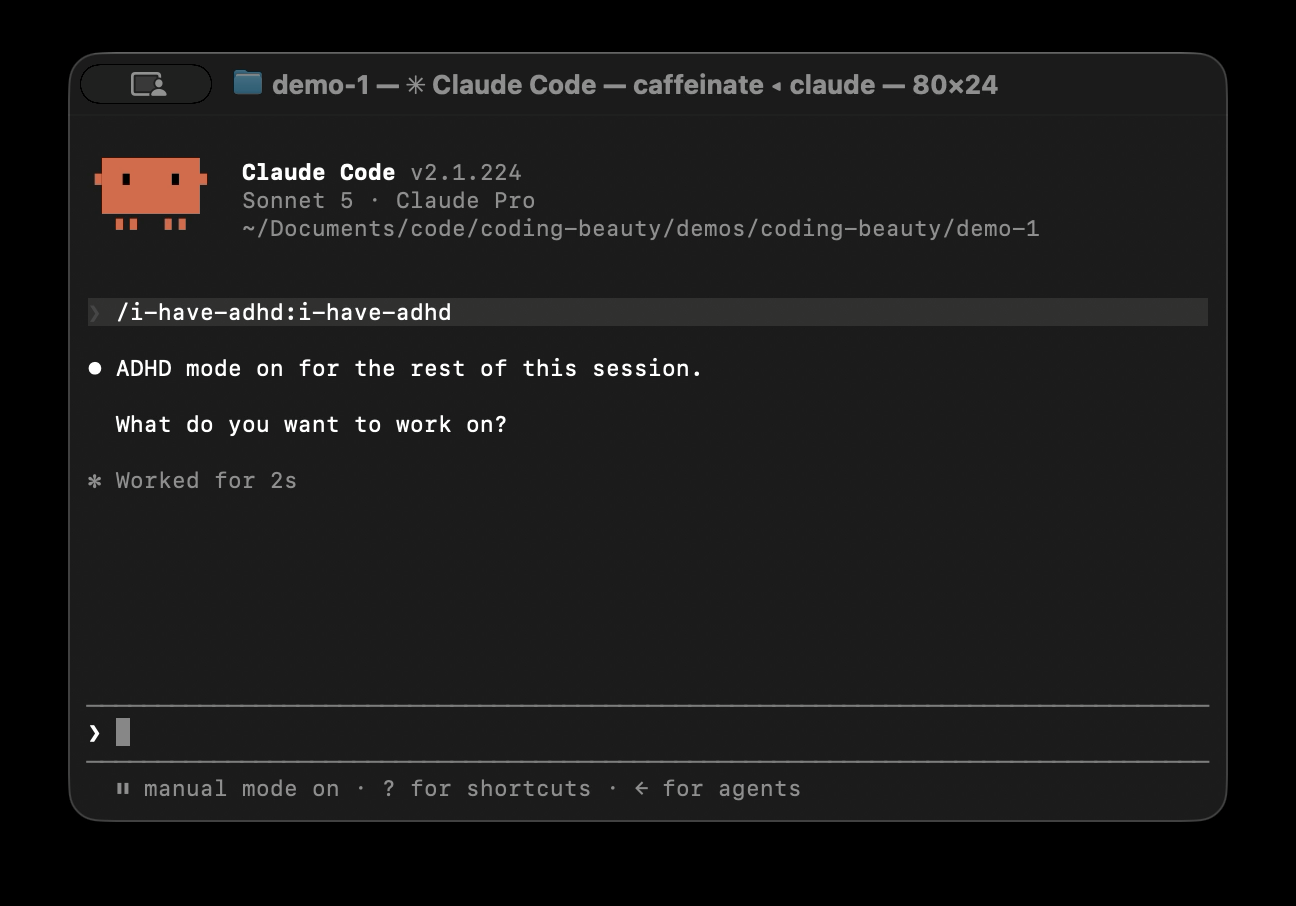
Then type /i-have-adhd in a Claude Code session to activate it — all the responses will be structured according to the rules of the skill for the rest of the session:

How to use it to transform your workflow (5 practical use cases)

1. Debugging production issues

Without the skill

Plain text
There are several reasons your API could be returning a 500 error. Let's begin by understanding how Express middleware works before we explore possible causes...

With the skill

Plain text
1. Check server logs. 2. Verify DATABASE_URL. 3. Run:    curl http://localhost:3000/health 4. Report the output.

Why it matters: When production is down, you need the next action — not a lesson.

2. Refactoring legacy code

Without the skill

Plain text
There are multiple approaches to refactoring this codebase. Before making changes, let's discuss architecture, design patterns, and technical debt...

With the skill

Plain text
Plan: ✓ Identify dead code ✓ Extract duplicate logic □ Add tests □ Rename interfaces Current step: Extract duplicate validation logic.

Why it matters: Breaking work into milestones makes large refactors feel manageable.

3. Building large features

Without the skill

Plain text
Let's build a complete authentication system. First, here's the architecture... [Hundreds of lines covering models, JWTs, middleware, RBAC, testing, deployment, and security.]

With the skill

Plain text
Phase 1 ✓ User model ✓ Login endpoint Phase 2 □ JWT middleware □ Refresh tokens Phase 3 □ Role middleware □ Permissions

Why it matters: You stay focused on one phase instead of being overwhelmed by the entire implementation.

4. Learning an unfamiliar codebase

Without the skill

Plain text
This project uses a layered architecture with controllers, services, repositories, middleware, utilities, shared modules, and configuration files... Let's walk through every directory.

With the skill

Read these first:

Plain text
1. routes.ts 2. auth.ts 3. middleware.ts Ignore everything else for now.

Why it matters: You can understand the project faster by focusing only on the files that matter.

5. Reviewing pull requests

Without the skill

Plain text
Overall this is a solid pull request. I noticed a few issues of varying importance, so let's review each one in detail...

With the skill

Plain text
Critical - SQL injection risk Important - Missing null check Minor - Rename variable Approve after fixing the first two.

Why it matters: Prioritized feedback makes reviews quicker to understand and easier to act on.

Final thoughts

You don’t just need a smarter assistant — you need an assistant that helps you get things done faster.

Sometimes the biggest productivity improvement isn’t giving an AI more knowledge. It’s simply teaching it to get to the point.

How the I Have ADHD Skill saves tokens & boosts your productivity Read More »

Claude Code refactors your codebase too slowly. Fix it with this feature

This Claude Code command is amazing.

It’s somehow like the multi-agent teams feature — but much simpler and more straightforward.

It’s perfect for those large-scale changes that can easily be broken down into smaller tasks — like mass refactoring and codebase migration.

It spins up multiple AI agents to work simultaneously across the codebase — giving you an immense boost in productivity.

Let’s look at the key features that make it so invaluable when working with Claude Code — from autonomous testing and pull requests, to how it combines brilliantly with other Claude Code commands to build a comprehensive engineering workflow.

1. Multi-agent task decomposition: ship large-scale code changes faster

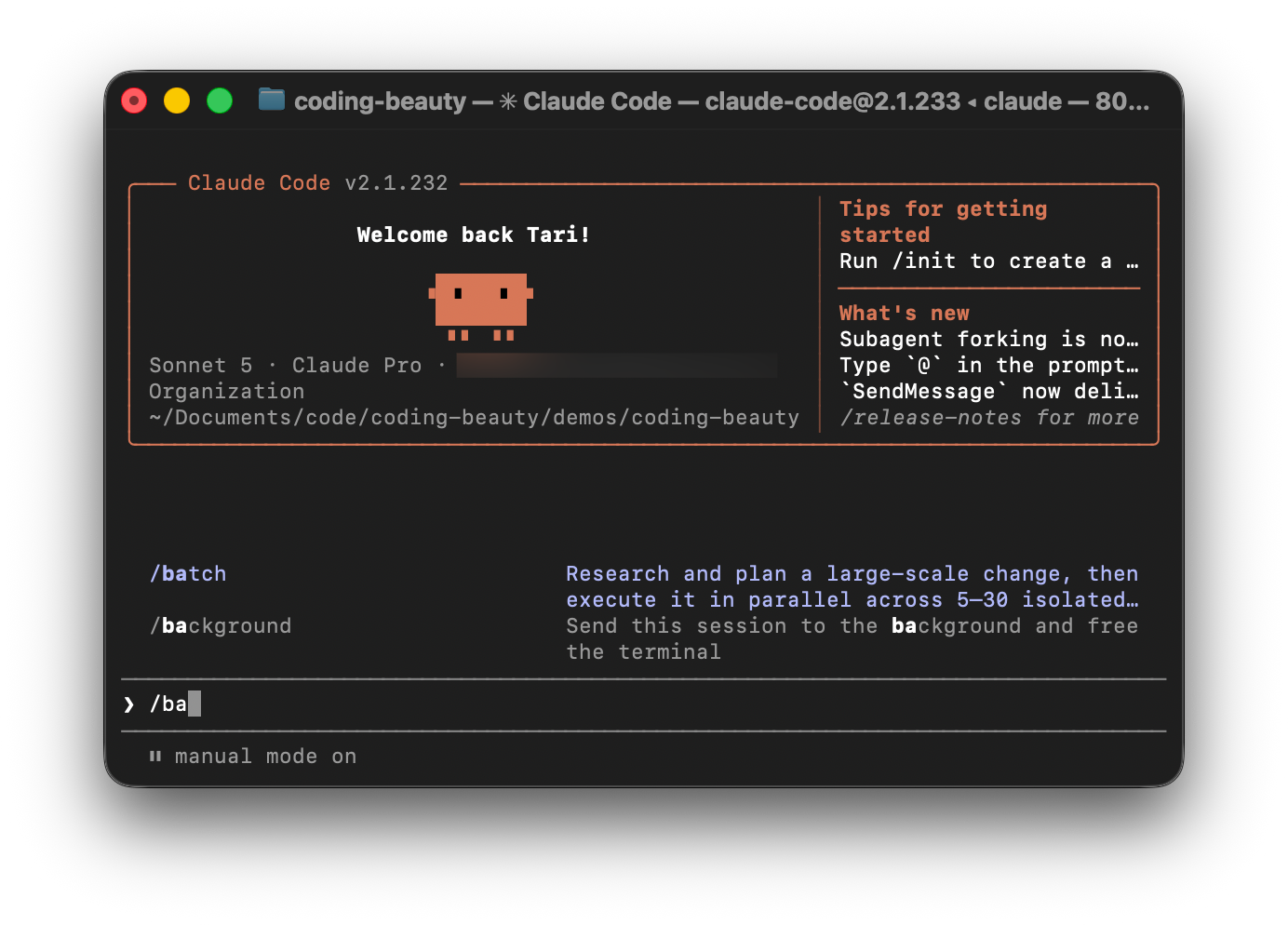
The foundation of /batch is its ability to break large requests into smaller, independent units of work.

When you invoke /batch, Claude Code:

  • Analyzes the repository.
  • Understands the requested objective.
  • Identifies logical boundaries within the codebase.
  • Decomposes the work into 5–30 independent work units.

Rather than editing files sequentially, Claude distributes work across multiple agents that can operate in parallel.

For example, a framework migration might be divided into:

  • Shared UI components
  • Authentication modules
  • Routing logic
  • API integrations
  • Testing infrastructure

By separating work into distinct scopes, /batch can scale far beyond the limitations of a traditional single-agent workflow.

2. The /batch and /simplify power combo

One of the more interesting aspects of /batch is how it complements Claude Code’s /simplify command.

While /simplify focuses on reducing complexity and unnecessary abstractions, /batch can coordinate improvements across an entire codebase.

The combination gives us several advantages:

  • Identifies overly complex patterns at scale.
  • Reduces unnecessary abstractions and indirection.
  • Improves code readability and maintainability.
  • Creates greater consistency across modules.
  • Eliminates repetitive manual refactoring work.

Instead of simplifying files one by one, you can use /batch to coordinate the effort across dozens of components simultaneously. This makes large-scale codebase cleanup and standardization significantly faster and more manageable.

3. Git worktree isolation: parallelize without conflicts

A key feature of /batch is its use of Git worktrees.

Every subagent receives its own isolated worktree instead of sharing a single working directory.

This enables:

  • Concurrent development
  • Independent validation
  • Isolated dependency management
  • Reduced merge conflicts

Because each worker operates in its own environment, changes made by one agent do not interfere with another.

A component migration can run in one worktree while another agent updates tests or refactors utilities elsewhere in the repository.

This isolation is what makes large-scale parallel execution practical and reliable.

4. Autonomous testing and pull requests

/batch is more than a code-editing tool.

Each subagent behaves like an autonomous developer responsible for its assigned scope.

Subagents can:

  • Implement code changes
  • Run test suites
  • Detect failures
  • Fix localized issues
  • Validate completed work
  • Create commits or pull requests

Instead of producing one massive repository-wide change, /batch generates smaller, self-contained outputs that are easier to review and merge.

The result is less manual coordination and a cleaner development workflow.

5. Plan-first execution

Before making any changes, /batch generates a structured execution plan.

The plan outlines:

  • How the task was divided
  • Which files or directories belong to each work unit
  • The responsibilities assigned to each subagent
  • The proposed transformation for each area of the codebase

Developers review and approve the plan before execution begins.

This approval stage:

  • Provides visibility into the process
  • Prevents unexpected repository-wide changes
  • Keeps humans in control of major modifications

Rather than blindly applying edits, /batch follows a plan-first approach designed for large-scale engineering work.

Final thoughts

Claude Code’s /batch command represents the broader shift single-agent coding assistance to coordinated multi-agent software engineering.

With key features like:

  • Intelligent task decomposition
  • Parallel AI execution
  • Git worktree isolation
  • Autonomous testing
  • Pull request generation
  • Human approval checkpoints

It enables repository-wide transformations at a scale that would traditionally require significant manual effort.

Software is no longer being built by a single AI agent, but now by a coordinated systems of specialized agents working together toward a common objective.

Claude Code refactors your codebase too slowly. Fix it with this feature Read More »

5 Claude Code Skills that every developer should know

Claude Code is powerful out of the box, but the right skills can make it so much better.

Skills give Claude reusable workflows for specific tasks. Instead of simply asking an AI to “build this feature,” you can give it a process for planning, designing, questioning assumptions, and remembering previous work.

Here are five Claude Code skills every developer should know.

1. feature-dev: Build features with a process

One of the biggest mistakes with AI coding agents is jumping straight from an idea into implementation.

You say:

“Add team invitations.”

And suddenly Claude is editing eight files before fully understanding the architecture.

feature-dev introduces a more structured workflow:

Understand → Plan → Implement → Test → Review

Claude can first explore the relevant parts of your codebase, understand existing patterns, develop an implementation approach, and then start making changes.

This becomes especially useful for features that touch multiple files, APIs, database models, or unfamiliar parts of a repository.

The goal is simple: don’t use Claude as a fast typist. Use it as an engineer responsible for the entire change.

2. frontend-design: Escape generic AI design

AI can build functional interfaces remarkably quickly.

The problem is that they often look… AI-generated.

Huge headline. Purple gradient. Three rounded cards. Glowing background.

Anthropic’s frontend-design skill pushes Claude toward more intentional, production-quality interfaces. Instead of immediately generating components, it considers things like typography, layout, visual hierarchy, color, motion, audience, and overall aesthetic direction.

So instead of simply asking:

“Build a dashboard.”

Claude can think about what the dashboard is for, who uses it, what information deserves attention, and how the interface should feel.

It’s especially useful for landing pages, dashboards, React components, product interfaces, and prototypes.

The real advantage isn’t better CSS. It’s better design decisions before the CSS gets written.

3. karpathy-guidelines: Make Claude precise and focused

AI coding agents can produce a lot of code very quickly.

Sometimes that’s the problem.

The community-built karpathy-guidelines skill packages ideas inspired by Andrej Karpathy’s observations about common LLM coding mistakes.

The principles are straightforward:

Think before coding. Keep solutions simple. Make surgical changes. Verify your work.

If you’re fixing one bug, Claude shouldn’t unnecessarily refactor three unrelated modules.

If requirements are ambiguous, it should surface the ambiguity instead of silently guessing.

And if it claims something works, there should be a test or another way to verify that claim.

The result is less unnecessary code and fewer “while I’m here…” changes.

4. claude-mem: Give Claude long-term memory

Monday: you explain your architecture to Claude.

Tuesday: you explain it again.

Wednesday: Claude rediscovers something it already learned Monday.

claude-mem tackles this problem by creating a persistent memory layer around Claude Code.

It can preserve useful observations from previous sessions — architectural discoveries, important files, implementation context, and other project knowledge — and surface relevant information later.

That means when you return to a project, Claude doesn’t always have to start its investigation from zero.

For large repositories and long-running projects, this can be a huge productivity boost.

The larger your codebase becomes, the more expensive forgetting becomes.

5. grill-me: Make Claude challenge your idea

This might be the most underrated skill.

Sometimes Claude’s implementation isn’t the problem.

Your idea is.

grill-me forces you to answer difficult questions before implementation begins.

Say you’re building an API usage billing system.

Claude might ask:

What happens when the same usage event arrives twice?

Can events arrive late?

Are usage limits hard or soft?

What happens when billing data disagrees with internal records?

Suddenly, you discover architectural decisions you hadn’t considered.

That’s valuable because AI has made implementation incredibly cheap. You can generate thousands of lines of code before realizing the underlying idea wasn’t properly thought through.

grill-me introduces useful friction before that happens.

Combine them

The real power comes from combining these skills.

Start with grill-me to challenge the idea.

Use karpathy-guidelines to keep the solution simple.

Use feature-dev to plan and implement it systematically.

Bring in frontend-design when you’re building the interface.

And let claude-mem preserve what Claude learns along the way.

The workflow becomes:

Question → Simplify → Plan → Build → Design → Verify → Remember

Claude can already write code incredibly fast. These skills help make sure it’s writing the right code, with the right process.

5 Claude Code Skills that every developer should know Read More »

The problem with LLMs that Jev AI solves (TypeSafe AI)

For the past few years until now it’s been all about Large Language Models (LLMs).

From generating code to drafting essays, LLMs showed us their remarkable ability to work with language and solve complex problems.

But inside modern AI-powered software systems, an interesting problem emerged.

Today, as developers we increasingly use large conversational models for tasks that don’t need any conversation at all:

  • deciding which action an automated agent should take next (like which button to click on a page)
  • tagging and sorting text data
  • deciding the next step of an AI-powered workflow
  • routing customer-support tickets
  • checking whether content violates a policy

In these situations, the application doesn’t need generated text. It needs a decision. It needs cold hard data — and fast.

That is the problem that Jev, a new trending model from TypeSafe AI, is here to address.

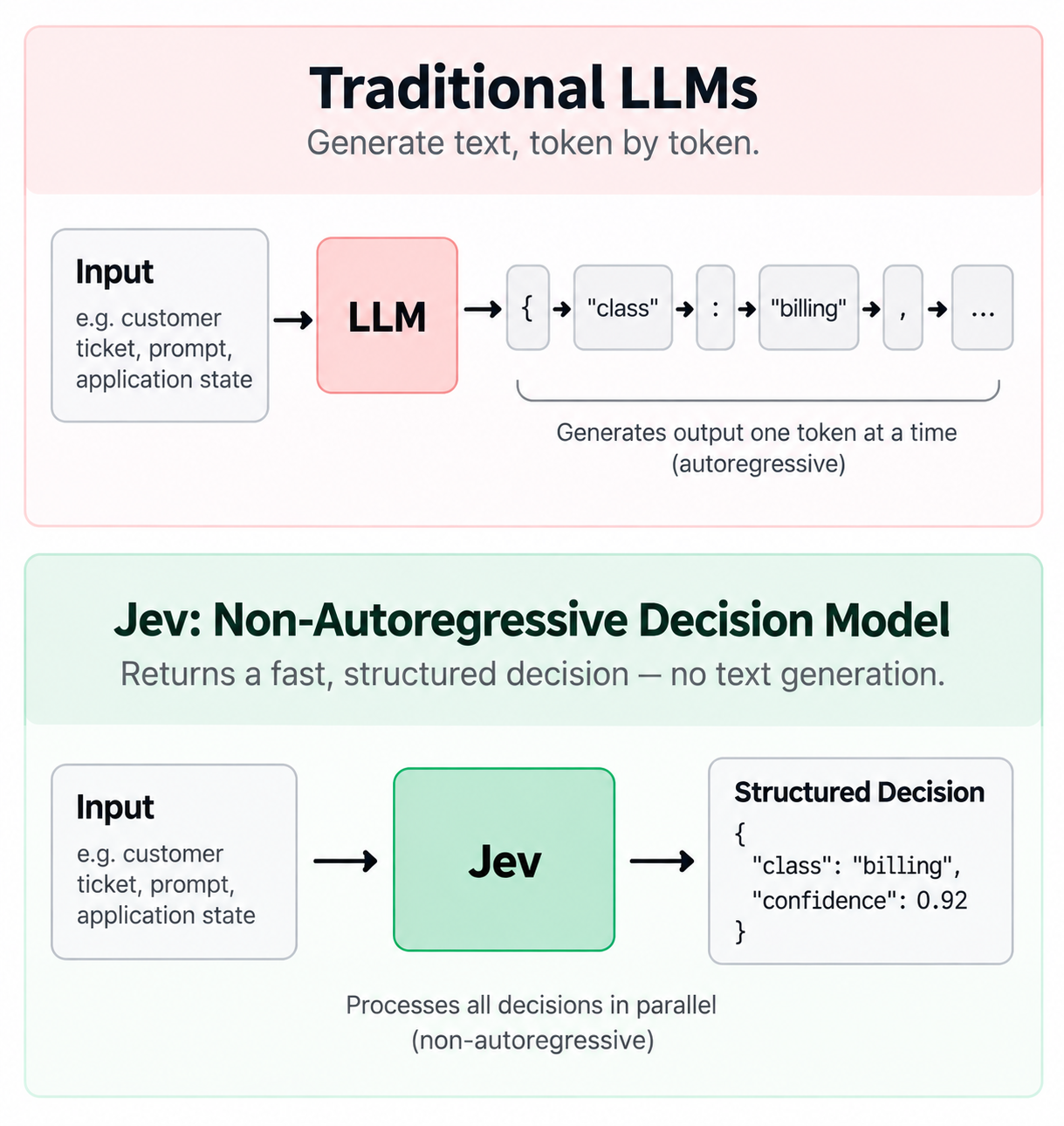
Jev represents an emerging category of non-autoregressive decision models.

Instead of generating natural-language responses, these models take application state and return constrained, probabilistic decisions.

They skip the LLM conversation layer entirely to focus on pure processing logic and decision making, which makes it much faster, among other benefits.

1. Much lower latency in AI model processing

Traditional LLMs generate responses autoregressively, producing one token after another. That makes sense for paragraphs or code, but it is inefficient when the goal is simply to “approve or reject” or “choose one of these categories.”

Jev-like models instead produce bounded decisions directly.

According to performance claims associated with Jev, this faster processing can take roughly 70–300 milliseconds — as much as 40x to 200x faster than using conversational LLMs to do it.

This makes AI decisions much more practical for UI automation, interactive applications, automated agents, and other latency-sensitive workflows.

2. Fewer parsing problems

LLM developers know the familiar instruction: “Respond ONLY with valid JSON.”

Yet models can still occasionally return Markdown, extra explanations, unexpected fields, or invalid values. Developers compensate with validation, constrained outputs, and retry logic.

Jev takes a different approach by eliminating arbitrary text generation. Its interface is based on constrained primitives like:

  • Choice: Select an option from a predefined set.
  • Noul: Evaluate a boolean condition with a probability.
  • Score: Evaluate input against an ordered scale.

Because it knows all its outputs in advance, applications can avoid many of the parsing and formatting problems associated with free-form generation.

3. Lower model processing costs

Cost becomes especially important when AI operates as invisible infrastructure.

A chatbot might receive a handful of requests per user — but a backend model could be invoked hundreds of times during automated workflows.

TypeSafe AI lists Jev’s input processing at approximately $0.042 per million tokens — and without an output-token charge — because it does not generate text.

We’re getting reports of cost reductions of roughly 40× to 400× for some structured classification workloads compared with generative LLMs.

The underlying idea is simple: if an application needs a classification rather than a sentence, paying to generate that sentence may be unnecessary.

4. Usable confidence scores

Conversational models often express incorrect answers with the same confident tone as correct ones. For automated systems, that makes uncertainty difficult to interpret.

Decision models can instead expose probabilities directly and optimize for calibration. Jev uses an approach called Reinforcement Learning for Calibrated Decisions (RLCD).

In principle, well-calibrated probabilities allow us as developers to create practical automation thresholds. High-confidence decisions might execute automatically, medium-confidence cases could go to human review, and low-confidence cases could be escalated.

That turns uncertainty into something application code can actually use.

5. Parallel evaluation

Software often needs multiple judgments about the same input — for example determining a document’s compliance status, sentiment, risk level, priority, category, and routing destination.

Rather than making separate generative calls, we can potentially evaluate multiple decision targets together with non-autoregressive models.

TypeSafe AI describes this approach as speculative fan-out, reducing the overhead involved in repeatedly processing the same application state.

The bigger picture

Models like Jev are not necessarily replacements for conversational LLMs. They address a different layer of the AI stack.

Generative models remain valuable for open-ended reasoning, writing, coding, and synthesis. Decision models are designed for something simpler:

state in → probability or decision out.

That could lead to a more specialized AI architecture, where powerful generative models handle difficult reasoning while fast decision models manage the thousands of routine judgments underneath.

It’s the world where AI becomes more than something users talk to.

Where it’s part of the software itself—routing requests, evaluating conditions, selecting actions, estimating risk, and determining when more expensive reasoning is actually necessary.

The problem with LLMs that Jev AI solves (TypeSafe AI) Read More »

5 things every developer should know about CLAUDE.md

CLAUDE.md is so much more than most developers realize.

It’s supposed to be a special file for providing persistent instructions and context to Claude Code.

But many developers think they can just dump whatever they like inside it — some feel it’s just a fancy way to avoid writing the same prompts over and over.

Some don’t even ever use it — missing out on one of the most powerful ways to shape how Claude behaves inside a project.

The reality is that CLAUDE.md is far more nuanced than it appears. Understanding a few non-obvious facts about it can completely change how you work with Claude Code, and the results it produces for you.

Here are five things every developer should know about CLAUDE.md.

1. It’s not a README or project summary

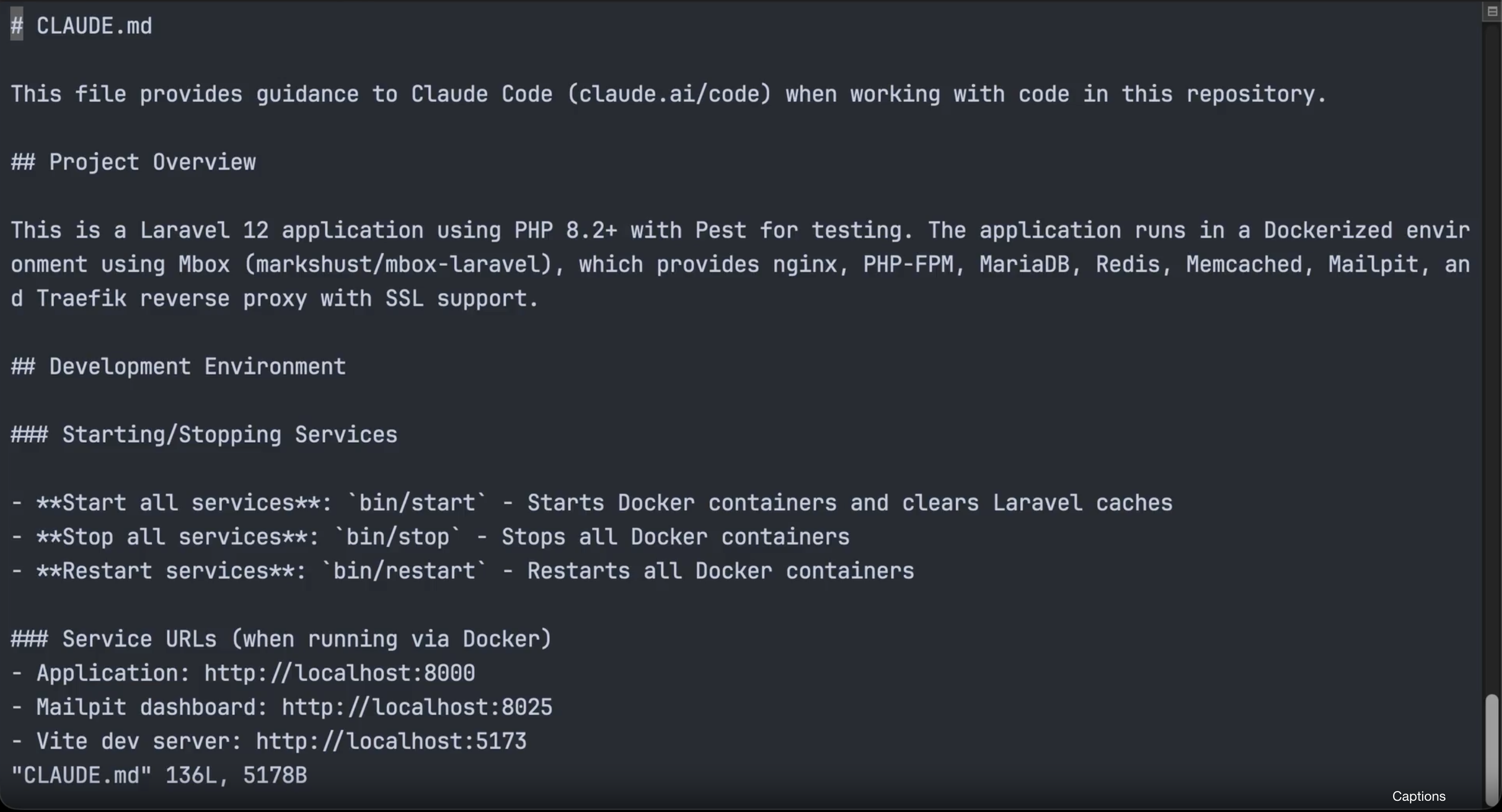
Actually not a very good CLAUDE.md:

A README exists to explain a project.

A CLAUDE.md exists to guide an agent working inside that project.

The most effective files don’t try to document everything. Instead they focus on specific expectations, workflows, constraints, and preferred ways of working.

For example:

  • Particular project-specific commands to run — or NOT run
  • What must happen before code is merged
  • Which patterns should be avoided when responding to prompts
  • How tasks should be approached

Thinking of CLAUDE.md as documentation often leads to bloated files. Thinking of it as a behavioral contract usually leads to better results.

2. It’s not a system prompt

One common misconception is that CLAUDE.md functions like a system prompt.

It doesn’t.

Claude Code loads the contents of the file into the model’s normal user context — it’s treated as important guidance rather than an untouchable source of truth.

It’s not an unbreakable instruction layer that reigns over every other context.

This is why clear, specific instructions tend to work much better than vague recommendations.

3. There can be more than one CLAUDE.md

Many developers assume there is a single CLAUDE.md at the root of a project.

But actually Claude Code supports a layered memory system.

Instructions can exist at multiple levels and be combined as Claude works through different parts of a codebase.

This makes CLAUDE.md less like a project configuration file and more like a hierarchy of contextual instructions that shapes behavior in different situations.

4. Claude can automatically generate your first CLAUDE.md

A surprising number of developers still start from a blank file.

Claude Code includes an /init command that can inspect a repository and generate an initial CLAUDE.md automatically.

The generated file won’t be perfect, but it provides a useful starting point and can save time by capturing common project information that would otherwise need to be written manually.

For many teams, it’s the fastest way to establish a baseline memory file.

5. CLAUDE.md is only one layer of Claude’s massive memory system

Perhaps the most important thing to know is that CLAUDE.md is not Claude Code’s entire memory system.

It’s just one layer.

Claude can draw context from user-level memory, project-level memory, session context and many other memory sources.

So when Claude successfully remembers how your team works, that behavior is often influenced by more than a single file.

The most interesting thing about CLAUDE.md is that it represents a new way of programming behavior.

Traditional software is configured through code and settings. Claude Code introduces the idea of configuring an agent through natural language instructions.

That’s why two developers can use the same model and get very different outcomes. The difference isn’t the model — it’s the behavior defined by the memory and instructions surrounding it.

5 things every developer should know about CLAUDE.md Read More »